
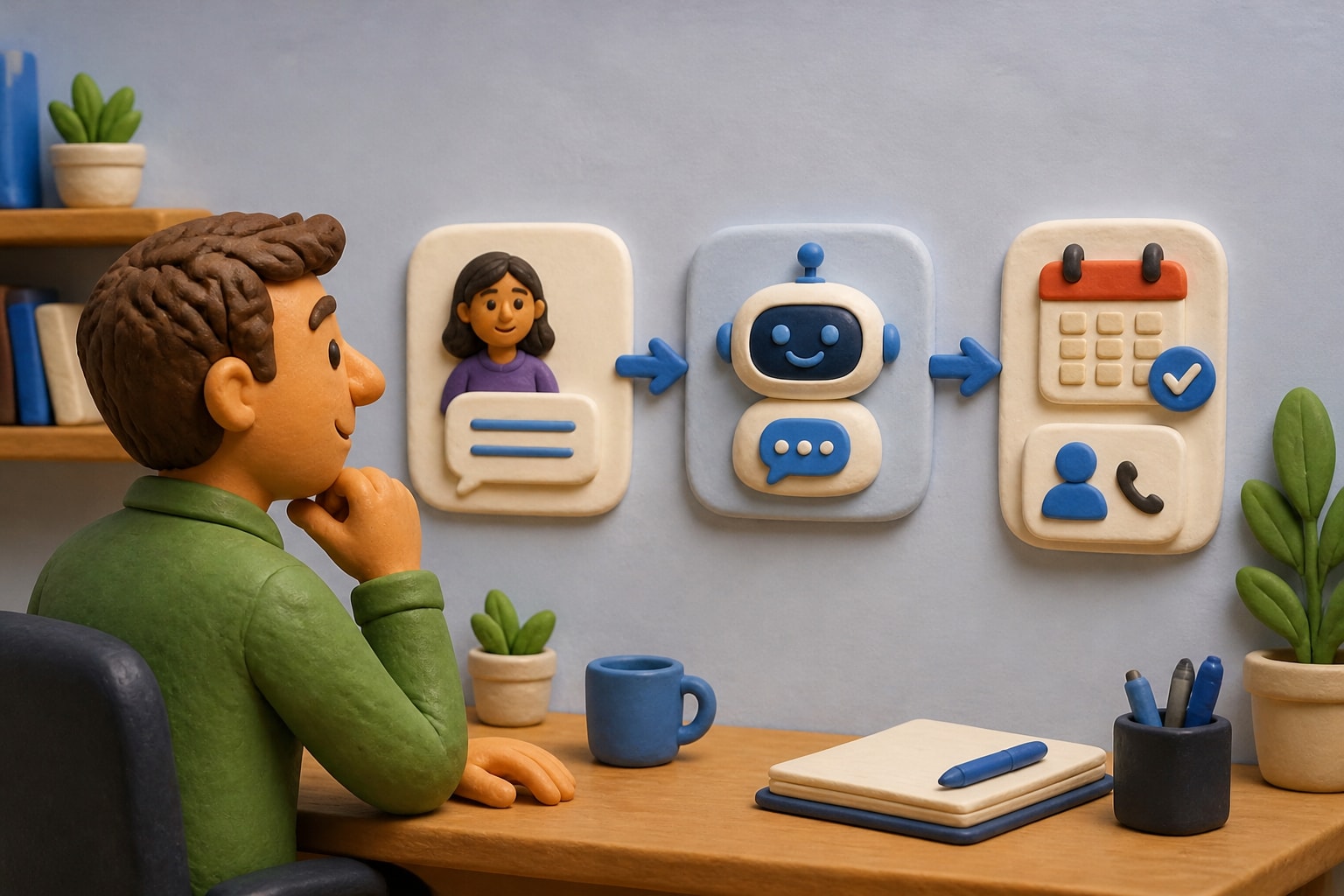
Conversational AI is software that talks with people in plain language, by text or voice, and then does something useful with what it hears. It can answer a question, book a call, qualify a lead, or update your CRM. For a 5 to 50 person firm, the point is simple: it takes repeat conversations off your team's plate.
Picture a recruiting firm with 12 people. A candidate messages at 9 p.m. asking about a role. Nobody answers until morning. By then the candidate has talked to two other firms. A conversational AI agent can reply in seconds, ask three screening questions, and book a call. Your recruiter wakes up to a booked slot instead of an unread message.
This guide explains how it works, where it fits in a service business, and how to pick your first project without wasting money.
What Is Conversational AI?
Conversational AI is technology that understands what a person writes or says, replies in natural language, and takes action based on the request. It is more than a chat window. The chat is just the front door.
Take a marketing agency. A prospect fills out a form at 4 p.m. on a Friday. Conversational AI texts them in under a minute, asks what they want to grow, checks the calendar, and offers two times. The prospect picks one. The sales lead never touched it.
Three parts make this work:
- Language understanding. The system reads a message and figures out what the person wants.
- Memory. It remembers what was said earlier in the chat and who the person is.
- Action. It connects to your tools, like your calendar, CRM, or help desk, and does the task.
Without the third part, you just have a talker. With it, you have a worker.
How Does Conversational AI Work?
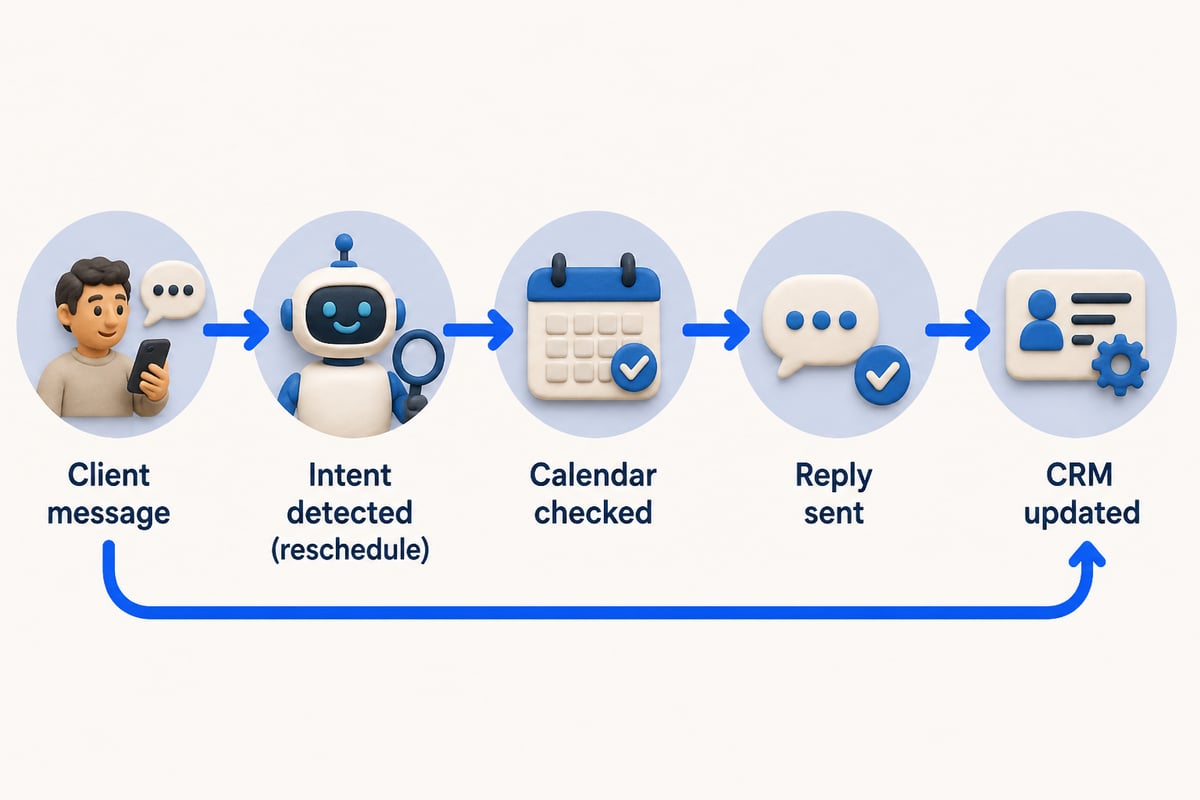
Conversational AI works in four steps: it takes in a message, works out the intent, decides what to do, and replies. Then it logs what happened.
Here is a real flow for a consulting firm. A client writes, "Can I move our Thursday call to Friday?"
- Input. The system receives the text. On voice, it first turns speech into text.
- Understanding. It reads the message and sees the intent is "reschedule" and the new day is "Friday."
- Decision. It checks the calendar, finds Friday at 2 p.m. is open, and picks that slot.
- Response and action. It replies, "Done. Moved to Friday at 2 p.m." It also updates the calendar and notes the change in the CRM.
The tech behind step two is called natural language processing, or NLP. It is the part that turns messy human writing into something a computer can act on. Modern systems use large language models for this. These models learned from huge amounts of text, so they handle typos, slang, and odd phrasing far better than old tools did.
The model is the brain. Your business rules and tool connections are the hands. Most of the work in a good build is in the hands.
Conversational AI vs Chatbots: What Changed?
Conversational AI differs from a classic chatbot because it understands free-form language and can take real actions, while a classic chatbot follows a fixed script.
Think of a clinic's old website bot. You click "Book appointment." It shows three buttons. You click one. It shows three more. If you type, "I need to see someone about my knee, preferably after work," it says, "Sorry, I did not get that." That is a script. It breaks the moment a person speaks like a person.
A newer conversational AI agent reads that same sentence, understands you want a knee appointment in the evening, checks open slots, and offers one.
Here is the plain comparison:
| Classic chatbot | Conversational AI agent | |
|---|---|---|
| Input | Buttons and set phrases | Free text or voice |
| Memory | None or very short | Remembers the chat and the person |
| Actions | Shows links and canned answers | Books, updates, sends, escalates |
| When it fails | Dead end | Hands off to a human with context |
| Setup | Fast, but limited | Needs a real build and testing |
The last row matters. A free self-serve widget is quick to set up. An agent that works inside your business takes a proper build. If you want the plain-English version of the chatbot side, this breakdown of AI chatbots for business covers it.
Why Should a 5 to 50 Person Firm Care About Conversational AI?
A small firm should care because it has too few people to answer every message fast, and speed decides who wins the client. Big companies fix this with large teams. You fix it with software.
Look at the numbers on adoption. Many small firms are still early with AI, so there is room to get ahead. Most of your competitors have not built this yet.
Now picture an owner with 20 staff. Her account managers spend about one hour a day answering the same five client questions. That is 20 hours a week across four people. At a $40 hourly cost, that is $800 a week, or $41,600 a year, spent on repeat answers. These are made-up round numbers to show the math, so swap in your own.
Three things change when you automate the repeat part:
- Response time drops from hours to seconds.
- Your best people get their time back for work only they can do.
- Nothing gets dropped on nights, weekends, or busy Mondays.
You do not need a big team to run this. You need one narrow job, done well.
Where Does Conversational AI Fit in a Service Business?
Conversational AI fits best in the places where your team repeats the same conversation again and again. Start by finding those spots.
Here are the four that pay off first.
Lead follow-up
A SaaS founder gets 60 demo requests a month. Half go cold because follow-up takes two days. An agent messages every lead within a minute, asks two qualifying questions, and books the call. Cold leads drop. The founder only talks to people who fit.
Speed here matters a lot. A fast reply usually keeps a lead warmer than a slow one, so test that against your own data.
Customer support
A course seller gets the same questions every week. Where do I log in? How do I get my certificate? Can I get a refund? An agent answers the common ones, pulls the person's account details, and sends hard cases to a human with the full chat attached.
For a deeper look, see this guide on AI customer service.
Scheduling and intake
A home services company gets calls all day while the crew is on a job. A voice agent picks up, asks what is broken and where, checks the schedule, and books a visit. For more on that idea, read about the AI voice agent and the AI receptionist.
Internal ops and reporting
A marketing agency spends every Monday building client reports by hand. An ops agent pulls the numbers from ad accounts, writes the summary, and drops a draft in the account manager's inbox. Someone still reviews it. They just do not build it from scratch.
Not every use is a chat with a customer. Some agents talk to your own team. "What is the status of the Henderson account?" gets an answer pulled from three tools in four seconds.
What Is Conversational AI Design?
Conversational AI design is the work of planning how an AI agent talks, what it can do, and what it does when things go wrong. It is the difference between an agent clients like and one they hate.
Start with an example. A recruiting firm builds a screening agent. The first draft asks nine questions in a row. Candidates quit at question four. The fix is to cut it to three questions and let a human ask the rest. Same agent, better design.
Good design comes down to a handful of rules:
- Give the agent one job. An agent that books calls should not also answer billing questions. Narrow agents make fewer mistakes.
- Write the voice down. Decide if it sounds formal or casual. Match your brand.
- Say it is an AI. People trust it more when you are honest.
- Plan the handoff. When the agent is unsure, it should pass the chat to a person with the full history. The client should never repeat themselves.
- Set limits. List what the agent must never do, like promise a refund or quote a price you have not approved.
- Keep replies short. Two or three sentences beat a wall of text.
The handoff rule is the one owners skip most. A bot that traps a frustrated client in a loop costs you the client. Build the exit first.
What Is the 30% Rule in AI?
The 30% rule in AI is an informal idea, not a law or a standard. It says to let AI handle roughly 70% of a repeat task and keep a human on the other 30%, usually the judgment calls and the final check.
There is no official source behind one fixed number, so do not treat 30% as science. Treat it as a way to think. A support agent might clear the easy tickets alone and pass the tricky 30% to a person. A reporting agent might build the draft and leave the review to a human.
Use it like this. Take one task. List the steps. Mark each step as "safe for AI" or "needs a person." Start with the safe steps. Move more over as the agent proves itself.
If someone quotes you a hard 30% rule as if it were fact, ask for the source.
How Do You Pick Your First Conversational AI Project?
Pick the first project by scoring your repeat tasks on three things: how often they happen, how much time they eat, and how low the risk is if the agent slips.
Walk through a real choice. A 15 person consulting firm lists four candidates:
- Answering "what are your rates?" emails, 10 times a week, low risk.
- Following up on proposals, 15 times a week, medium risk.
- Drafting legal contract language, 2 times a week, high risk.
- Booking intro calls, 25 times a week, low risk.
The best first pick is number four. It is frequent, simple, and safe. Number three is the worst first pick, because one error is costly and it happens rarely.
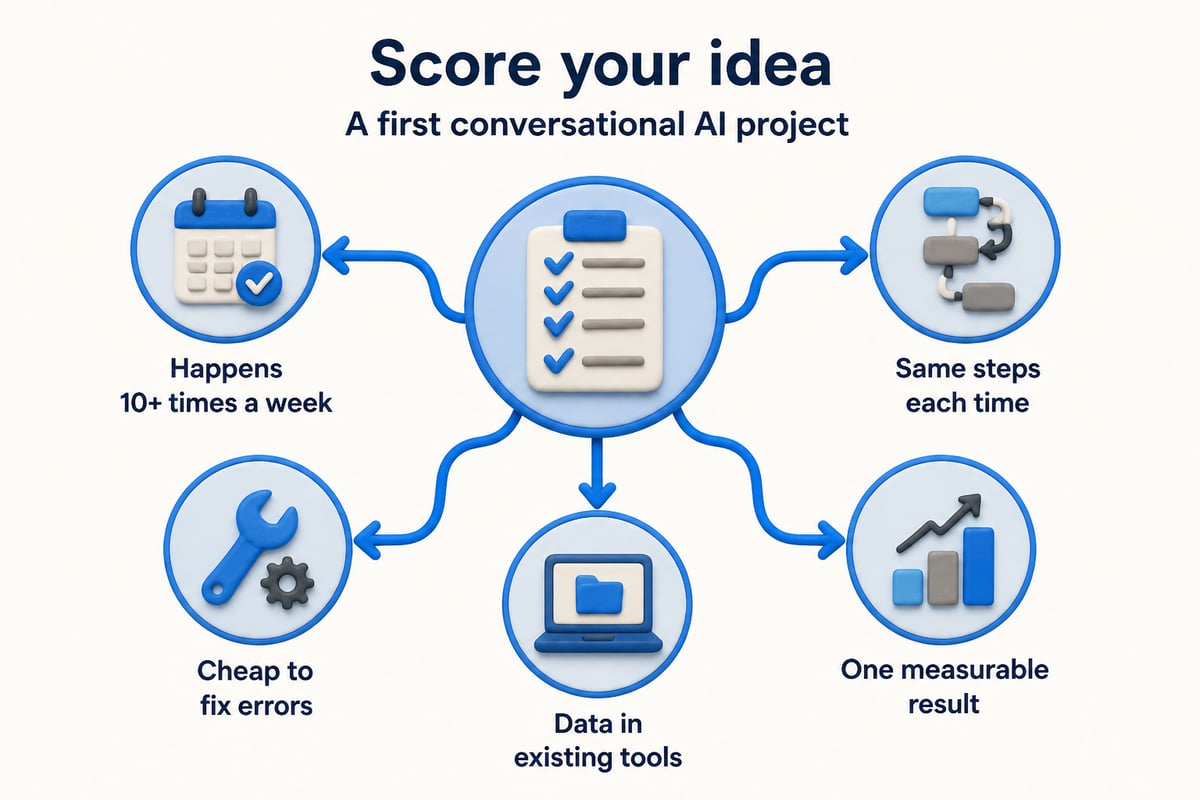
Use this short checklist:
- It happens at least 10 times a week.
- The steps are the same each time.
- A wrong answer is cheap to fix.
- The data it needs lives in tools you already use.
- You can say whether it worked in one number, like calls booked.
If a task fails two or more, wait. Pick something simpler first. For a wider view of what to build and in what order, read about AI agents for business and AI for small business.
What Are the 5 Major AI Platforms?
The big names behind most conversational AI tools are Google, Microsoft, Amazon, OpenAI, and Anthropic. Their models and cloud services power a large share of the agents businesses use.
Here is what each is known for:
- Google offers Gemini models and Dialogflow, a tool for building chat and voice agents.
- Microsoft offers Azure AI services and the Bot Framework, and it works closely with OpenAI.
- Amazon offers Amazon Lex for chat and voice, plus Bedrock, which gives access to several models.
- OpenAI makes the GPT models used inside many products.
- Anthropic makes the Claude models, which many teams pick for careful, long-form reasoning.
Does Amazon have an AI chatbot? Yes. Amazon Lex lets builders make chat and voice bots, and Amazon has its own shopping assistant for customers. Lex is the one that matters if you want to build a business agent.
Here is the part that matters for an owner: you do not need to pick a platform first. Pick the job first. The platform is a part inside the machine. A good builder will test several models and use the cheapest one that passes your quality tests. That keeps your cost per conversation low.
You can estimate what different models cost to run with the Vieerx model calculator.
What Does It Take to Run Conversational AI Safely?
Running conversational AI safely means controlling what the agent can see, say, and do, and testing it before real clients touch it.
Start with a cautionary example. Suppose an agency's support bot mixes up two clients and sends one client's invoice to another. That is a data leak and a trust problem. It is a small build mistake with a big cost.
The fix is separation. Each user should get their own memory, so one person's information never lands in another person's chat. This is a design choice you can demand from any builder.
Here are the safety basics:
- Separate memory per user. No mixing of client data.
- Least access. The agent only touches the tools and fields it needs.
- Test before launch. Run hundreds of sample questions, including tricky ones, and score the answers.
- Human review. Check a sample of real chats every week.
- A kill switch. You can turn the agent off in one click.
- Logs. Keep a record of what it said and did.
There is also outside guidance. The U.S. National Institute of Standards and Technology released a Generative AI Profile on July 26, 2024. the guidance names 12 generative-AI risks and just over 200 actions for managing them. It is voluntary, and it builds on the NIST AI Risk Management Framework. You do not need to read all 200 actions. But if you run an agent that touches client data, ask your builder how they handle the main risks, like wrong answers and leaked data.
How Do You Measure Whether It Works?
You measure conversational AI with a few plain numbers tied to money and time, not with how smart the agent sounds.
Take a recruiting firm that launches a screening agent. Before launch, a recruiter spent 6 hours a week on first-round screening calls. After launch, she spends 1 hour reviewing the agent's summaries. She tracks five numbers:
- Response time. From hours to under a minute.
- Resolution rate. Out of 100 chats, how many the agent finished with no human help.
- Accuracy. Out of 100 answers, how many were right when a person checked.
- Handoff rate. How often it passed the chat to a human, and whether it was the right time.
- Hours saved. Weekly hours given back to the team.
Set your target before launch. Say, "Book 30% more calls in 60 days" or "Cut first reply time to under two minutes." If you cannot name the number, you cannot tell if it worked.
Give it six weeks. A well-scoped agent should show a clear return in that window. If it does not, the job was too broad or the build was weak.
What Mistakes Do Small Firms Make With Conversational AI?
The most common mistake is trying to automate too much at once. Owners ask for an agent that does sales, support, scheduling, and billing. It does all four badly.
Here are the five mistakes that cost the most:
- Starting too big. One narrow job beats a do-it-all bot. A booking agent that works is worth more than a "smart assistant" that half works.
- Skipping the handoff. Clients hate loops. Always give them a path to a human.
- Feeding it bad data. If your price list is out of date, the agent will quote the wrong price with total confidence. Clean the source first.
- No testing. Launching on a Friday with no trial run is how you end up with an angry client by Monday.
- Buying a tool and walking away. A self-serve widget with no setup rarely fits how your firm actually works. An agent needs your rules, your tools, and your tone.
A sixth, quieter mistake is relying on one outside person for everything. If your builder disappears, your agent is stuck. Ask for training so your own team can adjust and add agents later.
How Does Vieerx Build Conversational AI Agents?
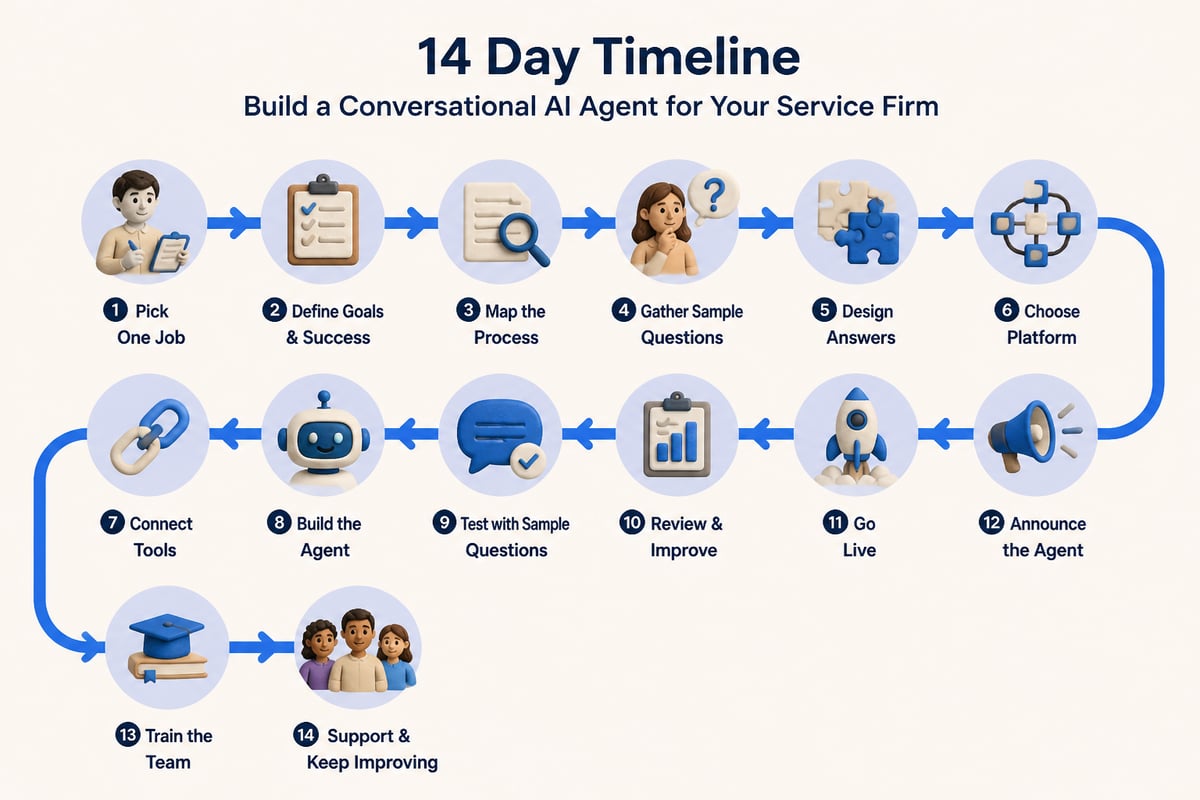
Vieerx builds custom conversational AI agents for service businesses and puts them inside the tools you already use. The goal is a live, working agent in 14 days.
Here is what that looks like in practice. Each agent owns one narrow job and runs without a person steering it. Each run uses the cheapest model that passes evaluation tests, which keeps cost down. Each user gets separate memory, so no client's information mixes with another's. Vieerx reports 99.4% answer accuracy across 1,000+ users and 17,169+ tickets resolved with zero mix-ups between users. A deployment crew also trains your team to build agents without Vieerx, so you are not stuck.
If you want to see what that could look like for your firm, the custom AI agents service is built for exactly this: sales, support, and ops agents made for your business and plugged into your tools. Vieerx is not a fit if you want a personal AI assistant or a free self-serve chatbot with no setup. It is a build for firms with 5 to 50 people that want real work taken off their team.
To learn more about the approach, read about AI automation services and agentic AI.
FAQ
Is conversational AI the same as a chatbot?
No. A chatbot follows a script with set buttons and phrases. Conversational AI understands free language, remembers the chat, and takes actions like booking a call or updating your CRM.
How long does it take to set up conversational AI at a small firm?
It depends on the job and your tools. A narrow agent, like one that books intro calls, is much faster than a broad one. Vieerx aims for a live, working agent within 14 days of kick-off.
Will conversational AI replace my team?
It takes over repeat conversations, not your judgment work. Your people stop answering the same five questions and spend that time on client work only they can do. A good setup always passes hard cases to a human.
Your next step is simple: write down the one conversation your team repeats the most each week, and count how many hours it takes. That is your first agent. Vieerx builds that agent for you and plugs it into your tools, starting with our custom AI agents service. Bring your number to a free call, and book a demo with Vieerx at https://cal.com/tanvieerx/agentic-review to see what a live agent could do for your firm in 14 days.