

AI lead generation means using software agents to find prospects, check if they fit, contact them, and book calls without a person doing each step by hand. For a service business with 5 to 50 people, the biggest gain is not finding more names. It is replying fast and following up every time.
Here is a small example. A recruiting firm gets 40 form fills a month. Two people check each one, write an email, and set a call. Some leads wait three days. Some never get a second message. An agent can read each form in seconds, score it, send a reply, and offer calendar slots. The humans only show up for the call.
This guide shows what AI can do in your lead flow, what to build first, how to measure it, and where it goes wrong.
What AI Lead Generation Actually Does
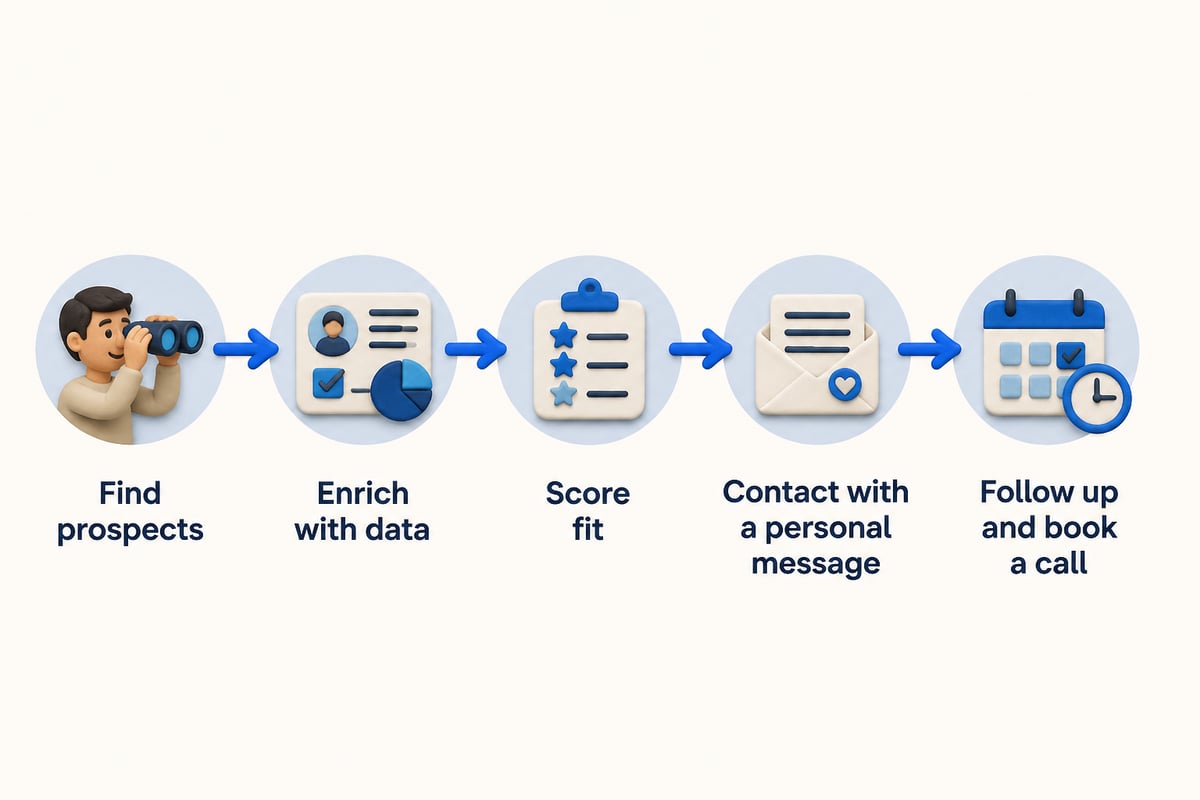
AI lead generation covers five jobs: finding prospects, adding data to them, scoring them, contacting them, and following up. Each job is a separate piece of work, and each can be handed to an agent.
Here are the five jobs in plain terms:
- Find. Pull names from search tools, directories, your website visitors, or your own past clients.
- Enrich. Add facts to each name: role, company size, industry, website, recent news.
- Score. Decide if the person is a good fit. Yes, no, or maybe.
- Contact. Write and send a message that uses what you learned in step two.
- Follow up. Reply when they answer. Nudge when they do not. Book the call.
Most owners think the first job is the whole game. It is not. A list of 5,000 names is worth little if nobody follows up. Steps four and five are where leads leak out of a service business.
What AI does not do
AI does not know your offer better than you. It does not fix a weak pitch. If your email says nothing, an agent will send that nothing to 500 people faster than you could. Write the offer first. Then automate it.
What Are AI Tools Used in Marketing and Sales?
AI tools in marketing and sales fall into a few groups, and each group maps to one step of the lead flow. You do not need all of them.
| Tool type | Job it does | Example use |
|---|---|---|
| Prospecting and data tools | Find and enrich names | Build a list of 300 agency owners with company size |
| Email and outreach tools | Write and send messages | Send a first email and two follow ups |
| Chatbots and voice agents | Talk to visitors and callers | Answer a pricing question at 11 p.m. |
| Scoring and CRM tools | Rank leads, update records | Flag the 20 warmest leads each Monday |
| Workflow tools | Connect all of the above | Move a form fill into your CRM and trigger a reply |
The workflow layer matters most. Tools that do not talk to each other make more work, not less. Platforms like n8n connect your forms, CRM, email, and AI models into one flow. If you want to see how that works, read our guide to n8n and our overview of AI automation tools.
How common is this now? A 2025 MarTech report on a global survey found that most marketing teams were deploying generative AI, and use for chatbots and customer interactions grew sharply. Your competitors are already trying this.
Five Uses of AI in a Lead Flow
The five best uses of AI in lead generation are instant reply, lead scoring, personalized outreach, follow up sequences, and call booking. These are the jobs where speed and consistency pay off most.
1. Instant reply to new leads
A lead who fills a form at 9 p.m. is warmest at 9:01 p.m. An agent can read the form, answer the question they asked, and send a calendar link in under a minute. No human can match that at night or on weekends.
2. Lead scoring
Not every lead deserves the same effort. An agent can check company size, role, budget signals, and fit with your best clients. It then sorts leads into hot, warm, and cold. Your team calls the hot ones first.
3. Personalized outreach
Generic emails get ignored. An agent can read a prospect's website and write a first line that proves someone looked. "I saw you added a second location in Austin" beats "Hope you are well."
4. Follow up that never stops
Most deals need several touches. People forget, get busy, or lose the email. An agent sends touch two, three, and four on schedule, and stops the moment the lead replies. If you want to go deeper here, our post on the AI sales agent covers it.
5. Booking and routing
The agent offers times, books the call, adds it to your CRM, and sends a reminder. If the lead is a poor fit, it sends a polite no and moves on.
A Hypothetical Example: A Recruiting Firm's Lead Flow
Hypothetical example: a recruiting firm wants more hiring manager clients. Today, one person spends much of the week looking up companies and sending emails, and little of that time goes to talking with buyers.
Here is how an agent flow could work for them:
- Monday: The agent builds a list of companies posting five or more open roles in the firm's niche. A company with five open roles has a real hiring problem, so it is a better target than a random name.
- Tuesday: For each company, it finds the hiring lead and reads the job posts to learn what hurts. A role that has been open for weeks tells the agent where the pain sits.
- Wednesday: It writes a short email that names two open roles and offers help filling them. The email proves someone read the posts.
- Thursday and next week: It sends two follow ups, three days apart. Each one adds a small new point instead of repeating the first.
- Any day a lead replies: It stops sending, tags the lead as warm, and tells a recruiter.
The recruiter now spends time on calls, not on research. The firm can also set simple rules. A company with fewer than five roles gets skipped. A reply that says "not now" moves to a 90 day check in. Our guide to AI in recruitment goes deeper on this kind of flow.
How to Make Money With AI Lead Generation (Without the Hype)
You will not make $1,000 a day by buying a tool and waiting. You make money by turning more of your leads into booked calls, then more of those calls into clients. The math is simple and you can check it yourself.
Take a consulting firm with these numbers:
- 100 new leads a month
- 30% get a reply within one day today
- 10% of leads book a call
- 25% of calls become clients
- Average client is worth $4,000
That is 10 calls, 2.5 clients, and $10,000 a month. Now say instant reply lifts the call rate from 10% to 14%. That is 14 calls, 3.5 clients, and $14,000. Same leads. Same offer. The only change is speed and follow up.
Those are made up numbers to show the math. Put your own in. If you do not know your own numbers, that is the first thing to fix. You cannot improve what you do not count.
Watch for claims that promise fast cash from AI. Real gains come from fixing a leaky flow, one step at a time.
Where Most AI Lead Generation Efforts Go Wrong
Most failures come from three things: no clear goal, no tracking, and too many tools used in random ways. The data backs this up.
A 2025 Jasper State of AI in Marketing survey of 503 marketing leaders found that most organizations were using generative AI. But more than half said they used it in isolated, ad hoc ways. And about half said they could not track ROI or see the business impact of their AI spend.
That is the pattern. Teams try a writing tool here, a chatbot there, and then cannot say what worked.
The fix is boring and it works:
- Pick one step of your lead flow that leaks the most.
- Write down today's number for that step.
- Build one agent for it.
- Check the number again after 30 days.
Adoption is also moving fast. A 2025 Duke Fuqua survey of 281 U.S. marketing leaders found that AI and machine learning powered a growing share of marketing efforts, roughly double the share reported in 2022. Leaders there expected that share to keep climbing over the next few years. The question is no longer whether to use AI. It is whether you use it with a plan.
What to Build First
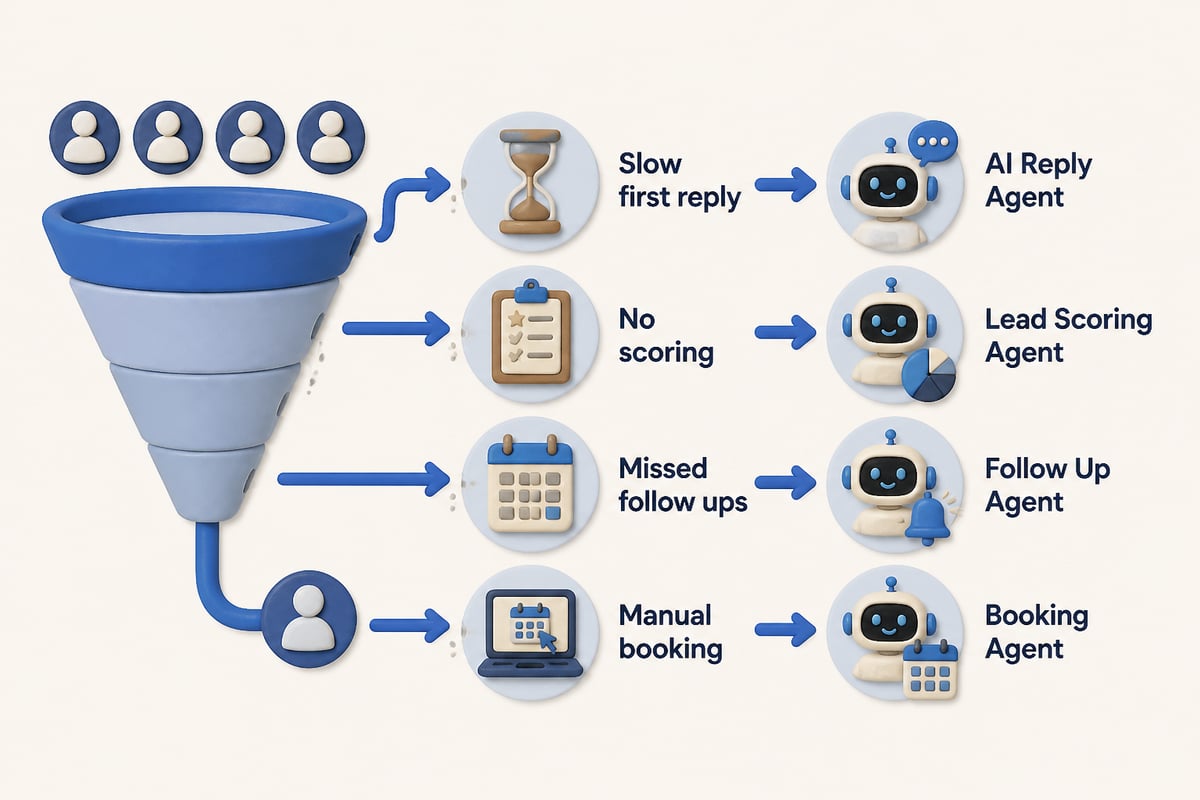
Build the instant reply and follow up agent first. It touches every lead, it is easy to measure, and it pays back fastest.
Here is the order that makes sense for most service businesses:
- Instant reply and booking. Every new lead gets a useful answer in under five minutes.
- Follow up sequences. Every lead who goes quiet gets a set number of nudges.
- Lead scoring. Your team sees the best leads first.
- Outbound prospecting. Only now do you build the list and send first touch emails.
- Reporting. A weekly summary of leads in, calls booked, and clients won.
Why this order? Fixing the leaks in leads you already pay for beats buying more leads. If you get 100 leads and lose 40 to slow replies, adding 100 more just gives you 40 more lost ones.
Your CRM matters here too. Agents need a clean place to read and write lead data. Our post on AI CRM explains how to set that up.
Add voice and chat where leads already are
Some leads call. Some chat on your site. An AI voice agent can answer the phone when no one is free, collect the key facts, and book a time. A chat agent can do the same on your website. Both feed the same CRM, so nothing gets lost.
How to Pick a Tool or a Partner
Pick based on the job, not the brand. Start with the step you want to fix, then ask what it takes to run that step well every day.
Ask these questions about any tool or builder:
- Does it do one narrow job well? Agents that try to do everything tend to do nothing well. A single narrow job per agent is easier to test and fix.
- Can it show accuracy numbers? Ask for a test score, not a demo.
- Does it keep each lead's data separate? Mixing up two leads' details is a fast way to lose trust.
- What does it cost per run? A strong agent uses the cheapest model that still passes its tests. You can check model costs yourself with the model calculator.
- Who owns it after launch? You should be able to edit it, or have your team trained to do so.
Self-serve tools work if you have time and someone technical on staff. A builder makes sense if you want it live fast and running without you steering it. Our post on AI automation services compares the paths, and the guide to AI agents for business shows what a working agent looks like.
One more check: ask how long it takes to go live. Months of planning before a first result is a warning sign. A working agent in two weeks tells you the builder knows the work.
How Vieerx Builds These Flows
Hypothetical example: a form fill lands at 9 p.m. on a Friday. Within a minute, the lead gets a reply that answers their question and a link to book a call. A person did not write that reply. An agent did, and it logged the lead in the CRM too. That is the kind of work Vieerx builds.
Vieerx builds custom agents that sit inside your business and run lead follow up, booking, and reporting. Each agent owns one narrow job and runs without a person steering it. One agent might only reply to new leads. Another might only send the second and third follow up. Narrow jobs are easier to test, and easier to fix when something breaks. Each run uses the cheapest model that passes its tests.
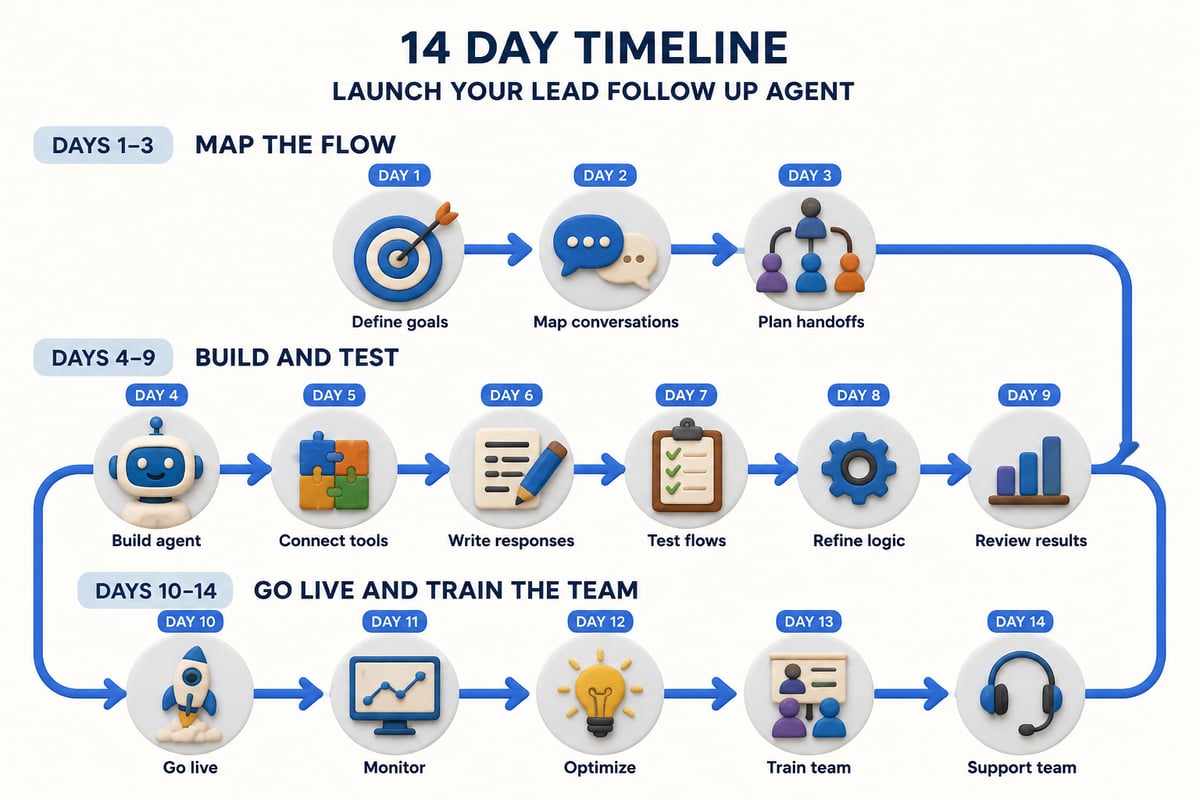
Vieerx puts a live working agent in place within 14 days of kick-off, and a deployment crew trains your team to build agents without them. The stated target is real ROI in six weeks or less. Each user gets separate memory, so no user's information mixes with another's.
If your lead flow runs on forms, a CRM, and email, the AI automation build is the closest fit. It uses n8n and Claude to handle lead follow up, booking, and reporting. For prices, limits, and scope, check the booking page rather than guessing.
How to Measure Whether It Works
Measure four numbers before and after you launch: time to first reply, reply rate, calls booked, and clients won. If those four do not move, the agent is not working.
Set it up like this:
- Before launch: Pull 30 days of data. Write down each number.
- At 30 days: Compare. Look at the step you changed first.
- At 60 days: Check clients won. This number is slow, so be patient.
Keep one more number: hours saved. If your team used to spend 10 hours a week on follow up and now spends 2, that is 8 hours back. Multiply by what an hour of that person's time costs you.
Do not judge on one week. Lead flow has good weeks and bad weeks. Look at 30 days at least.
Keep a human in the right place
Agents should not handle everything. Keep a person on:
- Pricing talks and custom quotes
- Angry or upset leads
- Large deals where trust matters most
- Anything the agent flags as unsure
The agent clears the routine work so your best people spend time where they win deals.
Rules to Follow for Cold Outreach
Say an agent sends 2,000 cold emails on day one from a brand new domain. By day three, the domain lands in spam folders, and the real emails from your team go there too. This is the most common way cold outreach goes wrong, and it is easy to avoid.
Cold outreach with AI still has to follow the law and basic manners. Get this wrong and you hurt your domain, your brand, or both.
- Honor opt outs. Every email needs a clear way to stop messages, and you must act on it fast. Have the agent remove the person from every list at once, not only the current one.
- Send in small batches. Blasting thousands of new emails from a fresh domain gets you flagged as spam. Start with a few dozen a day and raise the number slowly as replies come in.
- Check your facts. An AI can write something false about a prospect. Have the agent use only data it pulled from a real source, such as the company's own website or a job post. If a fact has no source, the agent should leave it out.
- Be honest about who is writing. Do not claim a person wrote it if no person did, where the law or the platform asks you to say so.
- Know your local rules. Email and call rules differ by country and state. Ask a lawyer if you are unsure.
If you want a team to run outbound for you, look for one that handles domain setup, sending limits, and opt outs as part of the work, not as extras.
Frequently Asked Questions
What are the best AI tools for lead generation?
The best tool depends on the job. Use a data tool to find prospects, an email tool to send messages, a chat or voice agent to answer visitors, a CRM to store everything, and a workflow tool to connect them. Pick the one step in your flow that leaks the most and fix that first. Our list of AI automation companies can help you compare builders.
Can a small service business use AI lead generation?
Yes. Businesses with 5 to 50 people often gain the most, because the same few people handle sales, delivery, and admin. An agent that replies in minutes and follows up on schedule gives back hours every week. Start with one flow, such as instant reply and booking, then add more. Our guide to AI for small business shows where to begin.
How long does it take to see results?
A simple flow like instant reply and follow up can go live in about two weeks. You will see faster replies and more booked calls within the first 30 days. Clients won takes longer, often 60 days or more, because sales cycles take time. Track the four numbers from the measurement section and judge on trends, not single days.
Pull your last 30 days of leads and write down how fast each one got a first reply, because that single number shows where to start. If it is more than an hour, a follow up agent will likely pay off first. Vieerx builds and installs these agents for agencies and service businesses, starting with the AI automation build for lead follow up, booking, and reporting, and you can book a free demo with Vieerx to see what yours would look like.