
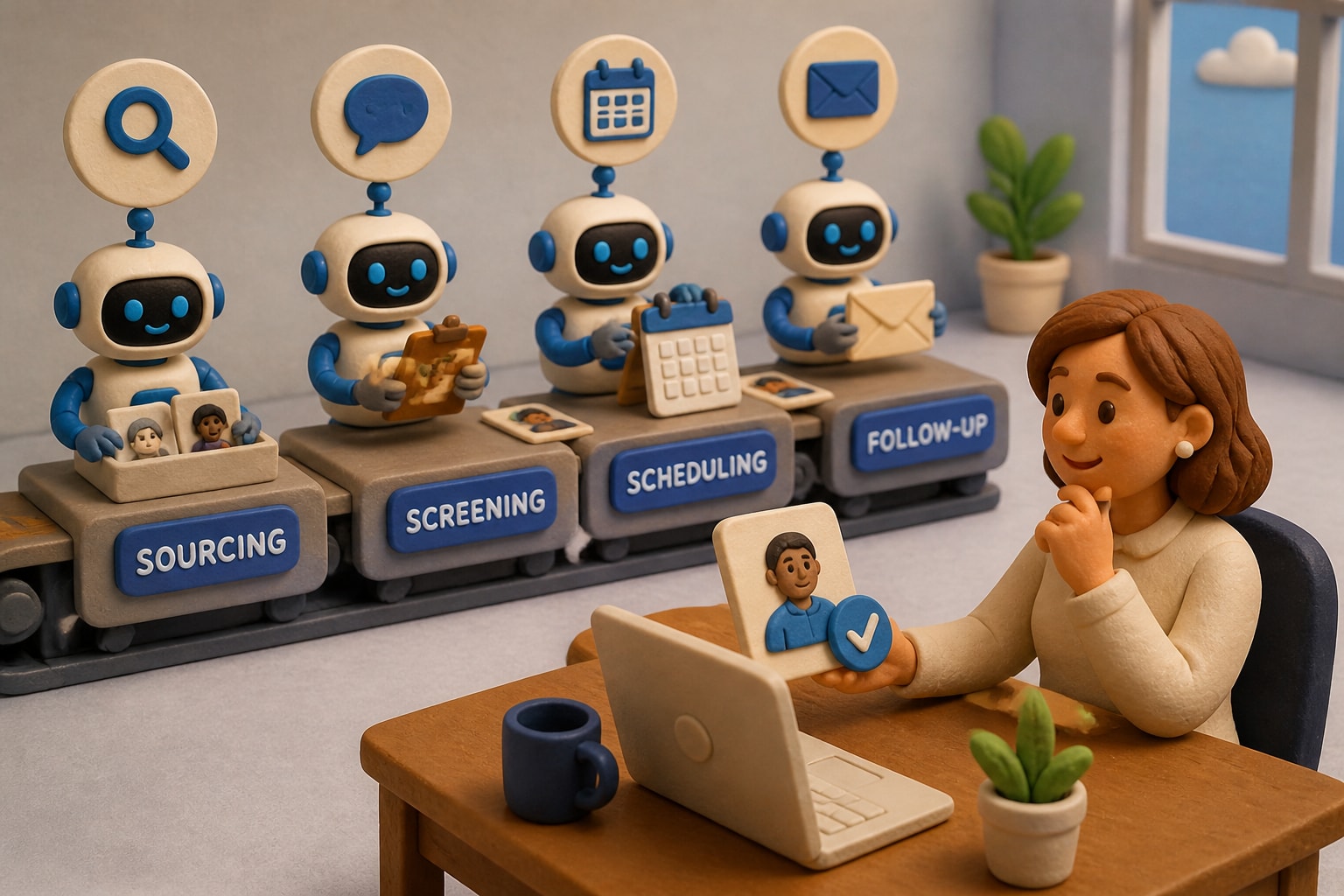
AI in recruitment means using software to do repeat hiring tasks, like screening resumes, booking interviews and following up with candidates, so your team spends its time on people instead of paperwork. For a small hiring team, the best use is narrow: one agent, one job, run every day without anyone steering it.
Here is a plain picture. A small recruiting firm posts one role and gets many resumes in a few days. Someone has to read them, sort them, email the maybes, email the nos and book calls. That can take days of work before a single real conversation happens. AI can do much of that first pass quickly.
This guide shows where AI fits, what it costs you in risk, and what to build first.
What Is the Use of AI in Recruitment?
AI in recruitment is used to take over the slow, repeat parts of hiring: finding candidates, sorting applications, answering questions, scheduling and keeping people updated.
Think about a typical week for a small recruiting team. Most of the hours do not go to judging people. They go to moving information from one place to another. Reading the same resume format. Typing the same email. Checking calendars for a time that works.
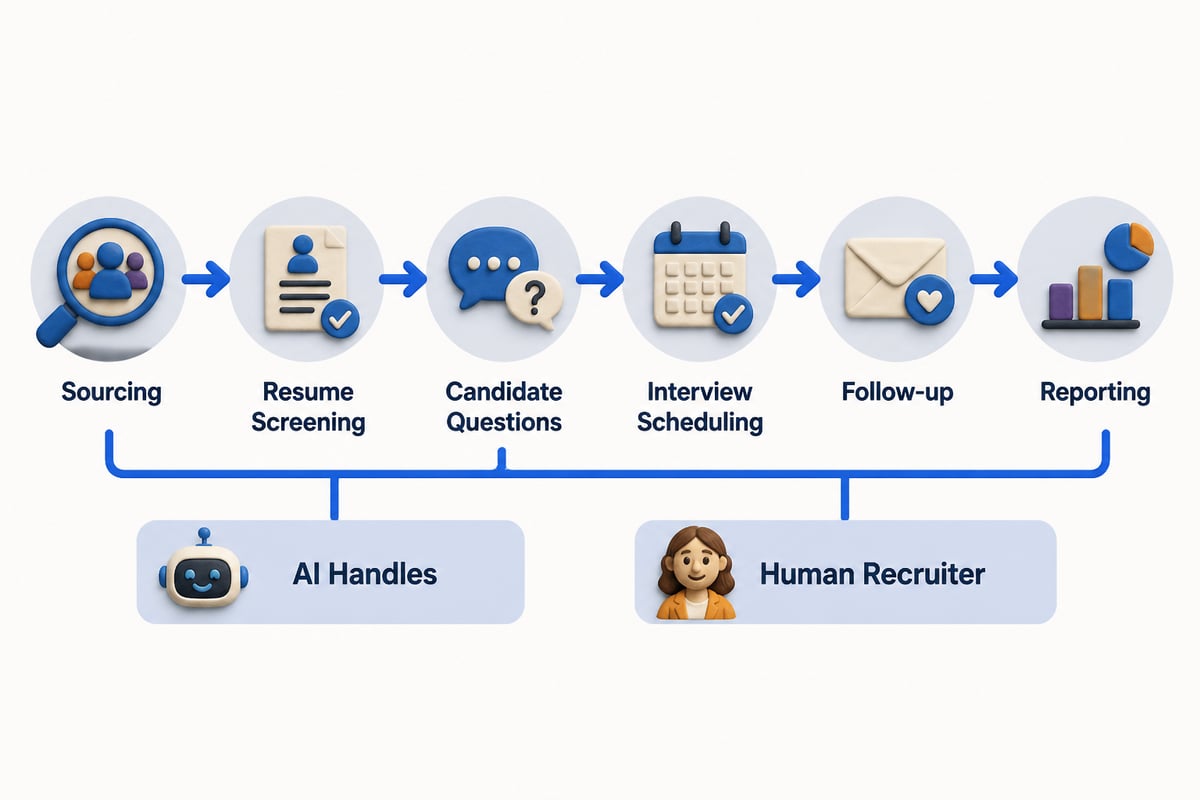
Here are the main jobs AI does today:
- Sourcing: finds possible candidates from job boards and public profiles that match a role.
- Screening: reads resumes and compares them to your must-have list.
- Chat and questions: answers candidate questions about pay, location and next steps at any hour.
- Scheduling: offers time slots, books the call and sends reminders.
- Follow-up: tells candidates where they stand so nobody goes silent.
- Reporting: counts how many people are in each stage and where they drop off.
SHRM surveyed 1,908 HR professionals in 2025. 27% said they used AI in recruiting, the most common HR area for AI use. Hiring is where most teams start because the work is repeat, high volume and easy to measure.
AI does not replace the recruiter. It clears the desk so the recruiter can talk to people.
How Many Teams Use AI in Hiring Today?
Roughly four in ten HR teams have adopted AI in some form, and the rest are split between planning to and sitting out.
The same SHRM survey found that 39% of respondents said AI had been adopted in their HR functions, and 7% planned to launch it that year. It also found that 54% of organizations had not adopted AI in HR and had no plans to do so that year.
So the field is not crowded. More than half of teams are still doing this by hand. That is a real gap for a small firm that moves first.
Use is also not casual among teams that adopt. Of respondents whose organizations had implemented AI, 26% used it weekly, 20% daily and 9% several times a day. Once a tool works, people lean on it.
Size matters too. In the EU, 19.95% of businesses used AI technologies in 2025, but the share among large businesses was 55.03%. Big companies moved first because they had the budget and the staff to try things. Small teams can catch up faster than they think, because a narrow tool is cheap to start.
Which Hiring Tasks Should a Small Team Automate First?
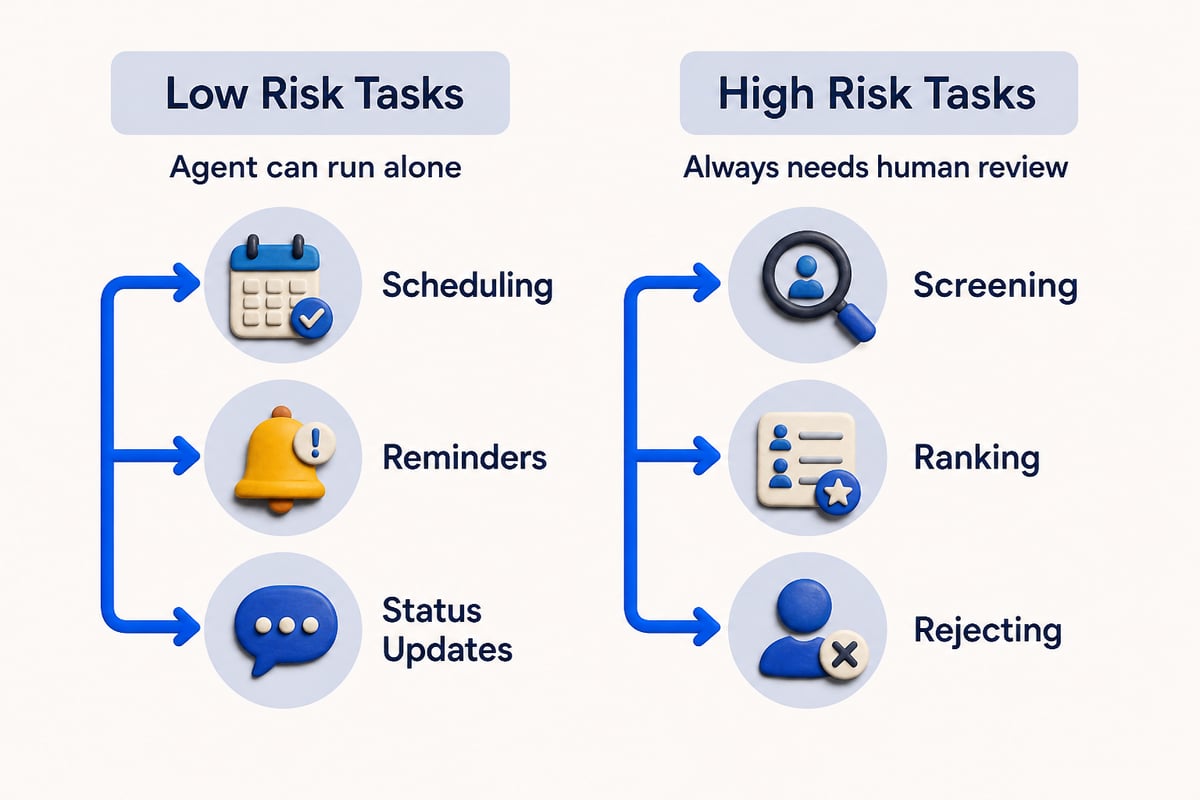
Start with the task that eats the most hours and carries the least risk, which for most small teams is interview scheduling and candidate follow-up.
Hypothetical example: a recruiter spends a lot of time each week on back-and-forth emails to book calls. The work is dull, rules-based and easy to check. If an agent books a wrong time, the cost is a rescheduled call, not a lost hire. That makes it a safe first build.
Rank your tasks by two questions. How many hours does it take each week? What happens if the AI gets it wrong?
| Task | Hours saved | Risk if wrong | Start here? |
|---|---|---|---|
| Interview scheduling | High | Low | Yes |
| Candidate status updates | High | Low | Yes |
| Answering candidate questions | Medium | Low to medium | Yes, with limits |
| Resume screening | High | High | After the first two |
| Ranking and scoring candidates | Medium | High | Only with human review |
Low risk tasks first. High risk tasks later, and only with a person checking the output.
Do not try to automate the whole pipeline at once. Teams that build one giant tool end up with a slow, fragile system nobody trusts. Build one agent for one job, prove it works, then add the next. Our guide to agentic workflows explains how single-job agents link together into a full process.
How AI Resume Screening Works
AI resume screening reads each application, pulls out skills, titles and years of experience, and compares them to the criteria you set for the role.
Hypothetical example: you tell the system the job needs several years of account management and experience with a CRM. The tool reads a large batch of resumes and puts the strongest matches at the top, so you review a short list instead of the whole pile.
That is the good version. The risk is in how the criteria are set.
If the tool is trained on past hires, it can copy past habits. If your last ten hires all came from the same three schools, a careless system may start to prefer those schools. It does not know that is unfair. It only sees a pattern.
Three rules keep screening safe:
- Set clear, job-based criteria. Skills and experience the role truly needs. Nothing else.
- Never let AI reject on its own. It sorts and flags. A person makes the call on every no.
- Check results on a schedule. Look at who gets passed and who gets cut. If one group keeps disappearing, fix the criteria.
A human in the loop is not a nice extra. For screening, it is the rule.
What Does the Law Say About AI in Recruitment?
The law is getting stricter, and hiring is one of the first areas it targets. The EU AI Act treats AI used for recruitment as a possible high-risk use.
The European Commission says AI used for recruitment or candidate selection, including tools that analyze or filter applications, is a potentially high-risk use under the EU AI Act. The EU AI Act Service Desk names automated job-matching and candidate-ranking tools that generate rankings as examples that may be classified as high-risk.
What does high-risk mean for you? In plain terms, tools that sort or rank people get more rules than tools that book meetings. A scheduling agent is far lower on the risk scale than a ranking engine.
Even if you hire outside the EU, the direction is clear. Rules on automated hiring decisions are growing in many places. A few habits keep you safe almost anywhere:
- Keep a person in charge of every hiring decision.
- Keep records of what the tool did and why.
- Tell candidates when AI is part of the process.
- Test for bias before you rely on a tool, and again every few months.
- Ask your vendor what data the tool was trained on.
This is not legal advice. Check the rules where you and your candidates live, and ask a lawyer before you use AI to rank or reject people.
Can Interviewers Tell if You Are Using AI?
Often, yes. Interviewers can usually spot AI use when answers sound polished but empty, or when a candidate pauses, reads and repeats the same phrases.
This question matters to your team from both sides. Candidates now use AI to write cover letters and rehearse answers. Some use it live during video calls. If you hire without a plan for this, you will struggle to tell skill from script.
Signs a recruiter may notice:
- Answers that are smooth but have no personal detail
- Eyes that move as if reading a screen
- Long, even pauses before every reply
- Cover letters that all sound alike
- Strong written work that does not match live conversation
You do not need to police this. You need interviews that show real skill. Ask follow-up questions. Ask for a specific example from a past job. Give a short task on the call. A real person can talk through a messy story. A script falls apart on the second question.
For your own side, tell candidates how you use AI. If an agent screens or schedules, say so. Trust drops fast when people feel tricked.
What Types of AI Show Up in Hiring Tools?
Hiring tools mostly use four kinds of AI: language models, machine learning for matching, speech tools and automation agents.
You will see "7 types of AI" lists online that sort AI by how smart it is, from simple reactive machines to systems that are only theory. Those lists are not much use when you are buying a hiring tool. What helps is knowing what each tool does for you.
- Language models read and write text. They draft job posts, summarize resumes and write candidate emails.
- Matching systems compare resumes to job needs and return a ranked list. These carry the most legal risk.
- Speech and voice tools turn calls into text, run phone screens and power an AI voice agent that answers candidates at any hour.
- Agents take an action on their own, like booking a call or sending a follow-up, instead of only suggesting one. You can read more in our post on AI agents for business.
When a vendor says "AI-powered," ask which of these four it is. The answer tells you the cost, the setup and the risk.
Where Do AI Agents Beat Simple Tools in Recruiting?
Agents beat simple tools when the job has several steps, because an agent finishes the whole job and a simple tool finishes one step.
Hypothetical example of the difference. A simple scheduling tool shows a calendar link. The candidate still has to click, pick, confirm and hope. An agent reads the candidate's reply, checks the calendars, books the slot, sends the invite, sets a reminder and moves the candidate to the next stage in your system. No one on your team touches it.
Good recruiting agents have three traits:
- One narrow job. An agent that does one thing makes fewer mistakes than one that tries to do ten.
- Clear limits. It knows what it can answer and when to hand off to a person.
- Separate memory per person. Candidate A's details must never show up in a reply to candidate B. In hiring, that is a privacy rule, not a feature.
That last point is easy to get wrong. A recruiting agent holds pay history, job moves and personal contact details. If its memory mixes people up, you have a privacy problem and an embarrassing one.
How Much Time and Money Does AI Save a Hiring Team?
AI saves time first, and money follows from the time. The size of the saving depends on your volume, so measure your own numbers before you buy anything.
Do this simple count before you start. Track one week of hiring work. Write down hours spent on scheduling, resume reading, candidate emails and status reports. Multiply by your hourly cost. That is the number the tool has to beat.
Hypothetical example: if a recruiter loses 10 hours a week to admin and the tool takes back half, that is 5 hours a week. Those hours go to calls with candidates and clients, which is the work that brings in revenue.
Go in with a clear target. Real return should show up in weeks, not years. Vieerx sets that bar for its own builds: a live working agent within 14 days of kick-off, and real ROI in six weeks or less. If a vendor cannot name a timeline like that, ask why. You can also run your own numbers with the model cost calculator to see what a given AI model costs per run before you commit.
Watch for costs that hide. Per-seat pricing grows with every new recruiter. Long contracts lock you in before you know if the tool works. Setup fees can rival a year of use. Ask for the full cost in writing.
What Should You Check Before You Buy or Build a Recruiting Agent?
Before you buy or build, check five things: the job it does, how it handles data, how it is tested, who stays in control and how fast it goes live.
Use this list as a short buying filter:
- What is the one job? If the answer is a long list, walk away.
- Where does candidate data go? Ask who can see it, how long it is kept and whether it trains someone else's model.
- How is accuracy measured? Ask for a number and how it was tested, not a promise.
- Where does a human step in? There should be clear handoff points, especially for any decision about a person.
- How long until it works? Weeks, not quarters.
Cost control matters too. A good build picks the cheapest model that still passes its tests for each run. Using the biggest model for every small task burns money for no gain.
If you are weighing options, our posts on AI automation tools and AI automation services walk through what to compare. And if your team has no one to build and maintain this, a done-for-you route can be faster than learning it yourself.
How a Recruiting Firm Could Set Up AI in 14 Days
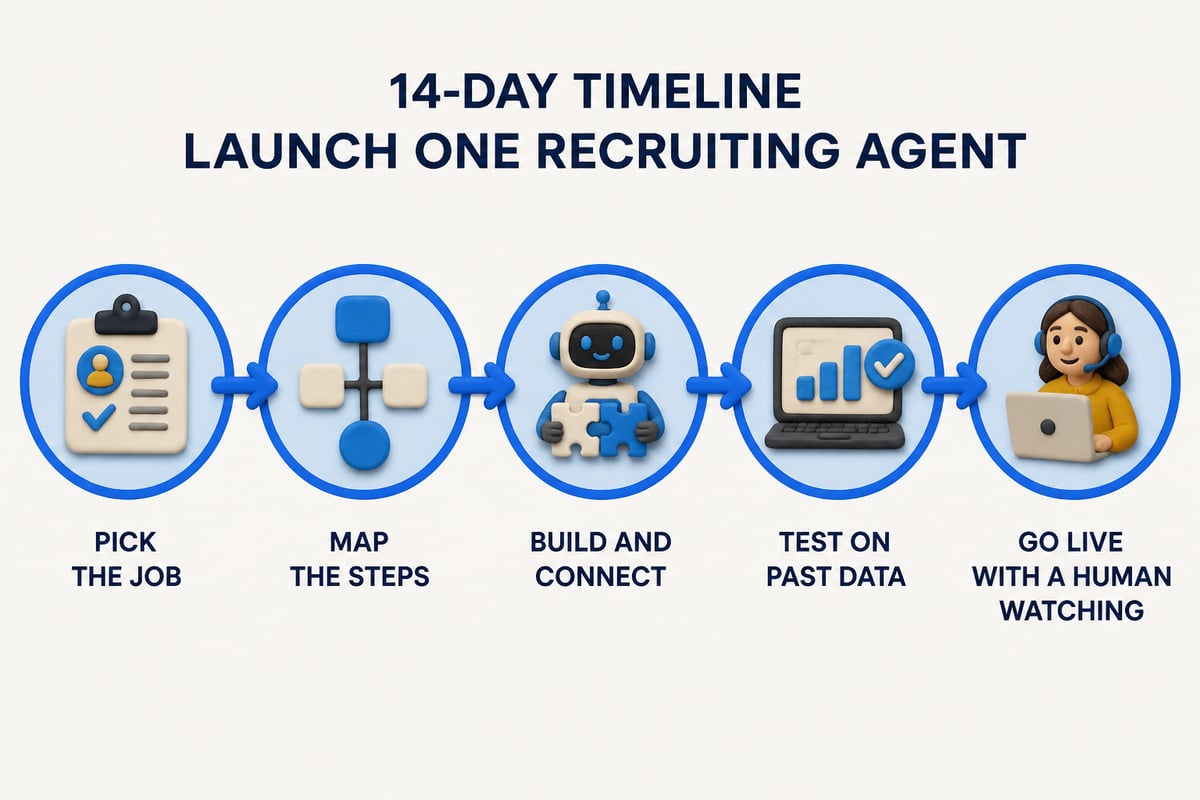
A small recruiting firm can have a first working agent running in two weeks if it picks one job and keeps the scope tight.
Hypothetical plan for a small firm that wants to stop losing days to scheduling and follow-up.
- Days 1 to 2: Pick the job. Choose one task, like booking first calls and sending status updates.
- Days 3 to 5: Map the steps. Write down every step a recruiter takes today, including edge cases like reschedules and no-shows.
- Days 6 to 9: Build and connect. Plug the agent into your calendar, email and applicant system.
- Days 10 to 12: Test. Run it on past conversations and fake candidates. Fix what breaks.
- Days 13 to 14: Go live with a human watching. Check every run for the first few days.
After that, add the next job. Follow-up first, then candidate questions, then reports. Screening comes last, with a person reviewing every output.
Vieerx builds agents this way. Every agent owns a single narrow job and runs without a human steering it. Its custom builds come with a deployment crew that trains your team to build agents without Vieerx. Vieerx builds agents with separate memory for each user, so nobody's information gets mixed with anyone else's. The same rule applies to candidate data in hiring.
If you want to see what a custom AI agent would look like for your hiring process, that is the place to start. For more on the build side, read about AI agent builders.
Common Mistakes Small Teams Make With AI Hiring Tools
The most common mistakes are automating too much at once, trusting the tool without checking it and hiding AI use from candidates.
Each one has a simple fix.
- Automating everything at once. Fix: one agent, one job, then add.
- No human review on rejections. Fix: AI sorts, people decide.
- Setting criteria from past hires. Fix: build criteria from what the job needs.
- Skipping the bias check. Fix: review who gets passed and cut every few months.
- Buying on a demo. Fix: ask for accuracy numbers and a live trial on your own data.
- Ignoring the candidate view. Fix: apply for your own job. If the process feels cold or confusing, candidates will drop out, and the best ones leave first.
One more point on speed. Candidates who hear nothing for a week take other offers. A follow-up agent fixes a problem that costs small firms good hires every month, and it is among the lowest-risk builds you can make.
FAQ
What is a very high-paying AI job?
Some senior AI roles at top labs or large tech companies pay very high salaries. They are rare and not a normal hiring benchmark. Most small teams hiring for AI work, or hiring with AI help, pay far less, and you do not need that kind of hire to put an agent to work in your own hiring process.
Does AI in recruitment replace recruiters?
No. It takes over scheduling, sorting, follow-up and reports. Recruiters still talk to candidates, judge fit, sell the role and make the final call. The firms that use AI well spend more hours on conversations, not fewer.
Is it safe to let AI reject candidates?
No. Keep a person in charge of every rejection. Rules on automated hiring are tightening, and the EU treats tools that filter or rank applications as potentially high-risk. Let AI flag and sort, and let a person decide.
Pick one task this week, like interview scheduling, and count the hours it takes your team. That number tells you where to start. If you want an agent built and live in 14 days, Vieerx can set up a custom AI agent for your hiring process, and you can book a demo to see exactly what it would do for your team.