
AI automation tools are software that does repeat work for you: answering leads, sorting tickets, writing reports, booking calls. For a service business, the right first build is lead follow-up, because slow replies lose deals you already paid to get. A 2025 survey of small-business decision-makers found AI use rose sharply from 2024 to 2025, according to Thryv. Many owners now know they should use AI. The hard part is picking what to build first.
This article gives you a build order. It shows what each tool type does, what to automate in what sequence, and how to avoid the mistakes that waste the first month.
What AI automation tools actually do
AI automation tools take a task a person does the same way every day and run it without that person. Hypothetical example: a recruiting firm gets many applications a day. Someone reads each one, checks it against the role, and sends a reply. An automation reads the form, scores the match, and sends the right reply quickly. The recruiter only sees the top matches.
There are three layers in any setup:
- Trigger. Something happens, like a new lead, a new email, or a missed call. Other triggers are a form submitted, an invoice marked paid, or a ticket left open for two days.
- Logic. The tool decides what to do. Old tools used fixed rules. New ones use AI to read text and choose.
- Action. The tool does the job: sends a message, updates the CRM, books the call.
The AI part sits in the logic layer. It reads messy input, like an email written in a rush, and picks a sensible next step. Rules alone can't do that. A rule can check if an email contains the word "pricing." AI can tell that "what would this run us for a team of eight?" is also a pricing question, and that "cancel my order" is a different thing.
Here is a small case. A message says, "Hi, saw your ad, can someone call me Thursday?" The trigger is the new message. The logic reads it as a hot lead with a time request. The action checks your calendar, offers Thursday slots, and tells your sales rep.
The U.S. Small Business Administration recommends considering AI for repeat tasks such as sorting email, updating to-do lists, summarizing meetings, and routing phone calls. Those are all small jobs. Small jobs that happen again and again add up fast.
The four types of AI automation tools
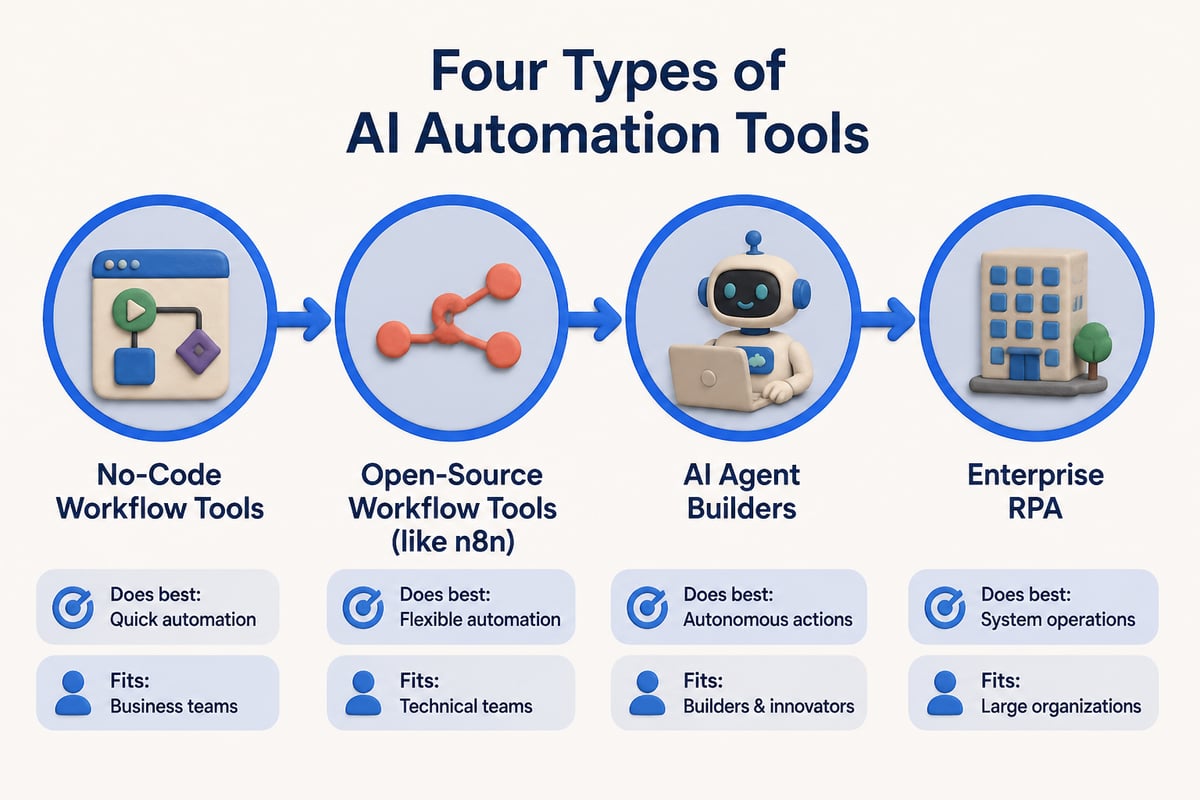
Every tool on the market falls into one of four groups, and the group matters more than the brand name. Pick the group first.
A quick picture shows why. Say you want a new lead to land in your CRM and get a thank-you email. That is a simple handoff, so a no-code tool does it in minutes. Now say you want the lead's message read, scored against your ideal client, and answered in your voice. That needs an agent. Same lead, two different jobs, two different groups of tools.
| Type | What it does | Good for | Weak spot |
|---|---|---|---|
| No-code workflow tools (Zapier, Make) | Connect apps with trigger and action steps | Simple handoffs between tools | Gets messy with long logic |
| Open-source workflow tools (n8n) | Same idea, with more control and lower run cost | Custom flows, data you want to own | Needs someone to set it up |
| AI agent builders | An AI model that reads, decides, and acts | Support, sales replies, ops tasks | Needs testing before you trust it |
| Enterprise RPA (UiPath, Power Automate) | Software robots that click through old systems | Large firms with legacy software | Too heavy for a 10-person shop |
For a business with 5 to 50 people, the middle two groups do most of the work. Workflow tools move data. Agents make decisions. You usually need both. A common pairing is n8n as the pipe and an AI model as the brain. n8n catches the new lead, passes the text to the model, then takes the answer and writes it into your CRM. The agent never touches your systems directly. The workflow tool does that, and it can log every step for you to check.
RPA fits a different problem. If a firm must key data into a 15-year-old desktop program with no connection to anything else, a software robot can copy the clicks. Most small service firms don't have that problem. For more on how the pieces fit, see this guide to agentic workflows.
Where n8n fits
n8n is a workflow tool you can host yourself or use in the cloud. It handles branching logic and AI model calls well. If you want to know whether it suits your team, read this n8n overview. It is a strong base layer, but a tool is not a system. Someone still has to design the flow, test it, and watch it.
What to build first: the order that pays back fastest
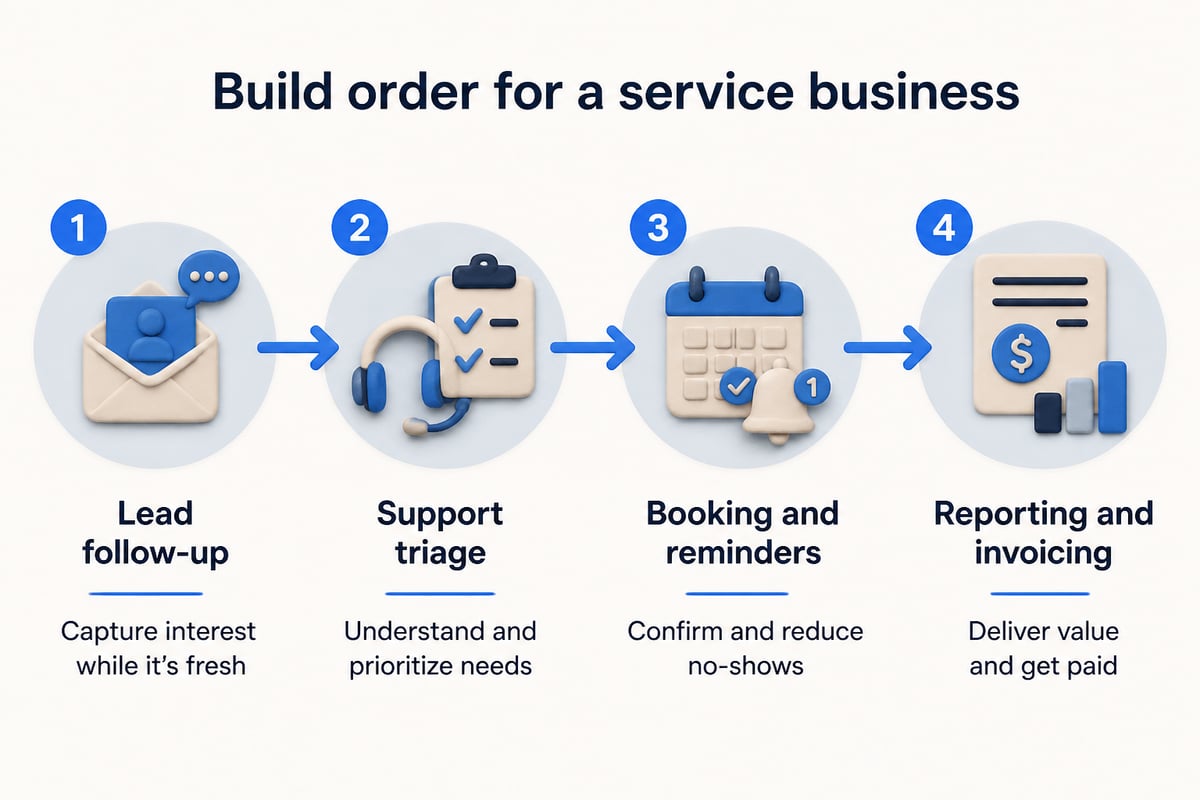
Build in this order: lead follow-up, then support triage, then booking, then reporting. This order follows the money. Leads bring in revenue. Support keeps it. Booking and reporting save time but don't create new income.
Here is why lead follow-up goes first. Hypothetical example: a marketing agency gets a form fill in the evening. The owner sees it the next morning. By then the lead may have talked to other agencies. An automation can reply within minutes, ask qualifying questions, and offer call times. The owner wakes up to a booked call.
Step 1: Lead follow-up
This is the first build for nearly every service business. The flow looks like this:
- A lead fills a form, sends an email, or books a call.
- The agent reads the message and checks it against your ideal client.
- It replies in your voice within minutes.
- It logs the lead in your CRM with a score and a note.
- It sends a human the leads worth a call.
Add a follow-up rule: if the lead goes quiet, send a nudge on day 2 and day 5. Most leads don't buy on the first touch. Most owners don't follow up a third time because they run out of hours.
Step 2: Support triage
Support is the second build because it frees the most hours. A support agent reads each ticket, answers the ones it can, and hands off the rest with a summary. The key is a narrow scope. An agent that answers billing questions only will beat an agent that tries to answer everything.
If you are weighing this build, the pages on AI customer service and AI agents for business cover what to expect.
Step 3: Booking and scheduling
Booking is simple, so it is a good third build. The agent checks calendars, offers times, sends reminders, and handles reschedules. A clinic or home-service firm gets the most from this because no-shows cost real money. A reminder text the day before and two hours before cuts the gap.
Step 4: Reporting and invoicing
Reporting is the last build because it hurts less. Nobody loses a client over a late weekly report, but it eats Friday afternoons. An automation pulls numbers from your ad accounts, CRM, and billing tool, writes a plain summary, and sends it. Invoicing works the same way: when a project hits a milestone, the invoice goes out.
How to pick one tool without wasting a month
Pick the tool by the job, not by the feature list. A 2025 Microsoft report found that most SMB leaders believe productivity must increase, and many named expanding team capacity with digital labor a top priority for the next 12 to 18 months, per the Microsoft Work Trend Index. Many owners feel that pressure. It can lead to buying several tools in a week and using none.
Use these five questions before you buy anything:
- What is the one job? Write it in one sentence. "Reply to new leads in under five minutes."
- Who does it now? Name the person and the hours they spend each week.
- What does a good result look like? Use a number, like "80% of leads get a reply in five minutes."
- What can go wrong? A wrong reply to a client, a lead dropped, a double booking.
- Who checks it? One named person looks at the output daily for the first two weeks.
If you can't answer the first one, you are not ready to buy a tool. Spend an hour with a notepad first.
A quick check on cost
Cost has two parts: the tool fee and the model fee. The model fee is what the AI charges each time it reads and writes. A simple task, like sorting an email, does not need the most expensive model. A smaller model can do it at a fraction of the cost. When you compare options, ask what model runs each step. Vieerx builds each agent so every run uses the cheapest model that passes its evaluation tests. You can see how model prices differ with the model calculator.
Mistakes that kill AI automation projects
Most failed automation projects fail for boring reasons, not technical ones. Here are the four we see named most often in the field.
- Starting too wide. An agent told to "handle sales" will do a mediocre job at ten tasks. An agent told to "reply to new inbound leads and book a call" will do one task well. Give each agent one narrow job.
- No test set. Before you let an agent talk to clients, run it against 50 old messages and check the answers. If you can't measure accuracy, you can't trust it.
- Mixing client data. If one agent holds the memory of every client in one pile, details leak between people. Each user needs separate memory. This is a basic safety rule, and it matters most for recruiting firms, clinics, and consultants who hold private details.
- No human exit. Every agent needs a way to say "I don't know" and hand off. Without it, the agent guesses, and guesses cost you clients.
Safety and trust
You don't need a legal team to run AI safely, but you do need a checklist. NIST published its Generative AI Profile in 2024. It is a voluntary companion to its AI Risk Management Framework. It helps teams think about trust when they design, use, and test AI. You can borrow its core idea in plain terms: know what the agent can touch, test it before launch, and watch it after.
Free tools or a built system?
Free and self-serve tools work for personal tasks. They get thin when a client is on the other end. A service business has three needs that free tools handle badly: your data stays separate per client, the agent follows your process, and someone fixes it when it breaks.
Think of it this way. A free note-taker that summarizes your meetings is fine. Google Workspace offers AI-supported workflows like email labeling, file search, meeting notes, and action-item summaries, and those are good starting points for internal admin. But a lead follow-up agent that replies to prospects in your voice, writes to your CRM, and books on your calendar is a system, not a toggle. It needs design, testing, and upkeep.
Build, buy, or hire out
You have three paths:
- Do it yourself. Cheapest in cash, most expensive in time. A first workflow can take an owner a good deal of trial and error. The time varies with your skills.
- Buy a packaged tool. Fast to start, but you fit your process to the tool.
- Hire a builder. You pay more up front. You get a working system shaped to your process and someone who owns the fixes.
Check three things: do they show accuracy numbers, do they train your team, and do they set a date for going live.
What a build looks like in 14 days
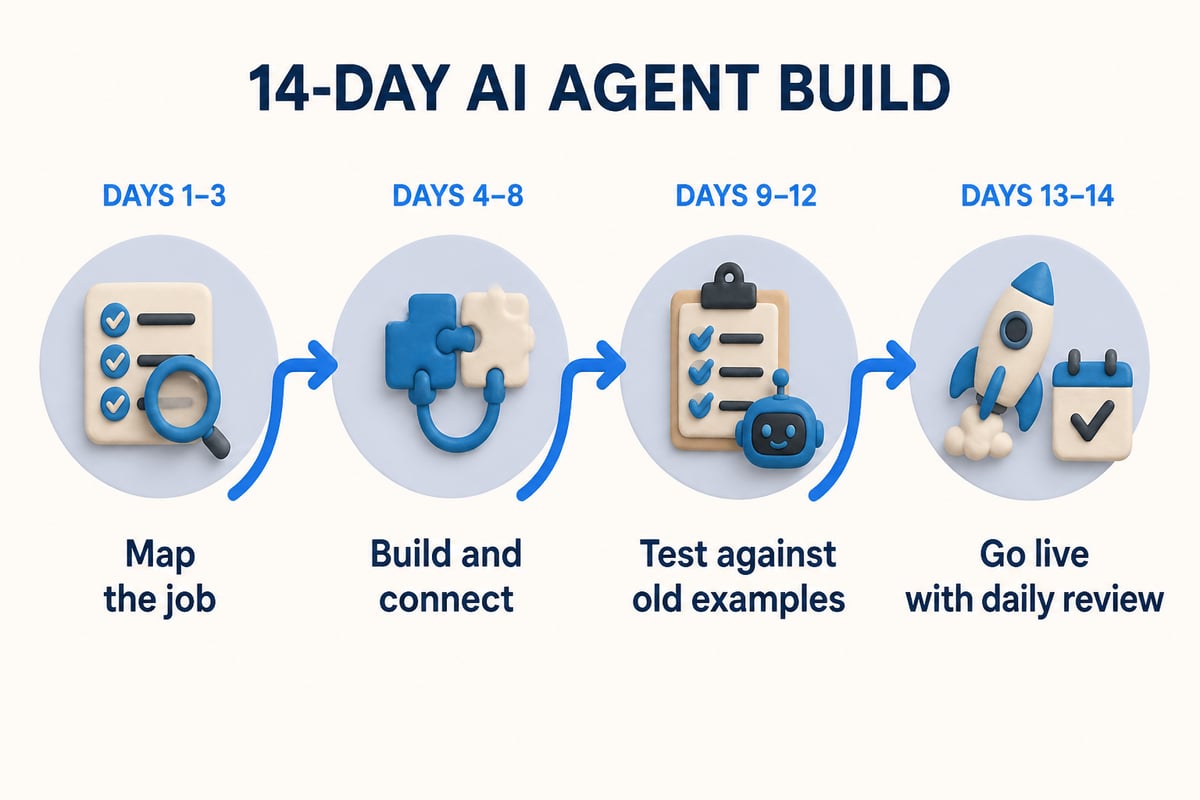
A good first build goes live in about two weeks, and each week has a clear goal. Vieerx runs its builds on this timeline, with a live working agent within 14 days of kick-off.
Days 1 to 3: Map the job. Pick one workflow. Write down every step a person takes today. Collect 50 to 100 real examples of the inputs, like past leads or tickets.
Days 4 to 8: Build and wire. Connect the trigger, the AI logic, and the actions. This is where tools like n8n and an AI model come together. The agent gets a narrow job, a set of rules, and access to only the data it needs.
Days 9 to 12: Test. Run the agent against your old examples. Score the answers. Fix the misses. Add a handoff rule for anything it is unsure about.
Days 13 to 14: Go live with a watch period. Launch to real traffic. Someone on your team reviews output daily at first. Then the review drops to a quick weekly check.
What the numbers can look like
Numbers should be proof you can check. Vieerx reports 99.4% answer accuracy across 1,000+ users, and 17,169+ tickets resolved with zero mix-ups between users. It also targets real ROI in six weeks or less. Ask any builder you talk to for numbers like these. If they can't give them, that tells you something.
The deployment also trains your team to build agents without us. That matters because your second and third automations should not need an outside firm for every change.
A hypothetical walk-through
Hypothetical example: a consulting firm gets a steady flow of inbound inquiries. The owner replies to each by hand. After a lead follow-up agent goes in, each inquiry gets a quick reply and a couple of qualifying questions, and only the best-fit leads reach the owner's calendar. This is an illustration, not a result from a real client.
Where to go after the first build
Once lead follow-up runs, add the next agent on the list and reuse what you learned. The second build is faster because your data, tone rules, and test method are already in place.
Think about what you already own after month one. You have a folder of real messages. You have a written tone guide, like "short, warm, no jargon." You have a test set of 50 old examples. You have a handoff rule for when the agent is unsure. Every one of these carries over. A support agent can borrow the tone guide on day one. A booking agent can borrow the CRM connection.
Before you start the next build, check the first one. Look at how many leads got a reply in five minutes. Look at how many handoffs a human had to fix. If the misses are high, tighten the first agent before you add a second.
A sensible path for a 5 to 50 person firm:
- Month 1: Lead follow-up agent.
- Month 2: Support triage or an email assistant. See this note on an AI email assistant for what it can handle.
- Month 3: Booking, reminders, and no-show handling.
- Month 4: Weekly reporting and invoicing.
If phones are your leak, a phone answering service built on AI can sit in front of this path. Home-service firms and clinics often start there instead. A plumber who misses calls while on a job can lose that work to the next name on the search page.
For a wider view of how AI fits a small firm, the page on AI for small business goes through more use cases.
Hand it off, don't hand over
The goal is not to remove your team. The goal is to remove the copy-and-paste. Your people should spend their day on calls, strategy, and client work. The agents handle the sorting, the first reply, the reminder, and the report.
If you want a builder to set up the first workflow, the AI automation build from Vieerx covers lead follow-up, booking, reporting, and invoicing on n8n and Claude. You can book a review and get a plain answer on what to build first for your firm.
FAQ
What are the best AI automation tools for a small service business?
Pick by job. Zapier and Make connect apps with simple rules. n8n gives you more control for longer flows. AI agent builders handle tasks that need reading and judgment, like replying to leads or sorting tickets. Most small firms end up using a workflow tool plus one or two agents. Start with the tool that fits your first job, which is usually lead follow-up.
How long does it take to set up AI automation?
A single, narrow workflow can go live in about two weeks if the job is clear and you have real examples to test against. Vieerx goes live within 14 days of kick-off. Wide projects that try to do many things at once take far longer and fail more often. Start with one job, test it, then add the next.
Do I need a developer to use AI automation tools?
Not for simple flows. Many no-code tools let an owner build basic automations alone. For agents that talk to clients, write to your CRM, and keep each client's data separate, most firms get better results from a builder who tests the work. A good builder also trains your team so later changes don't need outside help.
Your next step is simple: write down the one repeat task that costs your team the most hours each week, and count how many times it happens. If it is lead follow-up, you already know where to start. Vieerx builds custom sales, support, and ops agents for agencies and service businesses with 5 to 50 people, and the AI automation build is the fastest way to get the first one live. Book a demo with Vieerx and get a clear plan for what to automate first in your business.