

n8n (said "n-eight-n") is a tool that connects your apps and runs tasks between them without you clicking anything. A new lead fills out your form, and n8n adds them to your CRM, sends a reply, and books the call. This guide tells you what to build first with n8n, what it costs, and where it goes wrong.
What Is n8n, in Plain Words?
n8n is a workflow tool. You draw a chain of steps on a screen, and the tool runs that chain for you, again and again.
Here is a real picture. A recruiting firm gets 40 resumes a week by email. Today, someone opens each one, copies the name into a sheet, and sends a thank-you note. With n8n, a step watches the inbox. The next step reads the resume. The next adds a row to the sheet. The last sends the thank-you. Nobody touches it.
Each step is a box on a canvas. You link the boxes with lines. The lines show what happens next.
A few terms you will hear:
- Workflow: one full chain of steps, start to finish.
- Trigger: the event that starts a workflow, like a new email or a form fill.
- Node: one box in the chain. It does one job.
- Execution: one run of the workflow.
The name comes from "nodemation." You can ignore that. What matters is the idea. n8n does the boring, repeat work between your tools.
Why Service Business Owners Are Looking at n8n Now
Owners look at n8n because AI agents became normal inside companies, and the repeat work in service firms is easy to automate. The numbers back this up.
In Microsoft's 2025 Work Trend Index, many surveyed leaders said their organizations were already using AI agents to fully automate some workflows, mostly in customer service, marketing, and product development. The same report says most business leaders expect to use AI agents as digital team members within the next 12 to 18 months. The survey covered employees and executives across 31 territories, so it is not a small sample.
So your competitors are moving. A marketing agency that answers every lead quickly tends to win more deals than one that takes days to reply.
n8n is one of the tools that makes this work. It is not the only one. But it has two traits that suit service firms. It handles long chains with many branches. And you can host it on your own server, so client data stays where you put it.
How n8n Works: A Lead Follow-Up Example
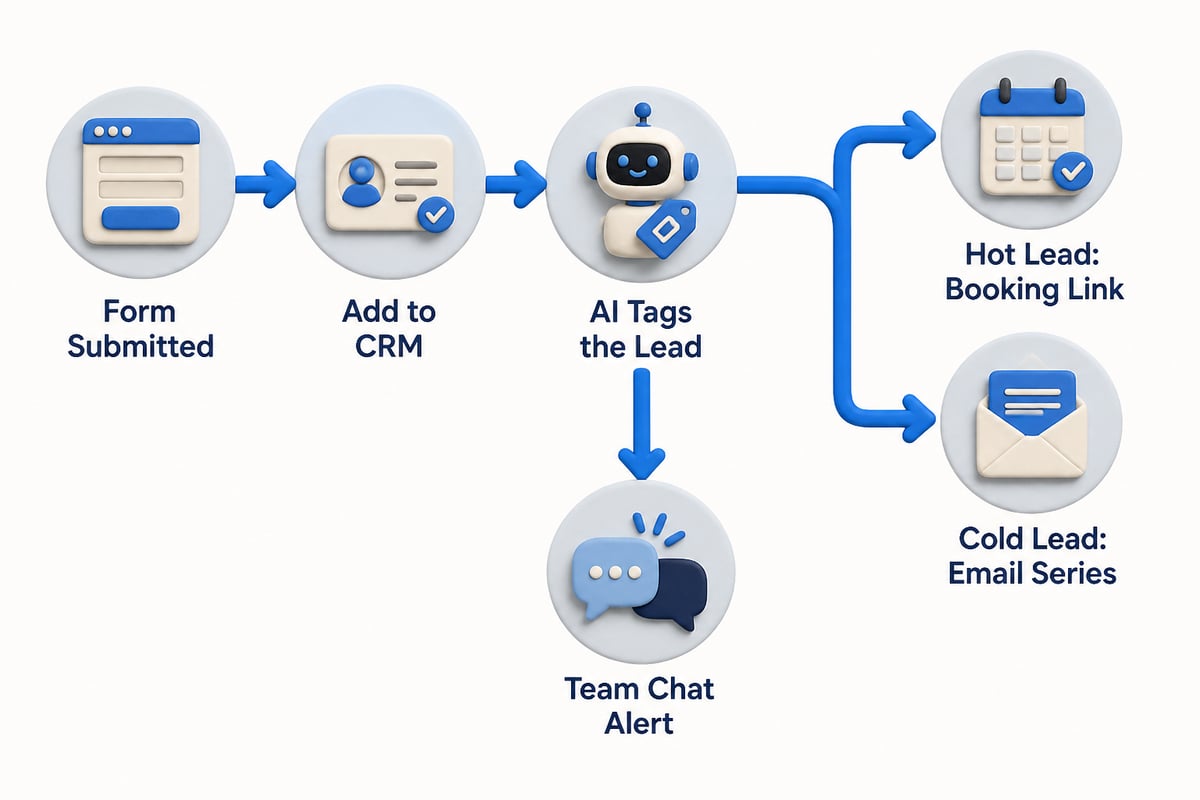
An n8n workflow is a trigger followed by a chain of nodes, and the best way to see it is one real chain. Take lead follow-up for a consulting firm.
- Trigger: Someone submits the contact form on your site.
- Node 1: n8n adds the person to your CRM.
- Node 2: An AI step reads the message and tags it as "ready to buy," "just looking," or "spam."
- Node 3: If the tag is "ready to buy," n8n emails a booking link within one minute.
- Node 4: If the tag is "just looking," n8n adds them to a slow email series.
- Node 5: n8n posts a note in your team chat so a person sees the hot lead.
That is six steps. Once built, it runs for every lead, at 2 a.m. or on a holiday.
The branch in step 3 is the key part. Simple tools run in a straight line. n8n can split the path based on what it finds. That is why it fits real business work, where the answer to "what happens next" is often "it depends."
What to Build First With n8n: Five Workflows in Order
Build the workflow that touches money first, which is almost always lead follow-up, and then work down the list. Each one below is narrow, useful, and safe to start with.
1. Lead follow-up
Start here. A slow reply loses deals, and a fast reply is easy to automate. The chain in the section above is your template.
Why it goes first: the payoff shows up in days. You see replies go out. You see calls get booked.
2. Booking and reminders
A clinic has a steady stream of weekly appointments, and some patients miss theirs. Each miss is lost income. A workflow sends a text the day before and a second one two hours before. It also offers a one-tap reschedule link.
This one is small and low risk. It is a good second build.
3. Weekly client reports
An agency pulls numbers from ad accounts, email tools, and a sheet. Someone spends Friday afternoon pasting them into slides. A workflow can pull the numbers, drop them into a template, and write a short summary for a person to check before it goes out.
Notice the last part. Keep a human on the final send for anything a client reads.
4. Invoicing and payment nudges
A consultant finishes a project. n8n creates the invoice, sends it, and checks for payment after 7 days. If nothing arrived, it sends a polite reminder. After 14 days, it alerts you.
You never forget to send an invoice again.
5. Support triage
A customer writes in. A workflow reads the message, finds the topic, and either answers from your help docs or sends it to the right person. This is the hardest of the five. Save it for last, once you trust the process. For more on this one, see AI customer service.
Here is the order in a table, so you can plan:
| Order | Workflow | Main payoff | Risk if it breaks |
|---|---|---|---|
| 1 | Lead follow-up | Faster replies, more booked calls | Medium |
| 2 | Booking and reminders | Fewer no-shows | Low |
| 3 | Weekly client reports | Hours saved each week | Low if a human checks it |
| 4 | Invoicing and nudges | Faster payment | Medium |
| 5 | Support triage | Faster answers | Higher |
Start at row 1. Do not skip to row 5 because it sounds exciting.
How Much Does n8n Cost per Month?
n8n's software is free to run yourself on your own server, and paid cloud plans charge a monthly fee that grows with how many runs you use. Check the current price on n8n's pricing page before you plan, because plans and limits change.
Here is how to think about it. There are two paths.
- Cloud: n8n runs it for you. You pay a monthly fee based on how many executions you use. You do no setup. This is the easier path.
- Self-hosted: You run the free version on your own server. The software costs nothing. You pay for the server, and you pay in time to keep it running.
For example, a small recruiting firm might build a few workflows that run often each month. On cloud, that usually fits a low plan. Self-hosting can save money on the software but costs time in upkeep. For most owners, an hour of their own time is worth more than the savings.
One more cost people skip: the AI model. If a step uses an AI model to read or write text, that model charges per use. Small, but it adds up. The cheapest model that does the job well is usually the right pick. If you want to compare model costs, the Vieerx model calculator can help.
How Do I Install n8n?
You install n8n by signing up for the cloud version, which takes about two minutes, or by running it on your own server with Docker, which takes longer. For most service businesses, start with cloud.
Cloud route (easiest):
- Go to the n8n website and make an account.
- Open a new workflow.
- Add a trigger node, like a form or an inbox.
- Add the next step and link the two.
- Run a test with fake data before you turn it on.
Self-hosted route:
- Get a small server from a hosting company.
- Install Docker, a tool that packs software into one box.
- Pull the n8n image and start it.
- Point a web address at it and add a lock (SSL).
- Set a password and turn on two-factor sign-in.
The second route works, but it asks for some tech skill. If nobody on your team has done it before, do not guess. A wrong setup can leave client data open to the web.
Do not rush the first workflow. Build the simple version. Test it with a few fake leads. Fix what breaks. Then turn it on.
Cloud or Self-Hosted: Which Should an Agency Pick?
Pick cloud if you want it running this week, and pick self-hosted only if you have a real reason, like strict rules on where client data may live.
Think of two firms. A small marketing agency wants lead follow-up and weekly reports. Nobody on staff runs servers. Cloud is the clear pick, since they can be live quickly.
A clinic group handles patient details and has rules about where that data sits. They may need self-hosting so the data never leaves their own system. They also need someone to run it.
The trade looks like this:
- Cloud: Fast to start. Updates happen for you. Less control over where data lives.
- Self-hosted: More control. You carry the setup, the updates, and the security.
Self-hosting is not "free." It swaps a monthly fee for your time and your risk. Count both before you decide.

Keep n8n Safe: Basic Security for Business Owners
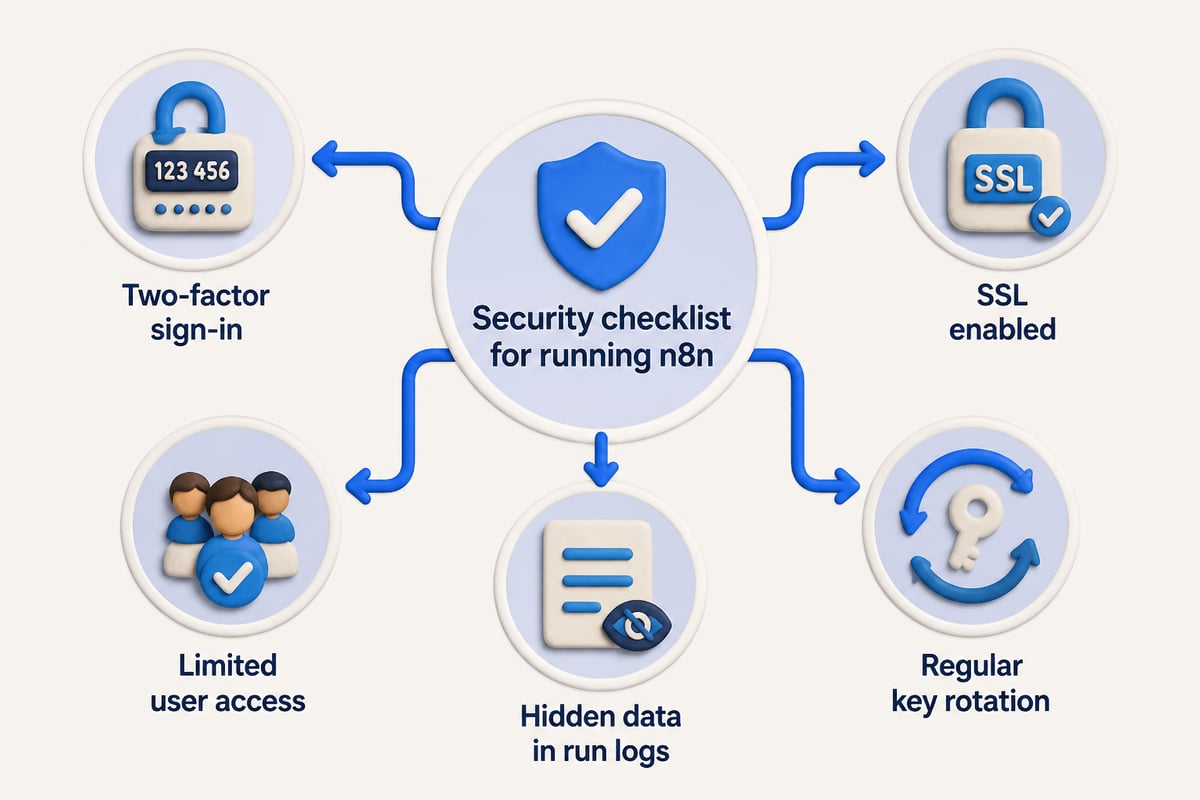
Safe n8n use starts with locking the door, which means two-factor sign-in, SSL, and limits on what the tool can touch. n8n's own docs say what to do.
n8n's self-hosting security guidance recommends measures such as security audits, SSL, SSO, restricting nodes and the public API, and redacting execution data. The same documentation describes rotating encryption keys, hardening task runners, turning on SSRF protection, and requiring two-factor authentication.
You do not need to know every term. Here is the owner's version:
- Turn on two-factor sign-in for every user.
- Use SSL so data is scrambled in transit.
- Give each person only the access they need.
- Hide private data from the run logs.
- Change keys and passwords on a schedule.
Why this matters for a service firm: your workflows hold client emails, phone numbers, and deal details. One leaked key can expose all of it. Treat n8n like you treat your CRM. It holds the same kind of data.
Where n8n Falls Short for Busy Owners
n8n falls short when nobody on your team has time to build, test, and fix workflows, because the tool is flexible but it is not a finished product. You build it. You also own it when it breaks.
Picture an agency owner who spends a weekend building a lead workflow. It works. Three weeks later, the CRM changes a field name. The workflow stops. Leads sit with no reply for four days. Nobody notices until a client complains.
That is the real risk. Not the tool. The upkeep.
Watch for these:
- Silent failures. A workflow can stop and tell no one. Set an alert for any failed run.
- Learning time. Simple chains take hours. Branching chains with AI steps take days.
- AI mistakes. An AI step can misread a message. Keep a human on anything a client sees.
- No owner. If no one is in charge of the workflows, they decay.
Compare this with simpler tools. Some are easier on day one but hit a wall on branching or on data rules. n8n has a higher ceiling and a higher effort to get there. Pick based on how complex your work is and how much time you have.
What Are the Alternatives to n8n?
The main alternatives to n8n are Zapier, Make, and Power Automate, and the right one depends on how much you want to build yourself.
- Zapier: The easiest to learn. Good for short chains. Gets costly as runs grow, and branching is limited.
- Make: A visual canvas like n8n. A middle path between ease and control.
- Power Automate: Fits firms already deep in Microsoft tools.
For an owner, the choice is simple. If your needs are two or three steps, an easier tool may do. If you need branches, AI steps, and data control, n8n is a strong fit.
There is also a fourth path that skips the tool choice. You hire a team to build and run the workflows for you. That is worth weighing if you would rather run your firm than learn automation. Read how to pick an AI agency and what AI automation services usually cover.
From Workflows to Agents: What Comes After n8n Basics
An AI agent is a workflow that can decide what to do next on its own, and n8n can build simple ones once your basic workflows run well. The jump is real, so go in order.
A plain workflow follows fixed rules. If the lead says "ready to buy," send the booking link. An agent reads the message, thinks about it, and picks an action. It might answer a question, ask one back, or pass the lead to you.
A good agent has one narrow job. A sales agent follows up on leads. A support agent answers questions from your help docs. An ops agent builds the weekly report. When one agent tries to do everything, it does everything badly.
Two rules keep agents safe:
- One job per agent. Narrow work is easier to test and trust.
- Separate memory per person. One client's details should never show up in another client's chat.
Microsoft's research points the same way. Its Work Trend Index hub collects its research on how work is changing with AI and agents. The shift is from "tools you use" to "teammates you manage." That only works if each agent is small, tested, and watched.
To learn more, read about AI agents for business and agentic AI.
A 30-Day Plan to Get Your First n8n Workflow Live
You can have a first workflow running in 30 days if you build one thing, test it hard, and add a failure alert on day one. Here is a plan an owner can follow.
Week 1: Pick and map. Choose lead follow-up. Write the steps on paper. Who replies? How fast? What does the reply say? If you cannot write it on paper, you cannot automate it.
Week 2: Build the simple version. Make the trigger, the CRM step, and the reply email. Skip the AI step for now. Test with five fake leads.
Week 3: Add the smart part. Add the AI tag, the branch, and the team alert. Add a failure alert so you hear when anything stops. Test again.
Week 4: Go live and watch. Turn it on for real leads. Check every run for the first week. Fix what breaks. Write down how long replies take now compared with before.
Measure one number. Reply time is a good one. If it drops from 20 hours to 2 minutes, you can see the value in a single line.
Some owners hire help for this. A team that has built these chains before will skip the mistakes that cost you a month. Vieerx's AI automation build runs workflows on n8n and Claude that handle lead follow-up, booking, reporting, and invoicing for you.
FAQ
What is meant by n8n?
n8n is a workflow automation tool, and the name is short for "nodemation." You link your apps in a chain of steps, and n8n runs the chain for you. It is used for tasks like lead follow-up, reminders, and reports.
Is n8n hard for a non-technical owner to learn?
Simple chains with two or three steps take a few hours. Chains with branches and AI steps take longer, and self-hosting needs real tech skill. Many owners build the first simple workflow themselves and hire help for the rest.
Which n8n workflow should a service business build first?
Build lead follow-up first. It touches revenue, it is easy to measure, and the payoff shows up in days. Move to booking reminders, reports, and invoicing after that.
Your next step today is to write down the first thing a new lead hears from you, and how long it takes to hear it. That one note tells you what to build first. If you would rather have a team build it and put it inside your business, book a free demo at Vieerx and see a working agent plan for your firm.