

AI customer service means software that answers customer questions, routes requests and finishes simple tasks without a person typing every reply. For a small team, it works best when one agent owns one narrow job, like order status or booking changes, and hands everything else to a human. Before you automate, our guide on AI for small business: where to start without wasting money shows which jobs pay off first.
Picture a recruiting firm with 12 people. Candidates email all day asking the same things. Where is my application? Did the client see my CV? Can I move my interview? Two staff members spend half their week on these replies. An AI agent can answer all three questions in seconds, at 2 a.m., and pass the odd case to a person.
That is the whole idea. This guide shows what to automate first, what to leave alone, how to avoid the common mistakes, and how a small team can be live in weeks.
What AI customer service actually does
AI customer service does four jobs: it answers questions, sorts incoming requests, completes small tasks, and helps your staff work faster.
Here is a plain example for each.
- Answers questions. A client asks, "What is your refund policy?" The agent reads your policy and replies in one message.
- Sorts requests. A message says "I was charged twice." The agent tags it as billing and sends it to the right person.
- Completes tasks. A customer wants to move a call. The agent checks the calendar and rebooks it.
- Helps staff. A human gets a draft reply and a short summary of the whole thread, so they do not start from zero.
The U.S. Small Business Administration says small businesses can use website chatbots to answer common questions or complete orders, and can automate phone service to route calls to the right department. Its guidance page was updated February 14, 2025, and recommends considering these uses for customer service.
Old chatbots followed a fixed script. If you typed something they did not expect, they broke. Modern AI agents read the message, understand what the person wants, look up your data, and act. That is the gap between a menu that annoys people and an assistant that helps them.
If you want a deeper look at the chat side, our post on AI chatbots for business covers it in plain terms.
Is AI customer service good for small teams?
Yes, AI customer service is good when it handles repeat questions and bad when it is forced to handle everything. The result depends on the job you give it.
Take a marketing agency with eight staff and 40 active clients. Every Monday, clients ask for the same things: last week's report, the status of a campaign, the date of the next call. An agent can pull the report and answer in under a minute. The account manager stops being a report courier and spends the hour on strategy.
Now take the same agency when a client is angry about a missed deadline. A bot should not handle that. A person should call.
The numbers back this up. A 2025 survey of 2,243 U.S. adults by Forethought found that 55% of consumers had felt negative emotions when dealing with an AI agent in the past year. Of those, 23% reported frustration, 11% anger, and 14% both. People get upset when a bot blocks them from a human or gives a wrong answer.
So the rule is simple:
- Let AI take the boring, repeat work.
- Give people an easy path to a human.
- Never trap a customer in a loop.
A team that follows those three rules gets fast answers for customers and fewer low-value tickets for staff. A team that ignores them gets angry emails.
What to automate first
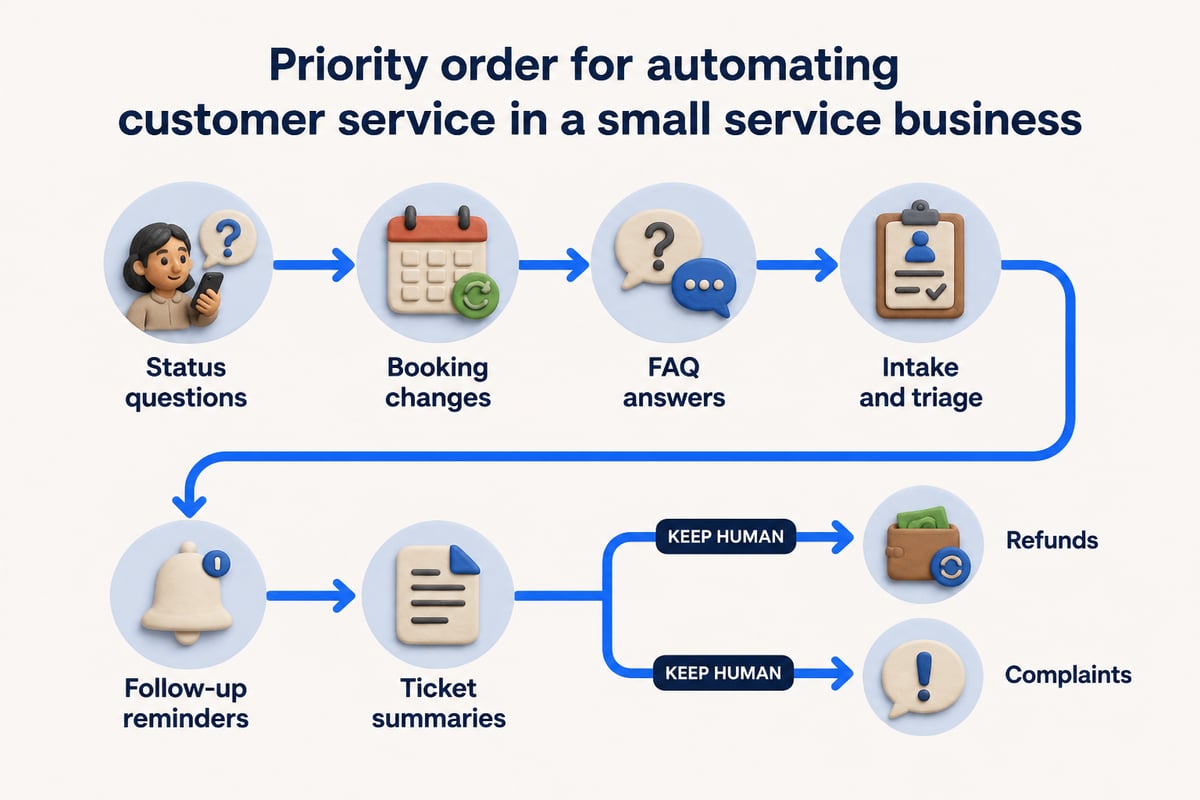
Start with the work that is high volume, low risk and easy to check. These tasks pay back fastest and fail safest.
Here is a ranked list for a typical service business.
- Status questions. "Where is my project, order, invoice or application?" These are the same question asked 100 ways.
- Booking and rescheduling. Calendar changes need no judgment, only access to your calendar.
- FAQ answers. Pricing, hours, process steps, what is included.
- Intake and triage. Collect the name, the issue and the urgency, then route it.
- Follow-ups. Reminders for unpaid invoices, missing documents, or unanswered quotes.
- Ticket summaries. A short recap so a human can pick up a thread fast.
Pull your last 200 support messages and count them by type. In most small businesses, three or four types cover more than half the volume. Those are your first targets.
Do not start with refunds, complaints, legal questions or anything where a wrong answer costs real money. Add those later, with a human approving each step.
The best AI tool for customer service depends on your job
The best AI tool for customer service is the one that fits one narrow job, connects to your real systems, and has been tested on your own questions. No single product wins for every business.
Here is how to compare options without getting lost.
| What to check | Why it matters | What a good answer looks like |
|---|---|---|
| Connects to your tools | An agent that cannot see your CRM or calendar can only guess | Reads and writes to the systems you already use |
| Handles one job well | Broad bots make more mistakes | Each agent has one clear task |
| Hands off to a human | Customers get stuck without it | One click or one phrase reaches a person |
| Keeps customers separate | Mixed-up data is a privacy problem | Each user has their own memory |
| Can be tested | You need proof before launch | You can run real past questions through it |
Two choices sit in front of you. You can buy a ready-made chatbot and set it up yourself. Or you can have a team build agents around your own workflows.
Self-serve tools are fine if you have time to write the answers, connect the tools and fix the errors. Most owners of 5 to 50 person firms do not have that time. They have clients to serve.
That is where a build partner helps. Custom AI agents from Vieerx are built for your business, plugged into your tools, and live in 14 days. Each agent owns a single narrow job and runs without a human steering it, which keeps errors low and results easy to measure.
If you are still deciding what kind of help you need, our guide to AI agents for business explains the options.
How to talk to AI customer service directly
You talk to an AI agent by typing or speaking in plain sentences, the same way you would write to a person. You do not need special commands.
If you are a customer, three habits get better answers:
- Say what you want in one sentence. "I need to move my Thursday call to Friday" works better than a long story.
- Give the key detail. Add the order number, the email or the date up front.
- Ask for a person when you need one. Type "talk to a human" or "agent." A good setup responds right away.
If you are the business owner, build the same ease into your side. Put the chat box where customers already look. Show how to reach a human on the first screen. Make sure the agent can say, "I can't help with that, let me connect you."
Voice matters too. In the same Forethought survey, 65% of consumers said voice was the fastest way to resolve a customer service issue. A phone line with an AI voice agent can answer instantly, which is why more small firms are adding one. Our post on the AI voice agent shows how that works. The AI receptionist is a close cousin that handles inbound calls and bookings.
Where AI customer service goes wrong
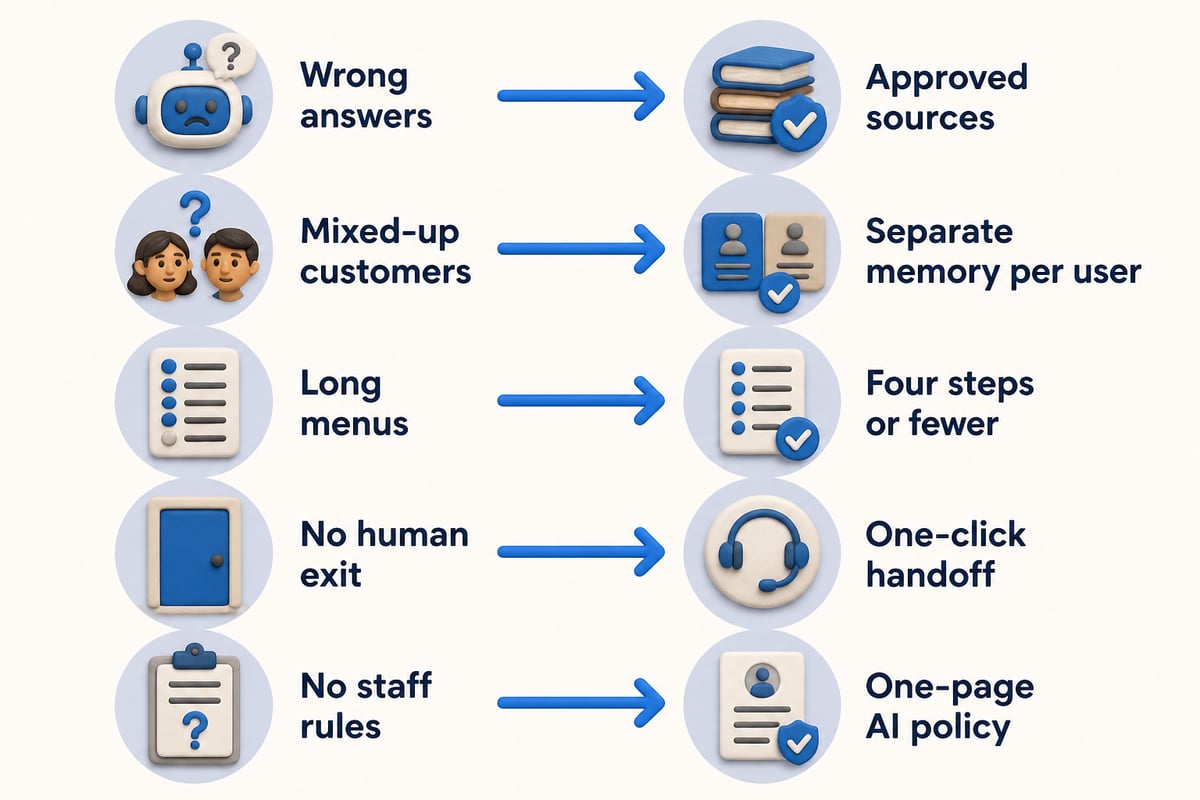
AI customer service goes wrong in five common ways: wrong answers, mixed-up customers, endless menus, no human exit, and no rules for staff. Each one is fixable.
Wrong answers. The agent invents a policy or a price. This happens when it answers from memory instead of from your documents. Fix it by making the agent read from approved sources and say "I don't know" when it is unsure.
Mixed-up customers. One person sees another person's data. This is the worst failure, because it breaks trust and may break the law. Each user needs their own separate memory. At Vieerx, each user gets separate memory, so no user's information is mixed with another's. Across Vieerx deployments, each user's information stays separate from every other user's.
Endless menus. The Forethought survey found that many consumers said they would disconnect after navigating a long menu of options. If your phone or chat flow asks people to press five buttons, you lose nearly half of them. Keep the path short.
No human exit. Customers who cannot reach a person get angry. Always offer one.
No rules for staff. A survey of U.S. sales and customer service professionals by Dialpad found that most said their company did not have a company-wide AI policy. Without rules, staff paste customer data into random tools. Write a one-page policy: what data may go into AI, which tools are approved, and who checks the output.
Real jobs AI customer service can do in a service business
AI customer service can handle many jobs in an agency or service firm, as long as each one is narrow and checkable. Here are five examples written as plain scenarios, not client stories.
A recruiting firm
Candidates ask for updates all week. One agent reads the applicant tracking system and replies with the current stage. It also sends a nudge when a candidate has not uploaded a missing document. Recruiters stop answering "any news?" emails and spend that time on calls.
A marketing agency
Clients want to know how campaigns are doing. One agent pulls the latest numbers and writes a short summary in plain words. It flags anything unusual to the account manager. Reporting no longer eats Friday afternoons.
A consultant or coach
Prospects ask the same five questions before they book. An agent answers them, qualifies the lead, and books a call on the right calendar. The consultant only sees people who are a fit.
A course seller
Students get stuck on login, access and payment. An agent solves the common ones and sends the rest to a human with a clear summary. Refund requests go to a person.
A clinic or home service company
Callers want to book, change or cancel. An AI voice agent handles the booking, confirms by text, and reminds people the day before. Fewer missed appointments means more revenue from the same schedule.
In each case, the agent does one job. It does not try to be the whole front desk. That is why it works.

How to roll out AI customer service in four steps
Roll out AI customer service in four steps: pick one job, prepare your answers, test with real questions, then launch with a human watching. A small team can finish all four in a few weeks.
The AWS guide to AI customer service for small and midsize businesses lays out a similar phased path: choose a use case, pilot it, get your data ready, set guardrails, keep humans in the loop, monitor results, then expand. The steps below are a shorter version of the same idea.
Step 1: Pick one job and one number
Choose a single task, like answering order or project status. Pick one number to move, such as "tickets per week" or "minutes to first reply." If you cannot measure it, you cannot tell if it worked.
Step 2: Gather your source material
List the questions and the correct answers. Pull your policies, price lists and past replies into one place. The agent is only as good as what it reads. Fix outdated pages before you connect them.
Step 3: Test before customers see it
Run 100 real past questions through the agent. Mark each answer right or wrong. Do not launch until the score is high enough that you would be comfortable signing your name under every reply. Vieerx runs each agent against evaluation tests, and each run uses the cheapest model that passes those tests, which keeps cost down without lowering quality.
Step 4: Launch small and watch closely
Turn the agent on for one channel or one customer group first. Read every conversation for the first week. Fix gaps. Then widen the scope.
Want to see what the cost might look like before you commit? The Vieerx model calculator gives a rough picture of running costs.
What AI customer service costs and when it pays back
AI customer service pays back when the time it saves is worth more than what it costs to build and run. The math is simple enough to do on a napkin.
Try this example. Say your team handles 400 repeat questions a month. Each takes six minutes. That is 40 hours a month, or one full work week. If a staff hour costs you $30, that is $1,200 a month spent on repeat answers. An agent that handles 70% of those saves about $840 a month, plus faster replies for customers.
Now add what is harder to count:
- Leads that get an answer at 9 p.m. instead of next morning.
- Staff who stop burning out on copy-paste replies.
- Fewer errors, because the agent follows the same rules every time.
Cost has two parts: the build and the run. The build is a one-time job to connect your tools and write the rules. The run is the monthly cost of the model and the platform. Careful model choice keeps the run cost low, which is why testing for the cheapest model that passes matters.
Vieerx aims for real ROI in six weeks or less, with a live working agent within 14 days of kick-off. For exact pricing and scope, check with the team through the Vieerx site rather than guessing.
How to keep your team in control
Your team stays in control of AI customer service when a human owns each agent, reviews its work on a schedule, and can change it without calling an outside vendor. Control is a habit, not a feature.
Use this short checklist:
- Name an owner. One person is responsible for each agent. Not "the team." One name.
- Review weekly. Read 20 random conversations. Mark errors. Fix the source.
- Track three numbers. Share of questions solved without a human, customer rating, and number of handoffs.
- Keep a stop switch. You must be able to pause the agent in one click.
- Write the policy. One page on data rules, approved tools and who checks outputs.
The last point on training matters most for small firms. If only the vendor knows how the agents work, you are stuck every time something changes. Vieerx sends a deployment crew that trains your team to build agents without Vieerx, so you are not locked in. You learn how to make the next agent yourself.
This is also where the idea of agentic AI fits. An agent does not just answer. It takes action across your tools. That power is why ownership and review rules matter from day one.
Questions to ask before you pick a partner
Before you pick a partner for AI customer service, ask six direct questions and expect direct answers. A good builder will not dodge any of them.
- What does one agent do? If the answer is "everything," walk away. Narrow jobs work.
- How do you test accuracy? Ask for the method and a score on real questions.
- How do you keep customers' data apart? Look for separate memory per user.
- What happens when the agent is unsure? The right answer is a clean handoff to a human.
- Can my team run it after launch? You want training, not a black box.
- How fast can it go live, and when will I see a return? Ask for dates, not promises.
If you want help picking a first project, an AI consulting call can map out which jobs to automate and in what order. Our overview of what an AI agency does also helps you judge who to trust.
FAQ
What are the top AI services for customer service?
The top AI services for customer service fall into four groups: chat agents, voice agents, ticket routing, and agent assist tools that draft replies and summaries. Most small teams get the best result by starting with one group and one narrow job, then adding more once the first one works.
Will AI replace my support staff?
No. AI takes the repeat questions, and your staff handle the complex and emotional cases that need judgment. Most small teams use AI to avoid hiring more people for low-value work, not to cut the people they have.
How long does it take to set up?
A focused setup takes weeks, not months. With Vieerx, you get a live working agent within 14 days of kick-off. The timeline depends on how clean your source material is and how many tools the agent must connect to.
Pull your last 200 support messages and sort them by type, so you know which repeat question to hand off first. If you want a team to build that agent for you, Custom AI agents from Vieerx plug into your tools and go live in 14 days, and you can book a demo with Vieerx to see one working on your own questions. Book a free demo at https://cal.com/tanvieerx/agentic-review.