
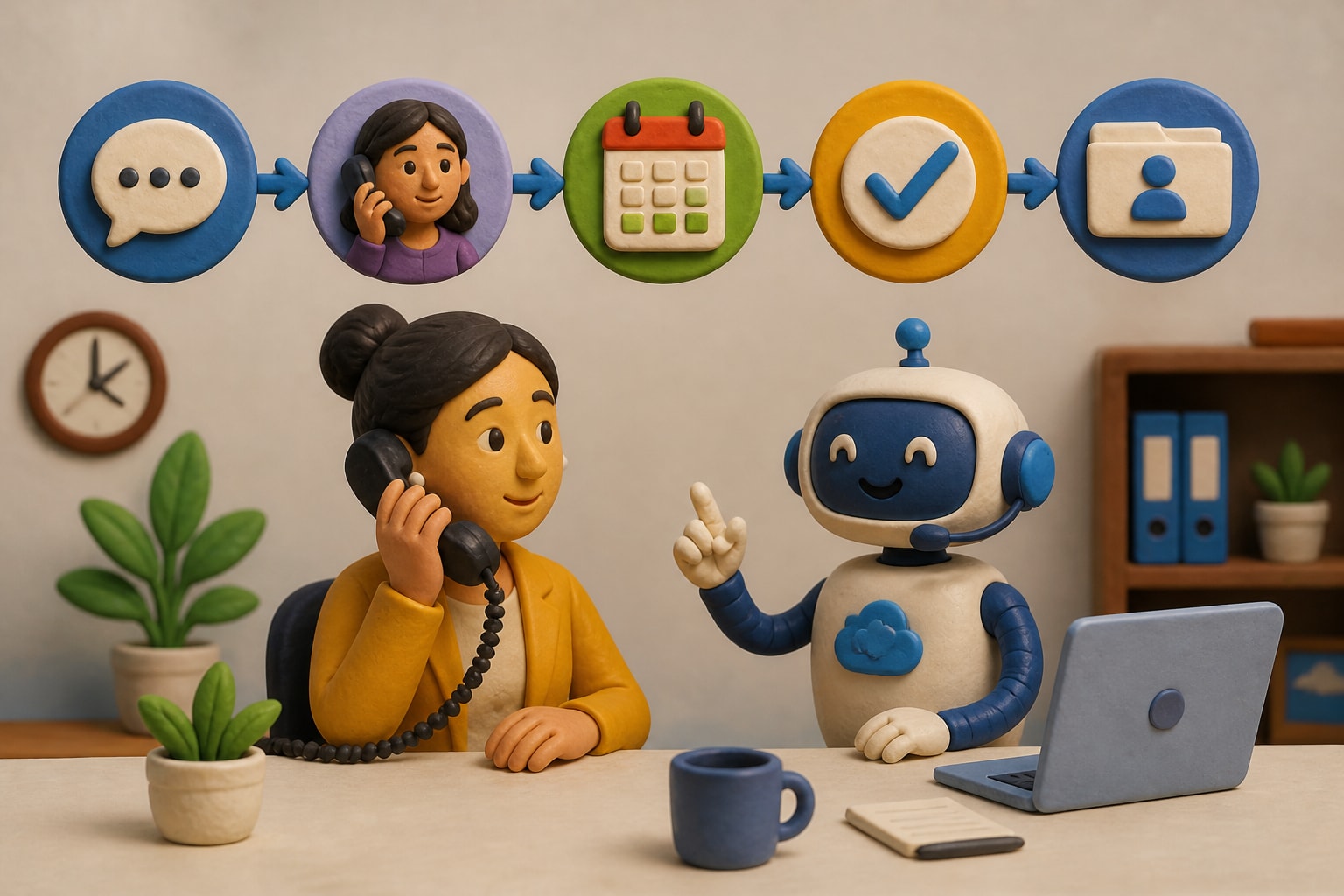
An AI voice agent is software that answers phone calls and talks like a person. It listens, understands what the caller wants, and does the task, like booking a visit or answering a question. A service business can use one to stop missing calls, follow up with leads quickly, and cut hold times.
Picture a plumbing company with six trucks. The phone rings at 7 p.m. Nobody picks up. The caller dials the next plumber on the list. One missed call like that can cost a lot of work. An AI voice agent picks up on the first ring, every time, at any hour.
This guide shows how these agents work, where they fit, what can go wrong, and how to set one up step by step.
What an AI voice agent does on a real call
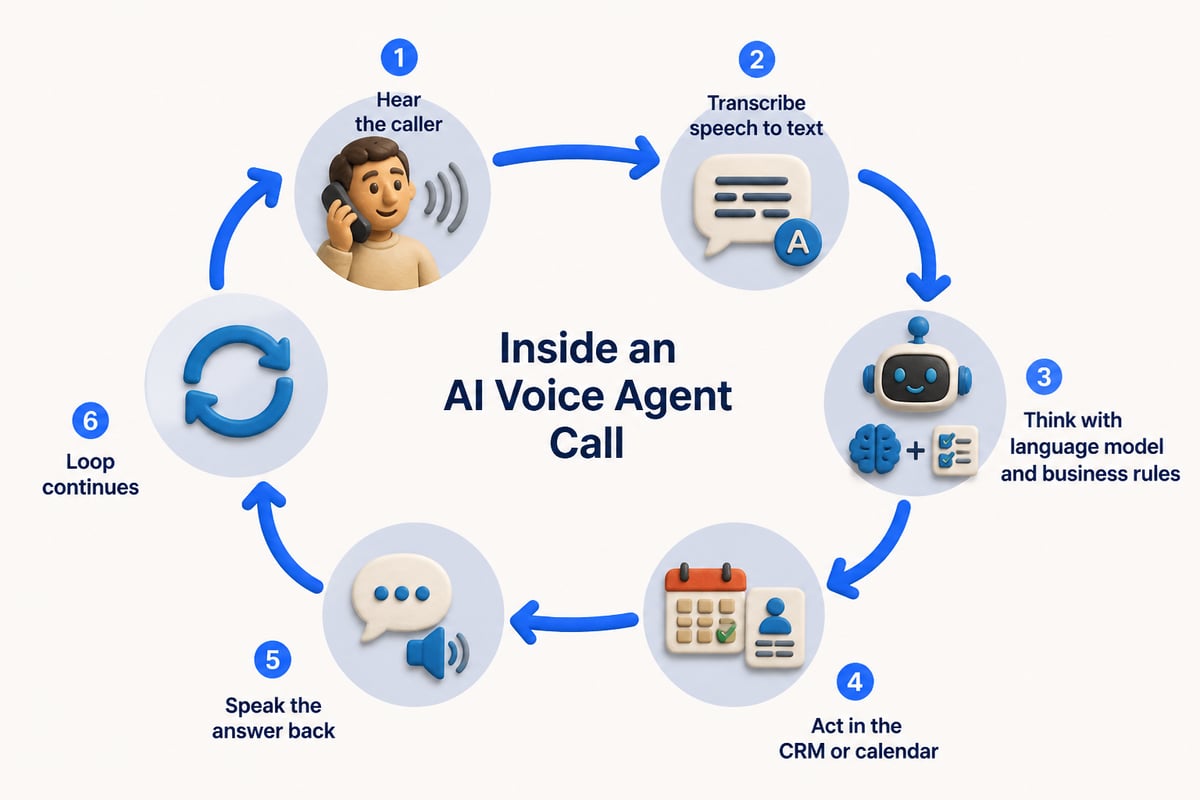
An AI voice agent handles a phone call from start to finish without a person on the line. It hears the caller, figures out the request, takes an action in your tools, and speaks the answer back.
Here is a real kind of call. A woman phones a dental clinic and says, "I need to move my cleaning from Tuesday to Thursday." The agent finds her record. It checks open slots. It offers Thursday at 2 p.m. She says yes. The agent updates the calendar and sends a text confirmation. The call is short. No front desk worker touched it.
That is the difference between a voice agent and an old phone menu. A menu says "press 1 for sales." An agent just talks and does the work.
Most agents can do these jobs:
- Answer inbound calls and route or resolve them
- Book, move or cancel appointments
- Call new leads within a minute of a form fill
- Qualify leads with a few simple questions
- Answer common questions from your own notes
- Log every call and update your CRM
They can also fail. They can mishear a name. They can say something wrong if you give them loose rules. That is why setup matters more than the tool you pick. We cover that below.
How an AI voice agent works, step by step
An AI voice agent works in five steps that repeat many times per call: hear, transcribe, think, act, speak. The loop has to run quickly, so the talk feels natural.
Take a recruiting firm. A candidate calls to ask about a job opening. Here is what happens inside:
- Hear. The phone line streams the caller's voice to the system.
- Transcribe. Speech to text turns the voice into words. "Is the Denver role still open?"
- Think. A language model reads the words, your rules and your job list. It decides the answer.
- Act. The agent checks your applicant system to confirm the role is open. It may also book a screening call.
- Speak. Text to speech turns the answer into a voice. The caller hears, "Yes, it's open. Want a call with a recruiter on Friday?"
Each step can slow things down. Speed is the thing callers notice most. A long delay feels broken. People start talking over the agent, and the call falls apart.
The "think" step is where most quality is won or lost. A good agent gets one narrow job and clear rules. A bad one gets a vague prompt like "be helpful" and a pile of documents. The first stays on task. The second makes things up.
AI voice agent vs IVR vs chatbot
An AI voice agent talks freely and takes action, an IVR only plays menus, and a chatbot only types. Pick based on where your customers reach you and what you need done.
Think of a clinic with a phone tree. A patient presses 1, then 3, then 2, and lands on a voicemail box. That is IVR. It costs little, but many callers find it frustrating and hang up before they reach a person.
| IVR phone menu | Chatbot | AI voice agent | |
|---|---|---|---|
| Channel | Phone | Website or app | Phone |
| How the caller speaks | Presses buttons | Types | Talks normally |
| Can it take action | Rarely | Sometimes | Yes, with your tools connected |
| Handles odd questions | No | Somewhat | Yes, within its rules |
| Setup effort | Low | Medium | Medium to high |
If your leads call you, a chatbot does nothing for you. If your leads fill out forms, a voice agent that calls them back within a minute beats a chatbot every time. If you want to see how text agents compare, our guide to an AI chatbot for business covers that side.
Where an AI voice agent pays off first
An AI voice agent pays off first in jobs that repeat daily, follow a script, and cost you money when missed. For service businesses, that means three jobs: answering calls, following up with leads, and confirming appointments.
Job one: answering the phone. A home services company with four techs cannot answer while everyone is on a roof. An agent answers, takes the job details, checks the schedule and books the visit. Our post on the AI receptionist goes deeper on this use.
Job two: fast lead follow up. A marketing agency gets a web form at 2:14 p.m. A salesperson calls back at 5 p.m. By then the lead may already have talked to other agencies. An agent can call quickly, ask three questions, and book a call with a human closer. Speed to lead is where voice agents can add the most value.
Job three: reminders and reschedules. A clinic with many daily appointments loses money on no shows. An agent calls the day before, confirms, and fills any open slot from a waitlist.
Other good early jobs:
- Overflow calls after hours
- Customer check ins after a project ends
- Collecting missing documents from clients
- Screening candidates before a recruiter calls
Start with one job. Not five. Teams that do well with this pick the most painful missed call problem and fix only that for the first month.
What to know before you let an agent call people
You must follow phone laws before an AI voice agent makes outbound calls. In the US, the FCC confirmed on February 8, 2024 that the TCPA's limits on artificial or prerecorded voices apply to AI that generates human voices.
That has real meaning. If you call people with an AI voice, you generally need their consent first. The FCC also made AI generated voices in robocalls illegal when they break these consent rules. Fines can be large, and each call may count as its own violation.
Here is a safe pattern for a service business:
- Call only people who asked to hear from you, like a form fill with a clear consent box
- Keep proof of that consent, with date and time
- Tell the caller early that it is an automated assistant
- Honor "stop calling me" right away and log it
- Respect calling hours in the caller's time zone
Inbound calls are lower risk. The caller chose to dial you. Still, many states have rules on call recording, so tell callers if you record. Ask your lawyer about your state before you launch outbound calling. This is not legal advice, and the rules change.
How to handle the risks of an AI voice agent
The main risks of an AI voice agent are wrong answers, mixed up customer data, and calls that go off script. You can manage these with narrow jobs, tight rules and testing before launch.
Think of a consulting firm whose agent tells a caller, "Yes, we offer a refund." The firm has no refund policy. The agent guessed. That one line can cause a real dispute. This is called a hallucination, and it happens when you give an agent loose rules and no hard limits.
The US government has a framework for this kind of risk. NIST's AI Risk Management Framework is voluntary and helps organizations build trust into how they design, use and test AI systems. NIST also published a Generative AI Profile on July 26, 2024. It describes suggested actions to govern, map, measure and manage the risks of generative AI. You do not need to read all of it. The four verbs are a good checklist for any small firm:
- Govern: name one person who owns the agent
- Map: list what the agent may and may not do
- Measure: test it on real calls and score the results
- Manage: fix problems fast and keep a log
Another risk is data mixing. If one agent serves many callers, it must keep each caller's details apart. Ask any builder how memory works. Each caller should get separate memory so one person's information never leaks into another's call.
Last, plan a human handoff. When the caller is angry, confused or asks for a person, the agent should transfer the call with a short summary. Never trap someone in a loop.

How to set up an AI voice agent, step by step
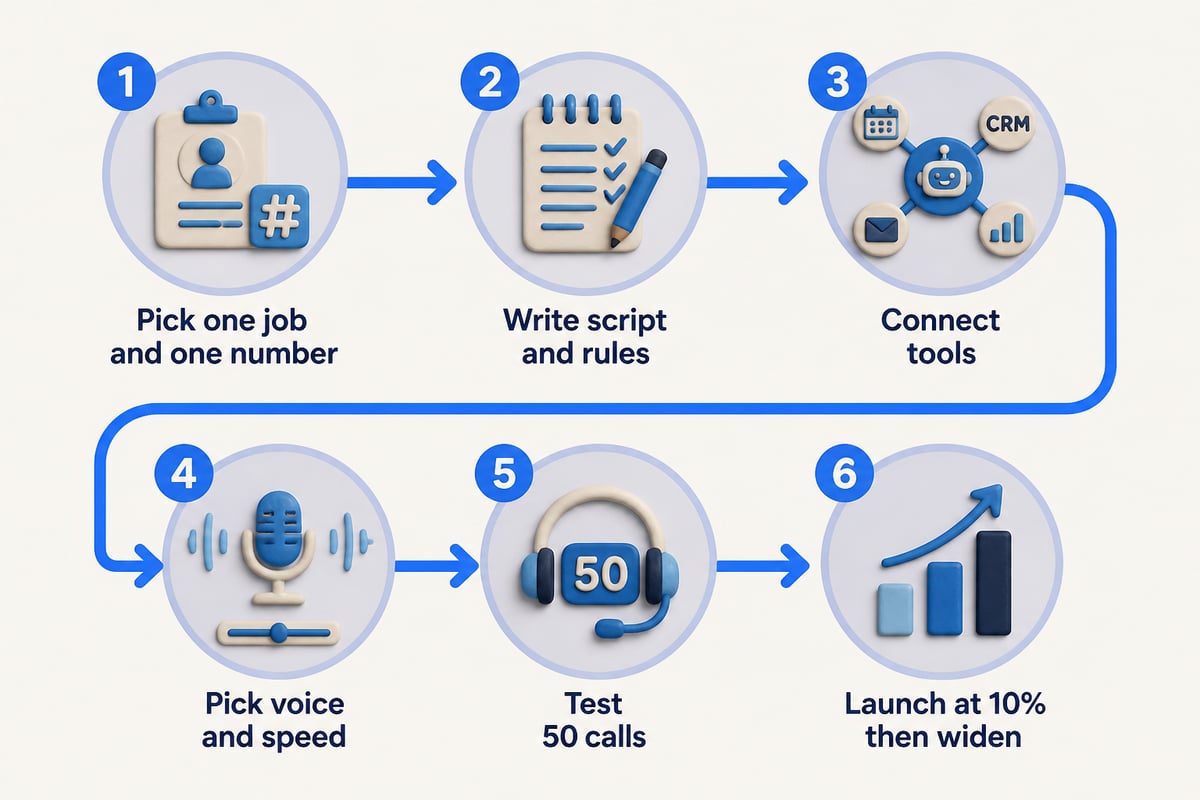
You can set up an AI voice agent in six steps, and a first version can run in about two weeks. Keep the scope small and test on real calls before you go live.
Consider a recruiting firm with 12 people that wants to stop losing candidates who call after 5 p.m. Here is how they would do it.
Step 1: Pick one job and one number
Write it in one sentence. "Answer after hours candidate calls and book a screening slot." Choose one success number, like "book 20 screenings a month." If you cannot write the job in one sentence, it is too big.
Step 2: Write the call script and the rules
List the five most common reasons people call. Write the right answer to each. Then write the hard limits: no pricing promises, no legal advice, no guessing. Tell the agent to say "I don't know, let me get a person" when it is unsure.
Step 3: Connect your tools
The agent needs to read and write to your calendar, CRM or applicant system. Without this it can only talk. With it, it can book and log. Connect the minimum needed, and give it the least access that still works.
Step 4: Pick the voice and the speed settings
Choose a voice that fits your brand. Calm and clear beats fancy. Test response time. Keep delays under about two seconds.
Step 5: Test with 50 real style calls
Have your team call it. Use accents, background noise, angry callers, and people who change their mind. Score each call pass or fail. Fix the top three failures, then test again.
Step 6: Launch small, then widen
Send 10 percent of calls to the agent for a week. Read the transcripts every day. Raise the share when the pass rate holds. Keep a one tap path to a human.
What an AI voice agent costs and how to measure the return
An AI voice agent costs money in three places: the platform, the voice and language usage per minute, and the build work. You judge it by one simple test: does it book more jobs or save more staff hours than it costs.
Here is easy math. Say your front desk spends 15 hours a week on routine calls. At $22 an hour, that is $330 a week, or about $1,430 a month. If an agent handles most of those calls, you free up a large share of that time. You also catch calls you used to miss, and those are often the best leads.
Use your own numbers. List these four:
- Calls per month
- Share of calls you miss today
- Average value of one booked job
- Staff hours spent on routine calls
Multiply missed calls by your close rate and job value. That number is often bigger than the labor savings. A firm that misses 30 calls a month, closes 25 percent, and earns $800 a job can lose a significant amount of work every month. You can also run your own scenarios in the Vieerx model calculator to see how model choice changes the cost of each run.
Watch the per minute cost. Long, rambling calls cost more. A tight script ends calls sooner and costs less. Good builders also use the cheapest AI model that still passes your tests, instead of the biggest one for every call.
Track four numbers weekly: answer rate, booking rate, handoff rate to humans, and caller complaints. If handoffs are high, your rules are too thin. If complaints are high, the voice or the speed is off.
Build in house, buy a tool, or hire a builder
You can build an AI voice agent yourself, buy a ready made tool, or hire a team to build it for you. The right pick depends on your time, your tech skill and how much the calls matter.
A marketing agency owner with 10 staff has a few choices:
- Self serve platform. You sign up, paste in a script, and connect a number. It is cheap and fast to start. It works for simple use cases. You own the testing, the fixes and the legal care.
- Do it with your own developer. You get full control. It takes weeks or months, and someone must maintain it when the phone, voice and model tools change.
- Hire an agency. You pay more up front. You get a tested agent wired into your tools, with someone accountable for results.
Ask any builder these questions before you sign:
- How fast can a working agent go live? (Two weeks is a fair target.)
- How do you keep each caller's data separate?
- What accuracy do you measure, and how?
- What happens when the agent is unsure?
- Who fixes it when it breaks?
- Will my team learn to run it, or am I locked in?
The last one matters. A builder who trains your staff to make changes saves you money for years. A builder who hides everything makes you pay for every small edit.
If you want to see how this fits a bigger plan, read our overview of AI agents for business. A voice agent is one agent type. Many firms also add a support agent and an ops agent after the first one works.
How Vieerx builds voice and support agents that hold up
The best fit among these options for a 5 to 50 person service firm is a narrow agent, built for you and plugged into your tools. That is the work behind Vieerx custom AI agents, which cover sales, support and ops jobs and go live in 14 days.
Here is how the approach works:
- Every agent owns one narrow job and runs without a person steering it.
- Each run uses the cheapest model that passes evaluation tests.
- Each user gets separate memory, so no one's information mixes with another's.
- Across 1,000+ users, answer accuracy has been 99.4%.
- The support agent has resolved 17,169+ tickets with zero mix ups between users.
- Teams get a live working agent within 14 days of kick off, and real ROI in six weeks or less.
- A deployment crew trains your team to build agents without us.
Narrow jobs are the whole idea. An agent that only books after hours screenings does that one thing well. It does not try to be your whole front desk. If you want the bigger picture of how agents act on their own, our post on agentic AI explains it in plain words.
FAQ
What is the difference between an AI voice agent and an AI voiceover?
An AI voiceover is a computer voice that reads a script, like narration for a video. It does not listen or reply. An AI voice agent holds a live two way phone call and takes action while it talks.
Is ChatGPT an agent or an LLM?
ChatGPT is a product built on a large language model, or LLM. The LLM is the brain that writes text. An agent adds tools and rules around that brain so it can take action, like checking a calendar and booking a visit.
Will callers know they are talking to an AI voice agent?
Many will guess within a few sentences, and the law and good manners say you should tell them. A short line at the start works, like "I'm an automated assistant for this office." Most callers do not mind if the agent solves their problem fast and offers a person when needed.
Your next step is simple: write down your top five reasons people call you, then count how many calls you missed last month. That list is the start of a good agent brief. If you want a working agent live in 14 days, built for your tools and tested on real calls, Vieerx can help, and you can book a free demo at https://cal.com/tanvieerx/agentic-review to see it run.