

Agentic AI is software that takes a goal, makes a plan, uses your tools, and finishes the job without you steering each step. A normal chatbot answers a question. An agent does the work. If a new lead fills out your form at 9 p.m., an agent can read it, check your calendar, send a reply, and book the call before you wake up.
This guide is for owners and managers of agencies and service businesses. You will learn what an agent is, how it works, what to build first, and how to avoid the mistakes that sink most first projects. No code needed to follow along.
What Is Agentic AI?
Agentic AI is a type of AI that acts on its own to reach a goal, instead of waiting for a prompt at every step. You give it a job. It decides the steps, uses tools, checks its work, and tells you when it is done.
Here is a plain example. A recruiting firm gets 60 résumés a week. A person reads each one, scores it, and emails the good ones. That takes about 10 hours. An agent can read every résumé, score it against the job, write a short note on each, and email the top five to the recruiter. The recruiter reviews five, not sixty.
Three things make a system "agentic":
- A goal. "Qualify every new lead," not "write me an email."
- Tools. It can read your CRM, send email, check a calendar, and update a sheet.
- A loop. It acts, looks at the result, and decides the next step.
Take away any one of the three and you have a chatbot or a script, not an agent.
How Does an AI Agent Work?
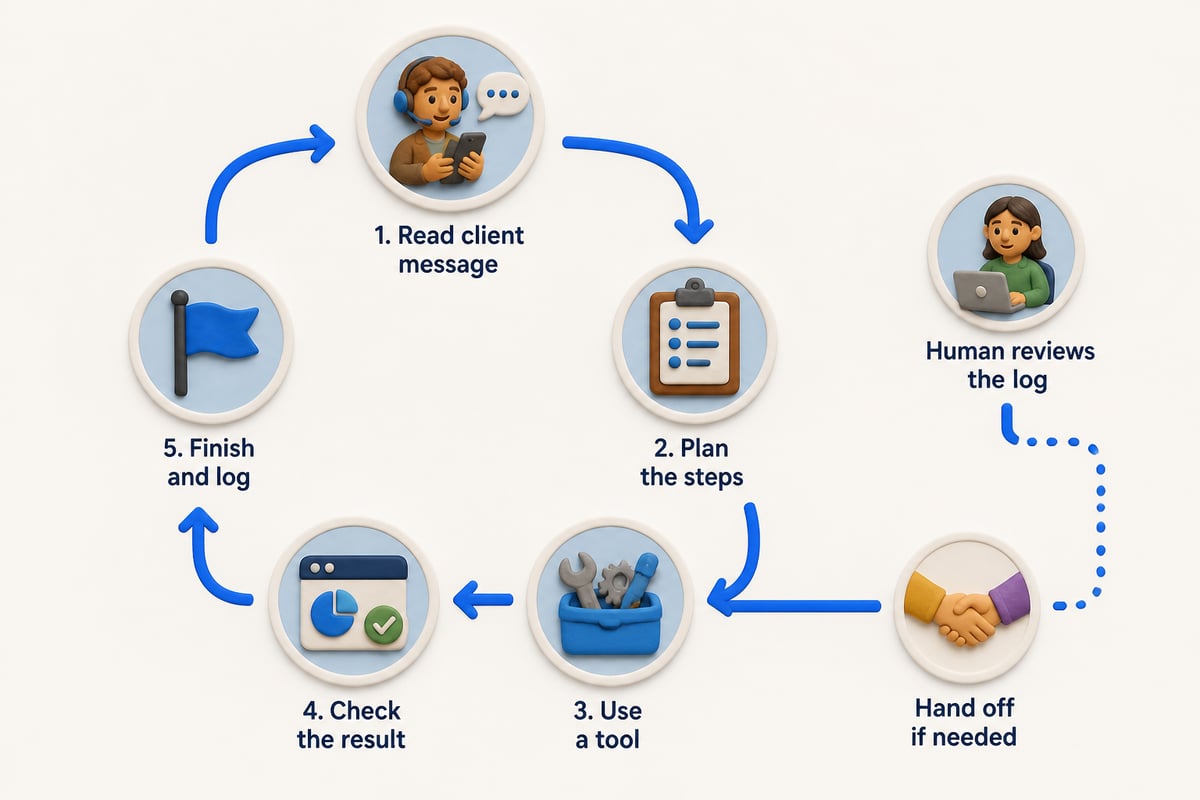
An AI agent works in a loop: it reads the task, plans a step, uses a tool, checks the result, and repeats until the job is done. The loop is simple. The skill is in the setup.
Picture a support agent at a marketing agency. A client writes in: "My report is missing last week's data."
- Read. The agent reads the message and finds the client's account.
- Plan. It decides to check the report tool and the data feed.
- Act. It pulls the report and sees a gap from Tuesday to Thursday.
- Check. It confirms the data feed broke on Tuesday.
- Finish. It re-runs the feed, sends the client a fixed report, and logs the fix.
A human did none of that. A human only sees the log.
The four parts inside an agent
- The model. The AI brain that reads and writes. It is the part that reasons.
- Memory. What the agent knows about this client, this lead, this past chat. Good memory keeps each person's data separate.
- Tools. The apps it can touch, like your CRM, inbox, calendar, and billing tool.
- Rules. What it may do, what it may not do, and when it must hand off to a person.
Most failed projects get the model right and the rules wrong. The agent is smart but has no fence around it.
Agentic AI vs Chatbots, Scripts, and Automations
Agentic AI differs from a chatbot because it finishes tasks across tools, while a chatbot only talks. It differs from a script because it can handle a case you did not write a rule for.
Take lead follow-up at a consulting firm.
- A script sends the same email 10 minutes after any form fill. It cannot tell a student from a CEO.
- A chatbot answers questions on your website. When the chat ends, nothing else happens.
- An agent reads the form, looks up the company, picks the right reply, books a time that fits both calendars, and notes it in the CRM.
Here is how they compare:
| Script | Chatbot | Agent | |
|---|---|---|---|
| Follows fixed rules | Yes | Mostly | Within limits you set |
| Handles new cases | No | Sometimes | Yes |
| Uses your tools | Few | Rarely | Yes |
| Finishes a full job | Only simple ones | No | Yes |
Is ChatGPT an agentic AI? On its own, ChatGPT is a chat tool. You ask, it answers. It can act more like an agent when it is connected to tools and given a task to finish, but the plain chat window is not one. The test is simple: does it finish a job across your apps without you pushing each step?
Why Agentic AI Matters for Service Businesses
Agentic AI matters because service businesses lose money on slow, repeat work: late follow-up, missed tickets, and manual reports. Agents do that work all day and all night.
Think about a home services company. A quote request comes in on Saturday. The owner sees it Monday. By then the customer called two other firms. An agent replies in two minutes, asks the right questions, and books the visit. Same lead, different result.
The numbers show leaders are already moving. In a survey of 308 U.S. business executives, PwC found that 79% said AI agents were already being adopted in their companies. Among those companies, 66% reported higher productivity and 57% reported cost savings. And most executives said they planned to raise AI budgets in the next 12 months because of agentic AI.
One more number matters for you. PwC also found that most respondents said half or fewer of their employees use agents in daily work. Most firms have started. Few have finished. That gap is the chance for a 5 to 50 person business: you can move faster than a big company with a slow committee.
What Are the Top Types of AI Agents?
There are five types of AI agents that matter for business: sales, support, ops, research, and reporting agents. Each does one narrow job well. Here is what each does in an agency or service firm.
- Sales agent. Follows up on every lead, asks qualifying questions, and books calls. A marketing agency can use one to answer new inquiries in minutes.
- Support agent. Answers client questions, fixes common issues, and hands hard ones to a person. A course seller can use one to handle login and access tickets.
- Ops agent. Moves work between tools. It creates tasks, updates records, and chases missing items. A recruiting firm can use one to sync candidates between the inbox and the tracking system.
- Research agent. Gathers facts about a lead, company, or topic and writes a short brief. A consultant can have one prepare a call brief on each prospect.
- Reporting agent. Pulls numbers, builds the weekly report, and flags what changed. An agency can send clients a clean report every Monday with no staff time.
You will notice a pattern. Each agent owns one job. That is on purpose, and it is the next lesson.
Why Narrow Agents Beat Big Ones
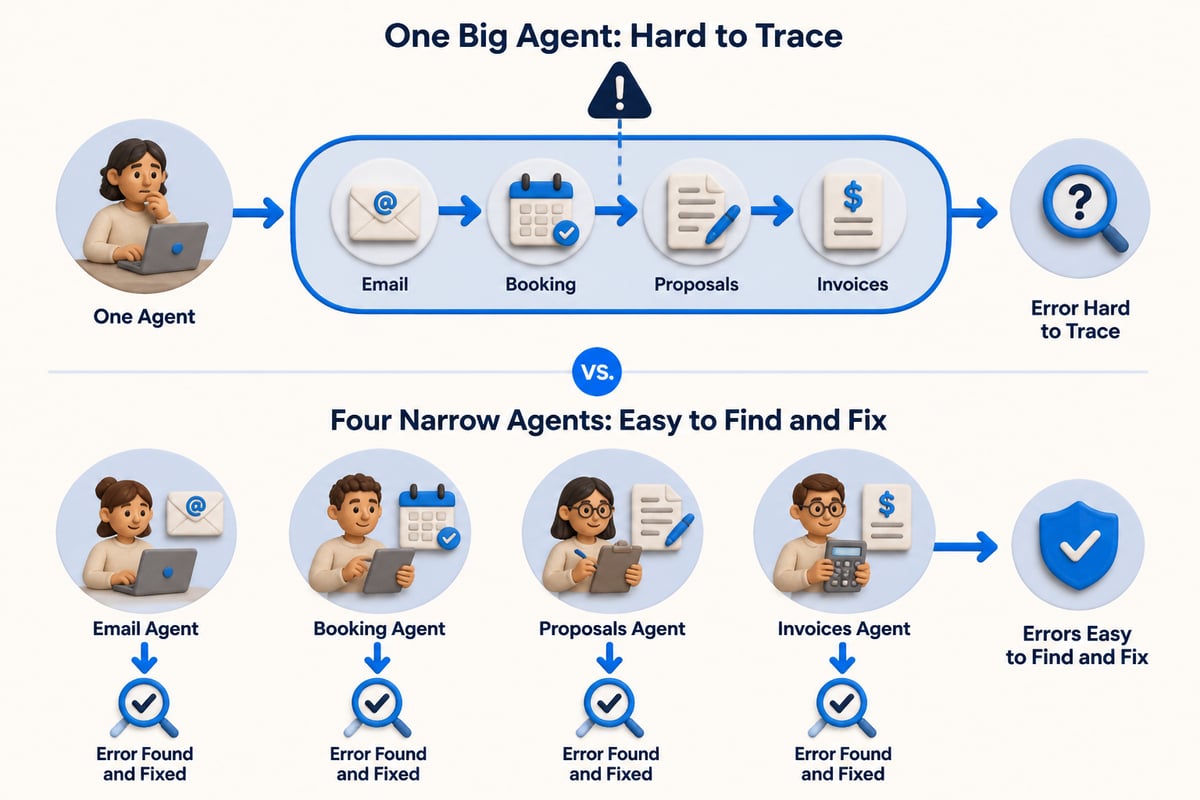
A narrow agent beats a "do everything" agent because it makes fewer mistakes, costs less to run, and is easier to test. One agent, one job.
Say you build one big agent for a consulting firm. It answers email, books calls, writes proposals, and sends invoices. When it makes an error, you cannot tell which job caused it. Fixing one task can break another.
Now split it into four agents. The email agent only sorts and answers email. The booking agent only handles calendars. The proposal agent only drafts proposals. The invoice agent only bills. When the booking agent double-books a call, you fix the booking agent. Nothing else moves.
Narrow agents also let you pick the right model for each job. A simple sorting task does not need the most costly model. A hard writing task might. Matching the model to the job keeps costs low. At Vieerx, every agent owns a single narrow job, and each run uses the cheapest model that passes our evaluation tests. That is how you keep the bill small as you add agents.
How to Start Building AI Agents: A 6-Step Plan
To start building AI agents, pick one repeat task, write down the steps a person takes, give an agent the tools and rules, test it on real cases, and launch with a human check. You can do this in two weeks if you stay narrow.
Step 1: Pick one painful job
Look for work that is repeated, slow, and has clear steps. Good first picks:
- Lead follow-up in the first hour
- Answering the same 10 support questions
- Building the weekly client report
- Scheduling and reminders
Skip anything vague, like "improve marketing." Pick a job you can describe in five steps.
Step 2: Write the steps a person takes today
Sit with the person who does the job. Write each step. Where do they click? What do they check? When do they ask for help? This sheet becomes the agent's instructions.
A recruiting firm might write: open the new résumé, check the role, score skills one to five, write a two-line note, send the top five to the recruiter. That is a full agent spec.
Step 3: Set the tools and the fence
List the apps the agent may touch. List what it may not do. For example: "May send email to leads. May not send email to existing clients. May not change prices. Must hand off any refund request."
Step 4: Test on real cases
Take 50 real past cases. Run the agent on them. Compare its answers to what your best person did. Count the misses. Fix the rules. Run again. Do not launch until the misses are low.
Step 5: Launch with a human check
For the first two weeks, have a person review what the agent does. Then review a sample. Then trust it for the easy cases and keep the check on the hard ones.
Step 6: Measure and grow
Track hours saved, response time, and errors. Once the first agent works, build the second. Most owners add their next agent within a month.
What Data and Tools Does an Agent Need?
An agent needs clean access to the data it works on and a few connected tools. Bad data gives bad results, no matter how smart the model is.
Start with a short checklist:
- Your CRM with up-to-date contact and deal records
- Your inbox and calendar so the agent can reply and book
- Your help desk or support inbox with past answers it can learn from
- A knowledge base with your prices, policies, and how you do things
- A place to log actions so you can see what it did
A small example. A course seller wants a support agent. They have 400 old support emails, a refund policy, and a list of course links. That is enough. The agent reads the policy, finds the right link, and answers. If the policy is out of date, the agent gives out of date answers. Fix the document first.
Memory matters too. If the agent serves many people, each person's information must stay apart. A client should never see another client's details. This is a design choice, not an accident. Vieerx gives each user separate memory, and in one deployment that held across 17,169+ resolved tickets with zero mix-ups between users.

What Is a Learning Agent in AI?
A learning agent is an AI agent that gets better over time by using feedback from its results. It tries something, sees how it went, and changes how it acts next time.
A simple case: a sales agent sends two kinds of follow-up. Short ones get more replies than long ones. A learning setup notices, and starts using more short ones.
In real businesses, "learning" usually means you review the results and update the agent's rules and examples. The agent does not rewrite itself in secret. That is a good thing. You want a change to be something you can see and approve. Treat learning as a weekly habit: look at the misses, add them to the test set, and fix the instructions.
The Risks: Keep Control While You Scale
The main risks of agentic AI are wrong actions, leaked data, and runaway costs. You manage them with limits, logs, and human checks, not with hope.
Here is a real kind of problem. A support agent is told to "keep customers happy." A customer asks for a refund the policy does not allow. The agent, trying to please, says yes. The fix is a rule: "Never promise a refund. Hand off to a person."
Plan for these five risks:
- Wrong action. Limit what the agent can do. Require approval for money, deletes, and contracts.
- Data leaks. Keep each user's data separate and give the agent only the access it needs.
- Made-up answers. Make it answer from your documents, and say "I don't know" when it cannot find the answer.
- Cost creep. Set a spending cap and match the model to the job.
- No trail. Log every action so you can review it.
Security groups are working on this too. NIST describes its AI security and resilience research, including planned control overlays for single-agent and multi-agent systems. You do not need to read it to start. It does show that safe setup is a real field, and it is worth treating as part of the build, not an add-on.
How to Know It Is Working: Numbers to Track
You know an agent works when it saves hours, speeds up replies, and keeps errors low. Pick three numbers before you launch and check them every week.
Use this simple scorecard:
- Time saved. Hours a week your team no longer spends on the job.
- Speed. How fast a lead or client gets a first reply. Going from four hours to two minutes is a clear win.
- Accuracy. The share of agent answers that are right. Check a sample each week.
- Hand-off rate. How often the agent needs a person. Falling is good, but not to zero.
- Cost per task. What each finished task costs, model and tools included.
Set a clear bar. For example: "At least 95% accurate on a 50 case test set, and first reply under five minutes." If it misses the bar, fix it before you widen it.
For scale, one Vieerx deployment reached high answer accuracy across 1,000+ users, and teams see real ROI in six weeks or less. Those are results from a tuned, tested build, not from switching a tool on. If you want to estimate your own model costs before you build, the Vieerx model calculator is a quick place to start.
Build It Yourself or Hire an Agency?
Build it yourself if you have a technical person with spare time. Hire an agency if you want a working agent fast and do not want to learn the tools. Both are fine. The wrong choice is to wait.
Consider an agency owner with 12 staff. Nobody is technical. The owner could spend two months learning agent tools, or work with a team that has already built these systems. The cost of two months of slow lead follow-up is real money.
Ask these questions before you pick:
- Can they show a live agent, not just slides?
- Do they test on your real data before launch?
- Will they train your team so you are not locked in?
- Do they give a timeline and a number to hit?
If you want help, custom AI agents from Vieerx are built for your business, plugged into your tools, and live in 14 days, and a deployment crew trains your team to build agents without us. If you are still deciding what to build first, our guide to AI agents for business walks through common starting points, and the piece on how to choose an AI agency covers what to check before you sign.
Common First-Project Mistakes
Most first agent projects fail for simple reasons: the job was too big, the data was messy, or nobody owned the result. All three are easy to avoid.
- Starting too big. An owner wants one agent for the whole company. Start with one job, one team, one number.
- Skipping the test set. Launching without testing on real cases. Test on 50 past cases first.
- No owner. Nobody is in charge of checking the agent each week. Name one person.
- Messy documents. The agent reads an old price list and quotes old prices. Clean the source first.
- No hand-off path. The agent hits a hard case and has nowhere to send it. Define the hand-off before launch.
- Chasing the newest model. A better model will not fix bad instructions. Fix the instructions first.
If you avoid these six, you are ahead of most first projects.
FAQ
How long does it take to build an AI agent for my business?
A narrow agent can go live in about two weeks if the job is clear and your tools are connected. Bigger projects with many agents take longer. Start with one job and grow from there.
Do I need a technical team to use agentic AI?
No. You need someone who knows the job the agent will do, and someone to check its work each week. The building can come from an agency or from a trained member of your team.
What should my first AI agent do?
Pick a repeat job with clear steps, like lead follow-up, common support questions, or weekly reports. These save time fast and are easy to test. Avoid vague jobs until you have a win.
Your next step is simple: write down the one repeat task that costs your team the most hours each week, and list the five steps a person takes to do it. That sheet is the start of your first agent. If you want a team to turn it into a working agent for your business, Vieerx builds sales, support, and ops agents that go live in 14 days, and you can see how it works with custom AI agents. Book a free demo at https://cal.com/tanvieerx/agentic-review and we will show you what your first agent could do.