
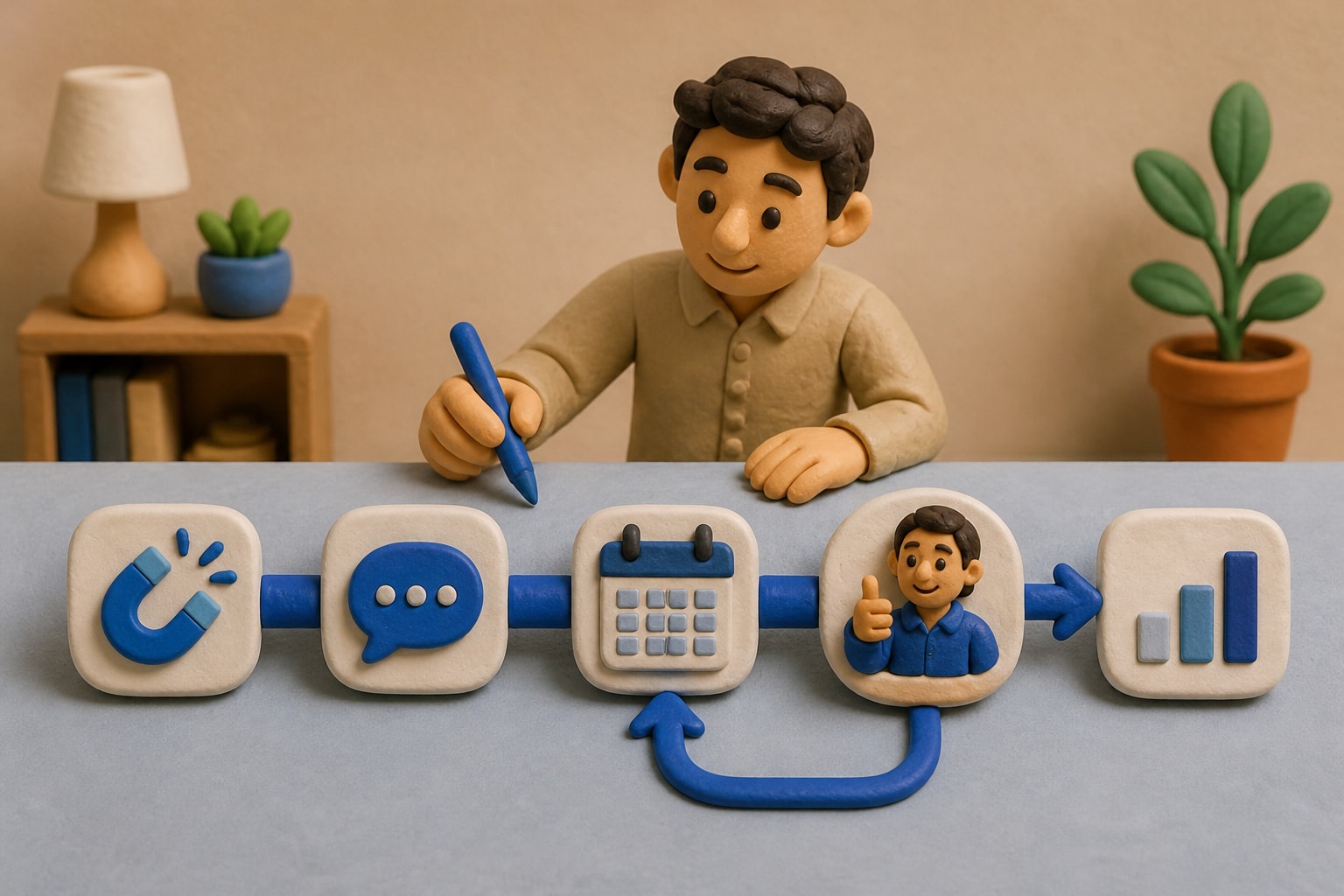
AI marketing automation is software that does repeat marketing work for you, and uses AI to decide what to say and when. It answers new leads, sends follow-ups, writes drafts, and builds reports without waiting for a person. For a service business, the goal is simple: fewer leads that go cold, and fewer hours spent on tasks a machine can do.
Here is a small example. A lead fills out your form at 9 PM. Without automation, someone replies the next morning, if they remember. With it, the lead gets a reply in under a minute, gets asked two questions, and gets a calendar link. Your team wakes up to a booked call.
This guide is for owners and managers of agencies, recruiting firms, consultants, clinics and home service companies. It covers what to automate, what to leave alone, how to set it up, and how to know it works.
What AI marketing automation actually is
AI marketing automation is old marketing automation with a smarter brain. Old tools followed fixed rules: if a lead clicks a link, send email #3. AI tools can read a message, understand what the person wants, and write a reply that fits.
Think of it in two layers.
- The trigger layer. Something happens. A form is filled, a call is missed, a deal goes quiet for seven days.
- The thinking layer. AI reads the context and picks the next step. It writes the message, scores the lead, or flags a problem.
Most tools you have used only did the first layer. A fixed email sequence is a trigger with no thinking. AI adds the thinking, and that is where the time savings come from.
One more distinction matters. A chatbot talks. An automation does a job. The best setups do both: they talk to the lead and also update your CRM, book the call and alert your team. If you want more background on how the two ideas fit together, this piece on AI and automation covers it.
Is AI coming for marketing?
AI is taking over the repeat tasks in marketing, not the whole job. Drafting emails, sorting leads, building reports and following up are going to machines. Strategy, taste, client relationships and trust stay with people.
The numbers back this up. A CoSchedule survey of marketing professionals found that most reported higher productivity after adopting AI. They did not report fewer jobs. They reported more output from the same people.
Here is a way to think about it. Your best account manager may spend a large part of the week on tasks like these:
- Writing the same follow-up email for the tenth time
- Copying numbers from one tool to another for a report
- Checking if a lead replied
- Sorting inbound messages
None of that is the reason a client hires you. Remove it, and that person has more time for the calls and decisions that win and keep clients. The risk is not that AI replaces your team. The risk is that a competitor with the same team gets twice as much done.
What can you automate? Six jobs, ranked by payoff
You can automate any marketing job that repeats, follows a pattern and has a clear right answer. These six jobs pay back fastest for service businesses.
- Lead follow-up. Reply fast, ask qualifying questions, book the call. This is the biggest leak in most service businesses.
- Appointment booking and reminders. Cuts no-shows and back-and-forth emails.
- Reporting. Pull numbers from ads, email and CRM into one weekly summary.
- Content drafts. First drafts of emails, social posts and case study outlines. A human edits.
- Re-engagement. Wake up old leads and past clients with a message that fits their history.
- Lead scoring and routing. Sort leads so your sales team talks to the best ones first.
Start with number one. A fast reply matters more than a clever one. If your team takes four hours to answer a lead, an agent that answers in one minute wins most of the gap on its own.
If lead flow is your main pain, the guide on AI lead generation goes deeper on that one job. For recruiting firms, AI in recruitment shows where the same ideas apply to candidate outreach.
What are the most popular AI tools for marketing?
The most popular AI marketing tools fall into five groups, and most owners need only one tool from two or three of them. You do not need to buy all five.
| Group | What it does | Examples |
|---|---|---|
| Chat assistants | Draft copy, summarize, brainstorm | ChatGPT, Claude, Gemini |
| All-in-one marketing platforms | Email, CRM, forms, sequences with AI features | HubSpot, ActiveCampaign, Mailchimp |
| Workflow builders | Connect tools and run steps automatically | n8n, Zapier, Make |
| Sales and outreach tools | Find leads and send outbound messages | Apollo, Instantly, Lemlist |
| Custom AI agents | Own one job end to end, with your data | Built for your business |
The first four groups are tools you operate. You log in, set them up and keep them running. The last group is different: an agent is built to do one job on its own, and someone builds it for you.
For a deeper look at the tool landscape, see this rundown of AI automation tools. A plain tool list will not tell you what to build first, so read the next section before you buy anything.
Can ChatGPT help with marketing?
Yes. ChatGPT can draft emails, rewrite ad copy, summarize call notes, suggest subject lines and turn a rough idea into an outline. It is a good first tool because it costs little and you can test it in an afternoon.
Here is a hypothetical example. You paste three of your best past emails into ChatGPT and ask for a follow-up for a lead who went quiet. You get a usable draft in ten seconds. You edit two lines and send it.
That works, but notice what is still manual: you opened the tool, you pasted the emails, you copied the draft, you sent it. ChatGPT helps you work faster. It does not do the work while you sleep.
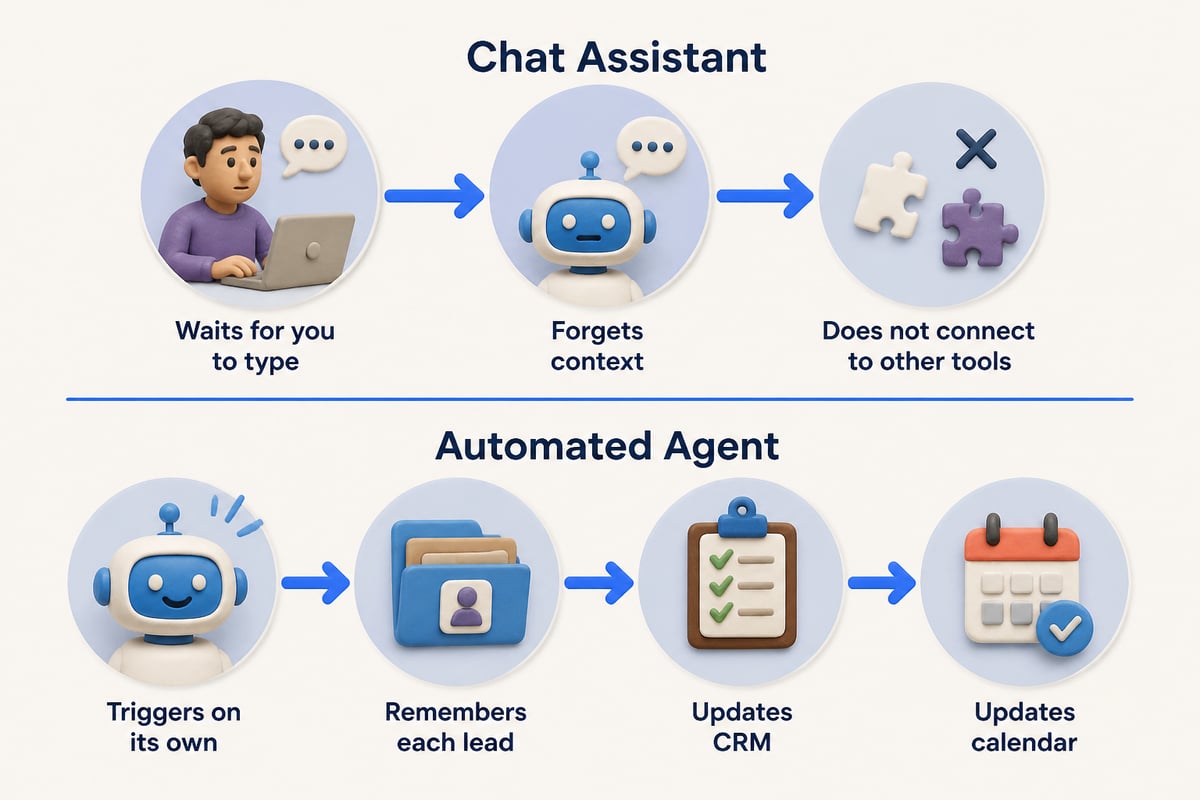
Chat assistants have three limits for marketing:
- They wait for you. Nothing happens until a person types a prompt.
- They forget. Each chat starts fresh unless you set up memory.
- They do not connect. They cannot update your CRM or book a call on their own.
That is where automation comes in. When you connect an AI model to your forms, calendar and CRM, the same smart reply happens on its own, every time.
How to set up AI marketing automation in five steps
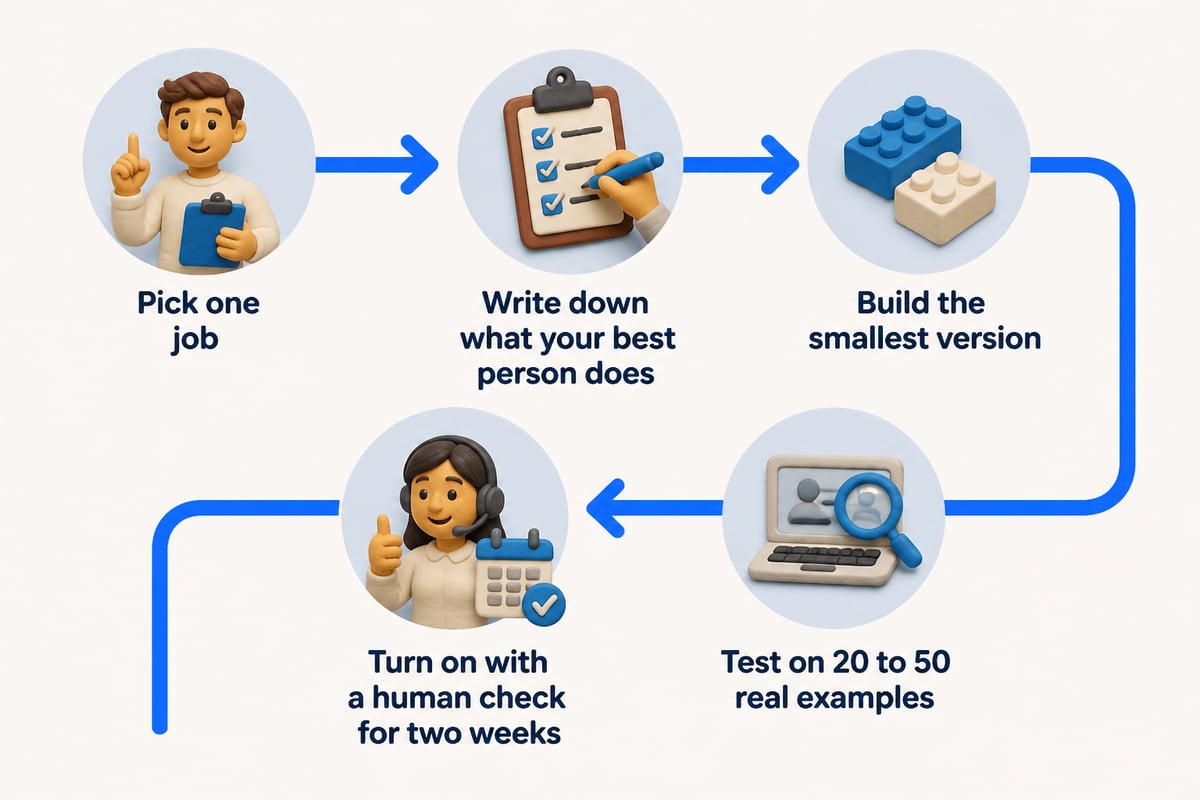
You set up AI marketing automation by picking one job, mapping it by hand, building it small, testing it against real messages, and then turning it on with a human check. Skip no step.
- Pick one job. Not five. One. Lead follow-up is the usual winner.
- Write down what your best person does. What do they say in the first reply? What questions do they ask? When do they follow up? That is your spec.
- Build the smallest version. One trigger, one AI step, one action. A form fill triggers a reply and a booking link. That is enough.
- Test with 20 to 50 real examples. Run old leads through it. Read every reply. Fix the ones that sound wrong.
- Turn it on with a human check. For the first two weeks, have a person skim what goes out. Then loosen the check as it earns trust.
A common mistake is building a huge system on day one. Ten connected steps break in ten places. One working step teaches you more than a perfect diagram.
The tools matter less than the spec in step two. Workflow builders like n8n can wire up the steps, and an AI model like Claude can write the replies. The hard part is knowing what good looks like for your business, and you already know that.
Why most AI marketing projects stall
Most AI marketing projects stall because they start without a clear job, a clear owner or a clear number. The tool is rarely the problem.
The data shows the gap. A 2025 Jasper survey of more than 500 marketers found that most organizations were using generative AI and seeing gains in productivity and efficiency. But many still used AI in isolated, ad hoc ways, and about half said they could not track ROI or see the business impact.
Read that again. Many people using AI cannot say if it pays off. That is not a technology problem. It is a setup problem.
Here are the four stall patterns:
- Too many tools, no owner. Five subscriptions, and nobody is in charge of making them work together.
- No baseline. You never wrote down how many leads you answered or how fast, so you cannot prove it got better.
- Wide jobs. An agent told to "handle marketing" does nothing well. An agent told to "answer new leads and book calls" does one thing well.
- No review loop. Nobody reads the outputs, so small errors repeat for months.
The fix for each is boring. Name one owner. Write down the starting numbers. Give each automation one narrow job. Read a sample of outputs every week.
Narrow agents beat wide ones
A narrow AI agent does one job and does it all the way through, and that is the design that holds up in daily use. A wide agent that tries to do ten things makes more mistakes and is harder to fix.
Here is a hypothetical example. A recruiting firm might want help with outreach. A wide setup asks one agent to find candidates, write messages, reply to answers, book interviews and update the ATS. When something goes wrong, nobody knows which part broke.
A narrow setup uses separate agents:
- One agent drafts first-touch messages from a candidate profile
- One agent reads replies and sorts them: interested, not now, not a fit
- One agent books interviews for the interested ones
Each agent has one rule set and one test. If replies get sorted wrong, you fix one agent and leave the others alone. This is also how cost stays low. Simple jobs can run on small, cheap models, and only hard jobs need a bigger one.
This is the design Vieerx uses. Every agent owns a single narrow job and runs without a human steering it, and each run uses the cheapest model that passes evaluation tests. For more on how these pieces link up, read about agentic workflows.

Keep each lead's data separate
Every lead and client must have their own memory in your system, so one person's details never leak into another person's reply. This is the risk owners rarely think about until it happens.
Picture the failure. An AI agent handles 200 conversations at once. If it shares one memory, a message to Lead A could mention something Lead B said about their budget. That is embarrassing at best and a privacy problem at worst.
Ask any builder, including yourself if you build in-house, these questions:
- Does each contact get a separate memory space?
- Can the agent only see data for the person it is talking to?
- Is there a test that checks for mix-ups before launch?
Vieerx builds each user with separate memory, so no user's information gets mixed with another's. Across its support work, Vieerx reports 17,169+ tickets resolved with zero mix-ups between users, and 99.4% answer accuracy across 1,000+ users. Those numbers come from support agents, but the same rule applies to any marketing agent that talks to many people.
Marketing agents that handle replies, booking and re-engagement touch the same kind of personal data. Treat separation as a requirement, not a nice extra.
How to measure whether it works
Measure AI marketing automation with three or four numbers you wrote down before launch, and compare them every two weeks. If you cannot name the starting number, you cannot prove the gain.
Pick from this list, based on the job:
- Speed to first reply. Minutes from form fill to first message. Before: maybe 4 hours. After: under 5 minutes.
- Lead to booked call rate. Out of 100 leads, how many book. Even a few extra points add up.
- Hours saved per week. Count the hours your team used to spend on the task.
- Cost per booked call. Total spend divided by calls booked.
- Error rate. Out of 50 sampled outputs, how many needed a fix.
Here is a hypothetical example of the math. Say your team spends a set number of hours a week on follow-up and reporting, at a loaded cost per hour. Multiply the two to get your yearly cost. Then estimate how much of that automation could cut, and count the extra calls booked from faster replies as a bonus.
Set a deadline. A fair test runs about six weeks. If a build shows no gain on your chosen numbers by then, change the job or stop. You can also estimate model costs up front with the model calculator.
Build, buy or hire it done
You can build automation yourself, buy a ready-made platform, or hire someone to build it, and the right choice depends on your time, not just your budget. Here is the plain comparison.
| Option | Best when | Main cost | Main risk |
|---|---|---|---|
| Build it yourself | You have a technical person with free hours | Their time | Stalls when they get busy |
| Buy a platform | Your needs match what the tool does | Monthly fee | Fits 70%, fights you on the rest |
| Hire a builder | You want it live fast and working | One-time build fee | Picking the wrong builder |
Building yourself works if someone on your team likes this work and has real hours for it. Most owners underestimate those hours. A platform works if your process is standard. If your process is odd, which for service businesses it often is, you will spend time bending the tool.
Hiring a builder is the fastest path to a working result. If you go that way, check these things before you sign:
- Do they build for your type of business, with a 5 to 50 person team in mind?
- Do they set a date to go live, and is it short?
- Do they train your team, or do you stay dependent on them?
- Do they show you test results, not just demos?
If you want to compare providers, the lists of AI automation companies and AI automation services explain what to look for.
One option is Vieerx's AI automation build. It creates workflows on n8n and Claude that do repeat work such as lead follow-up, booking, reporting and invoicing. Vieerx says it goes live in 14 days, with a deployment crew that trains your team to build agents without them, and it points to real ROI in six weeks or less.
Where AI marketing automation fits with sales and support
Marketing automation works best when it hands off cleanly to sales and support, because a lead that gets a fast reply and then a slow human is still lost. Plan the handoff before you plan the first message.
Here is a hypothetical example for a consulting firm. A lead fills out a form, and an agent replies, asks about team size and budget, and books a call. At that point, a sales agent or a human takes over. The notes from the first chat go into the CRM so the person on the call does not ask the same questions again.
Three handoffs to design:
- Marketing to sales. The agent passes a short summary: who they are, what they want, what was said. A good AI CRM setup stores this on the contact record.
- Sales to marketing. Deals that go quiet re-enter a re-engagement flow automatically.
- Support to marketing. Happy clients get a review request. Unhappy ones get left alone.
For deeper reading on the sales side, see the pieces on an AI sales agent and AI in sales. When one tool owns the full path from first touch to booked call, nothing falls between the cracks.
What to leave to humans
Keep humans in charge of strategy, pricing, sensitive replies and anything where one wrong sentence costs you a client. Automation handles volume. People handle judgment.
Leave these jobs with a person:
- Positioning and offers. What you sell and to whom is not an AI task.
- Angry or upset messages. Route them to a human fast. Flag them by keyword or tone.
- Big-ticket proposals. A $50,000 deal needs a real conversation.
- Final review of public content. AI drafts, a person approves.
- Legal and compliance claims. Especially in clinics and recruiting, where rules apply.
Set clear stop rules inside each agent. If a lead mentions a complaint, a lawyer, a refund or a competitor by name, the agent stops and alerts a human. That one rule prevents most of the stories people tell about AI gone wrong.
FAQ
What is an AI automation solution?
An AI automation solution is a setup where AI handles a repeat business task from start to finish, with little or no human help. For a service business, that could be an agent that answers new leads, books calls and updates your CRM. It combines a trigger, an AI model that decides what to do, and connections to your tools.
How long does it take to get AI marketing automation running?
A narrow build, such as lead follow-up and booking, can be live in about two weeks if the job is clear and your tools are ready. Vieerx says it goes live in 14 days with a working agent. Wide projects with many steps take longer, which is one more reason to start with one job.
Do I need a technical team to use it?
No. You need someone who knows your process well and can read the outputs and say if they are right. The building can be done by a partner, and a good one trains your team so you are not stuck depending on them. Your own knowledge of how your best person works is the most important input.
Book a free demo at https://cal.com/tanvieerx/agentic-review.
Your next step is simple: write down the one repeat task that costs your team the most hours each week, and note how many hours it takes. If lead follow-up, booking or reporting tops that list, the AI automation build from Vieerx is built for exactly those jobs. Vieerx is an AI integration agency that builds custom sales, support and ops agents and puts them inside your business. If you want to see what that looks like for your team, book a demo with Vieerx and bring your list.