

AI and automation mean using software to do repeat work for you, with AI handling the parts that need judgment, like reading an email or answering a question. Automation follows fixed steps. AI can handle messy input. Put them together and a small team can stop doing the same task fifty times a week.
Here is a plain example. A lead fills out your form at 9 p.m. A normal automation sends a thank you email. An AI agent reads what the lead wrote, checks your calendar, replies with two real time slots, and logs the lead in your CRM. Nobody on your team touched it.
This guide is for owners and managers of agencies, recruiting firms, consultants and similar service businesses. It covers what AI and automation are, where to start, what to avoid, and how to know it works.
What does AI and automation mean?
AI and automation mean two different tools that work best together. Automation runs a fixed set of steps. AI reads, writes, and decides inside those steps.
Think of a coffee machine and a barista. The machine does one thing the same way every time. The barista hears "something warm, not too sweet" and picks a drink. Automation is the machine. AI is the barista.
Here is how they split the work in a service business:
- Automation: When a new client signs, create a folder, send a welcome email, and add a row to your tracker.
- AI: Read a client's long, messy email and tell you what they want.
- Both: Read the email, pull out the request, create the task, and assign it to the right person.
Old automation broke when input changed. If a form field was empty, the whole chain stopped. AI fixes that. It can read a sloppy message and still pull out the right facts.
The word "agent" gets used a lot. An agent is an AI that owns one job and runs it without someone steering. A follow-up agent follows up. A support agent answers tickets. You can read more in this guide to AI agents for business.
How many small businesses use AI today?
About four in ten small businesses already use AI. In a 2025 survey of 600 U.S. small-business owners and decision-makers, Verizon Business found that 38% said their business was using AI. Of those, 28% used it for marketing and social media, and 24% used it for written communications. Nearly a quarter used it for customer-service assistants.
Read that last number twice. One in four small businesses with AI uses it to talk to customers. That is where the work piles up in a service firm. Questions come in. Someone has to answer.
The survey also tells you something about the other 62%. Most small firms have not started. If you start now, you are not early, but you are not late. You are in the big middle group that knows AI matters and has not picked a first project.
That is the real problem for most owners. The tools exist. The hard part is knowing what to build first and who to trust to build it.
Where does AI and automation save the most time?
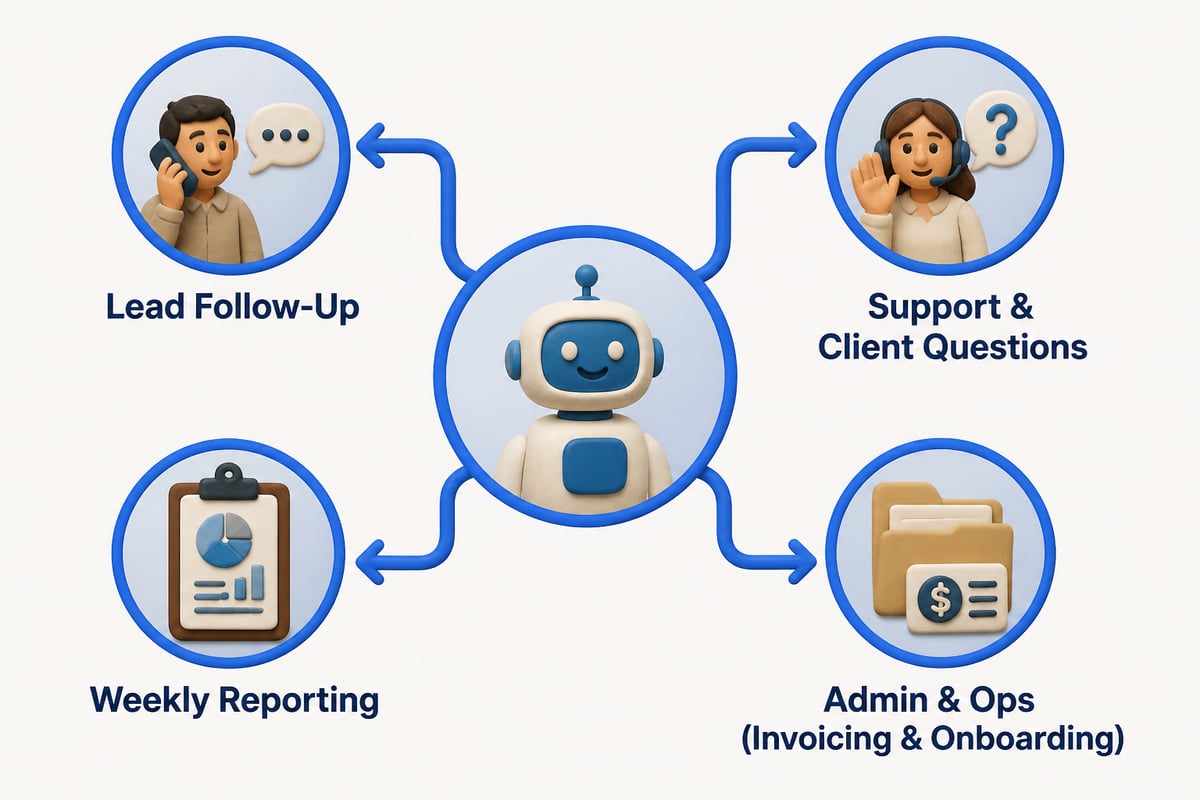
AI and automation save the most time on work that repeats, follows a pattern, and does not need your personal judgment. Four areas cover most service businesses.
1. Lead follow-up. Leads go cold fast. If your team replies in two days, a competitor replied in two minutes. An agent can answer every new lead in under a minute, ask the first qualifying questions, and book a call.
2. Support and client questions. Clients ask the same ten questions. "Where is my report?" "Can I move my call?" "What does this line item mean?" An agent answers these from your own documents and passes hard ones to a person.
3. Reporting. Someone on your team pulls numbers from four tools every Monday and pastes them into a slide. A workflow can pull the numbers, write the summary, and send it. That is two to three hours back each week per account manager.
4. Admin and ops. Invoicing, scheduling, onboarding checklists, status updates. Dull work that someone has to do and nobody wants to.
Google Workspace lists similar uses for small firms: drafting email responses, summarizing meetings and sending action items, and automating repetitive tasks like labeling emails. Those are small wins. They are a fine place to practice. But the big hours sit in the four areas above.
What should a small team automate first?
Automate the one task that your team does most often, hates most, and gets wrong most. Do not try to automate your whole business in one go.
Hypothetical example: a recruiting firm where staff spend the first hour of each day replying to overnight applicants with nearly the same message. An agent could read each application, check it against the role, send a reply, and book a screen call for good fits, so recruiters start the day with booked calls instead of an inbox.
That is a good first project because it has three traits:
- It happens every day, so you see results fast.
- The rules are clear enough to write down.
- A mistake is cheap and easy to catch.
Use this short test on any task. Score it yes or no.
- Does it happen at least ten times a week?
- Can you explain the steps to a new hire in one page?
- Does it take under ten minutes each time?
- Would a wrong result be fixable, not a disaster?
Four yeses means build it. Two or fewer means wait. A task that a person does once a month, or that needs a lot of trust and nuance, is a poor first pick.
If you want ideas by function, these posts go deeper on AI in sales, AI in recruitment, and AI customer service.
Is automation a job killer or a job creator?
Automation changes jobs more than it ends them, but it does remove tasks, and some roles shrink. For a small service team, the honest answer is that it removes the boring part of a job and leaves the human part.
Take an account manager at a marketing agency. Today, maybe 40% of the week goes to building reports, chasing updates, and answering "what's the status?" emails. Those are tasks, not the job. The job is advising the client and spotting the next idea. When an agent takes the tasks, the manager has more time for the job.
There are real limits to say out loud:
- Pure data entry roles will shrink. That work is the easiest to hand off.
- First-line support volume drops when an agent handles simple tickets.
- New work appears: someone has to check the agent, update its rules, and handle the hard cases.
For a 5 to 50 person firm, the usual result is not layoffs. It is taking on more clients without hiring another coordinator. You grow without the new payroll line. That is a better frame than "job killer or job creator." Ask: what work do I want my people to do?
What is the 30% rule for AI?
The 30% rule is a rough guide that says AI should handle about 70% of a repeat task while people keep about 30%, mainly review and judgment. There is no official standard behind it. Treat it as a rule of thumb, not a law.
Here is how it plays out. Say an agent drafts every client reply. A person reads each draft, fixes tone, and sends it. The agent did most of the typing. The person kept the final say. That setup is slower than full automation, but it is safe, and it is how most teams should start.
Over time the split can move. Once an agent has run 500 replies and your team changed almost none of them, let it send the easy ones on its own. Keep a person on the hard ones.
A simple way to set the split:
| Task type | Starting split | Move toward |
|---|---|---|
| Simple FAQ replies | Agent drafts, person approves | Agent sends alone |
| Lead qualification | Agent asks, person books | Agent books alone |
| Reports | Agent builds, person reviews | Agent builds and sends |
| Refunds, pricing, contract terms | Person decides | Stay with a person |
The point is to earn trust with data, not to guess. If you track how often people edit the agent's work, you will know when it is ready.
Which jobs will survive AI?
Jobs built on trust, touch, and complex judgment are the safest, and no one can name an exact five. Anyone who gives you a fixed list of five is guessing, so be careful with that kind of claim.
What we can say plainly is which parts of work hold up:
- Work with people in the room. Nurses, electricians, plumbers, therapists, and clinic staff do hands-on or face-to-face work.
- Work that rests on trust. Consultants, recruiters, and account leads win clients because a client trusts them.
- Work that needs a decision with real stakes. Someone has to own the call when the data is unclear.
- Work that builds the system. People who set up, check, and fix AI tools are in demand.
For your own team, flip the question. Do not ask which jobs survive. Ask which tasks in each job can be handed off. A recruiter's job survives. Their 90 minutes of daily inbox triage does not need to.
How does an AI automation get built and run?
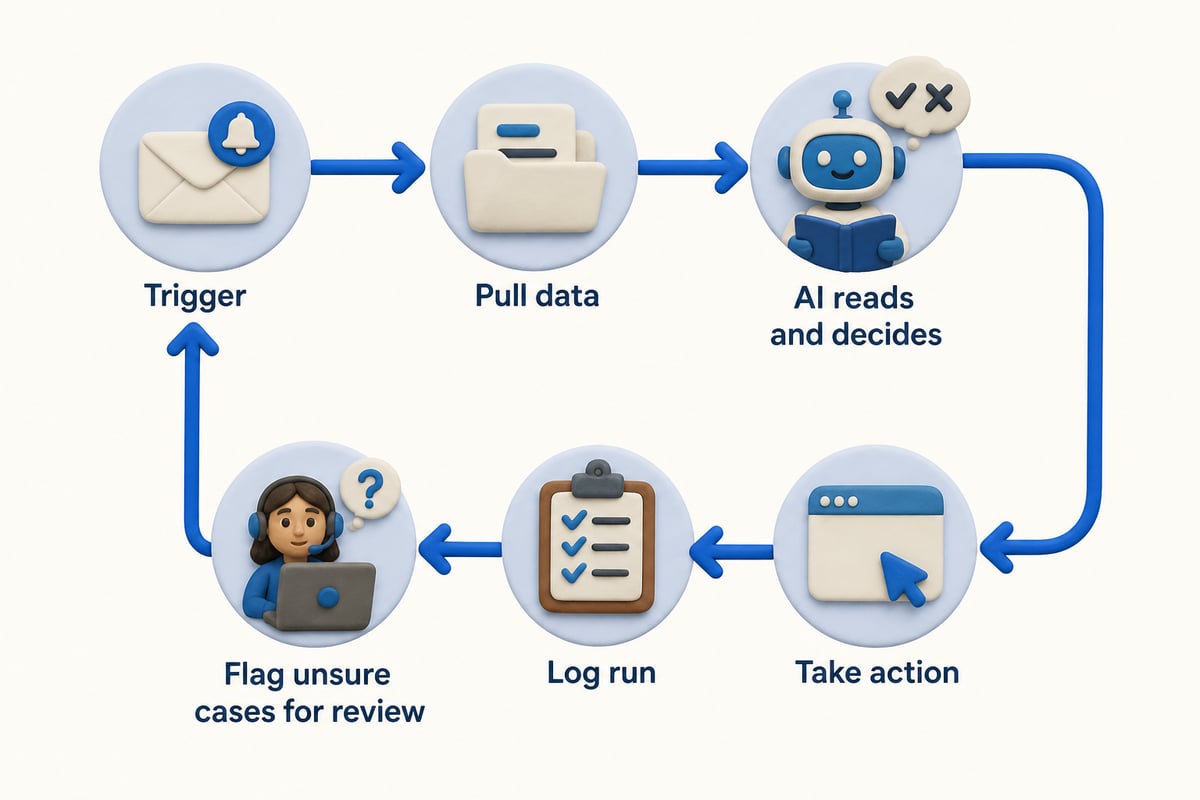
An AI automation takes an input, runs it through steps, and returns an output, with AI doing the reading and writing in the middle. Most small-team builds follow the same five parts.
- Trigger. Something starts the run. A new lead, a ticket, a Monday morning, a paid invoice.
- Data. The system pulls what it needs, like the CRM record, the client's past emails, or your price list.
- Brain. An AI model reads the data and decides what to do or write.
- Action. It sends the email, books the call, updates the record, or posts to Slack.
- Check. It logs what it did, and flags anything it was unsure about for a person.
Tools like n8n connect these steps without much code. If you want to see how that works, here is a plain look at n8n for business workflows. For a wider view of what is out there, see this list of AI automation tools.
One design choice matters more than people think: keep each agent narrow. One agent, one job. A lead agent does not also write reports. A narrow agent is easier to test, easier to fix, and breaks in smaller ways. That is how Vieerx builds. Every agent owns a single narrow job and runs without a human steering it.
What does a worked example look like?
A worked example shows the steps, the time saved, and where a person still steps in. This one is hypothetical, with round numbers to show the math.
Hypothetical example: a 15-person marketing agency and its monthly reports.
Today, each of 10 clients gets a monthly report. An account manager spends 3 hours pulling numbers from ad platforms, analytics, and email tools, then writing a summary. That is 30 hours a month.
With an automation:
- On the 1st of the month, a workflow pulls the numbers from each tool.
- An AI model compares them with last month and writes a plain summary: what rose, what fell, and one suggested next step.
- The draft lands in the account manager's inbox.
- The manager spends 20 minutes per client reading, adding context, and sending.
New time: about 3.3 hours across 10 clients instead of 30. That is roughly 27 hours back every month, or more than three full workdays. The numbers here are made up to show the method, so run your own with your own hours.
Notice what stayed human. The manager still reads every report and adds the client-specific note. The agent did the grunt work. That is the 70/30 split from earlier in action.
How do you keep AI and automation safe and accurate?
You keep AI and automation safe by limiting what the agent can touch, testing it before it goes live, and watching its results after. Four controls cover most of the risk for a small team.
Limit access. Give the agent only the data and tools its one job needs. A follow-up agent does not need your billing system.
Keep each person's data apart. If your agent talks to many clients, one client's details must never show up in another's chat. Vieerx gives each user separate memory, so no user's information gets mixed with another's. Vieerx reports 17,169+ resolved tickets with zero mix-ups between users.
Test before launch. Write 50 to 100 real questions with the right answers. Run the agent on them. Score it. Do not go live until it passes. Vieerx reports 99.4% answer accuracy across 1,000+ users, and each run uses the cheapest model that passes its evaluation tests. That second point matters for cost. A cheaper model that passes your tests is better than an expensive one you did not need.
Set a hand-off rule. Decide in advance what the agent must pass to a person: refunds, angry clients, legal questions, anything over a set dollar amount. Write it down.
Then watch it. Check a sample of 20 outputs a week for the first month. Look for wrong answers, strange tone, and cases where it should have asked for help.
What does it cost, and when do you see a return?
Cost depends on what you build, so get a real quote, but the return should show up in weeks, not years. A fair target for a first project is a clear payback inside six weeks.
Here is the math to run before you spend anything:
- Hours saved per week, times the hourly cost of the person doing the task.
- Add the value of faster replies, such as leads you no longer lose.
- Subtract the build cost and the monthly tool cost.
If a coordinator earns $30 an hour and an agent saves 10 hours a week, that is $300 a week, or about $1,300 a month. A project that costs less than that per month to run is easy to defend. Use your own numbers.
Model cost is part of the monthly bill. If you want to see how model choice changes it, try the Vieerx model calculator.
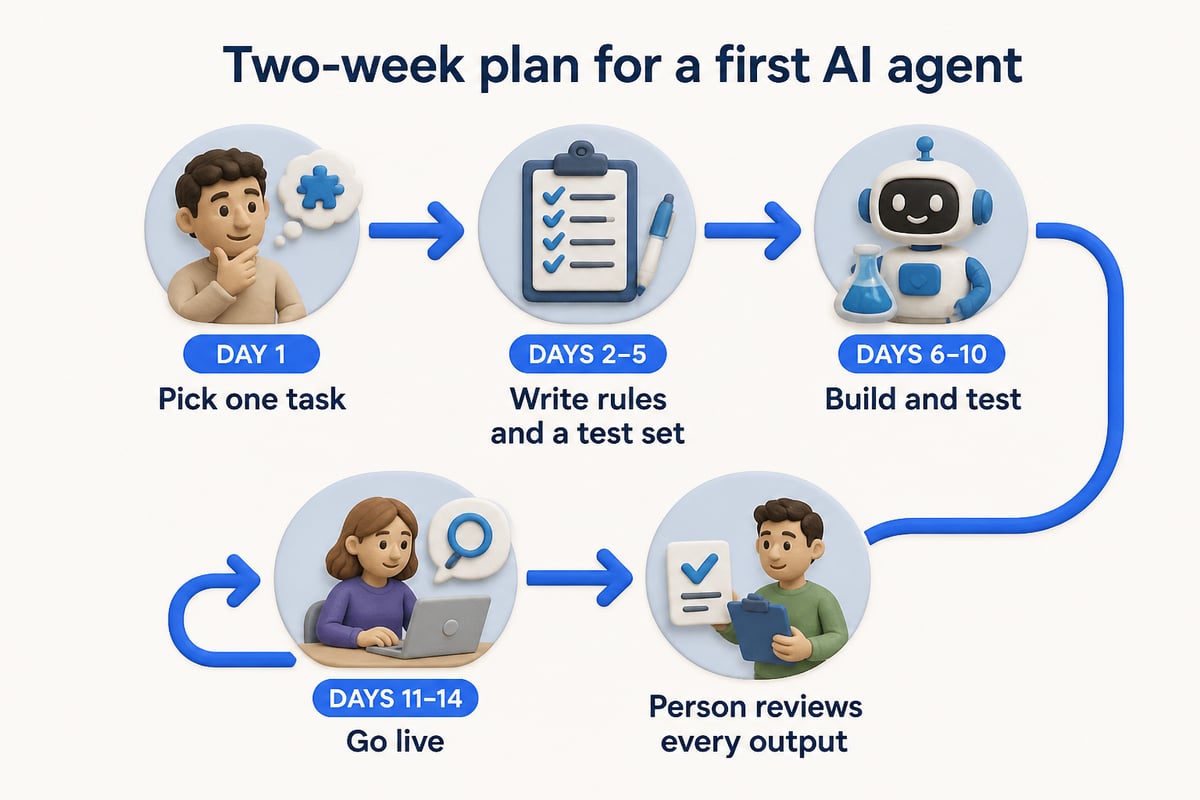
Timing matters too. A first agent should be live in about two weeks, not six months. Vieerx puts a working agent live within 14 days of kick-off and aims for real ROI in six weeks or less. If a build plan stretches to a year before you see anything, the scope is too big. Shrink it.
Should you build it yourself or hire help?
Build it yourself if you have someone with spare time and technical comfort, and hire help if you want it live fast and working the first time. Both are fair choices. The wrong choice is to start with no owner at all.
Build it yourself when:
- One person on your team likes tools and has about five hours a week.
- The first task is simple, like email sorting or meeting notes.
- You are fine with a slow start and a few mistakes.
Training exists for this. Grow with Google's AI course for small businesses offers seven courses and more than 20 interactive activities on practical AI skills and workflow setup. For a plain overview of use cases, Microsoft's small-business AI overview covers customer service, CRM, and productivity.
Hire help when:
- The task touches clients, money, or your reputation.
- Nobody on your team has the hours.
- You have tried a tool and it did not stick.
If you go the agency route, ask four things. Who owns each agent's job? How do you test accuracy? What happens when it fails? Will my team learn to run it? A good partner trains you so you are not locked in. Vieerx sends a deployment crew that trains your team to build agents without them.
If you want workflows on n8n and Claude that handle lead follow-up, booking, reporting, and invoicing, the AI automation build from Vieerx is built for that. It fits 5 to 50 person agencies and service firms that want the repeat work gone, not another tool to learn.
What mistakes should you avoid?
The most common mistakes are starting too big, skipping tests, and having no owner. Each one is easy to avoid once you know it.
- Starting too big. "Automate the whole company" is not a project. One task is a project.
- No test set. If you cannot score the agent, you cannot trust it.
- No owner. Someone on your team must own each agent, the way someone owns a client account.
- Messy source data. An agent that reads an out-of-date price list will quote out-of-date prices. Fix the documents first.
- Removing people too early. Keep a person in the loop until the numbers say you can step back.
- Skipping the hand-off rules. An agent that never says "I don't know" will make something up.
- Picking tools before tasks. Start with the job, then pick the tool.
A last one: waiting for the perfect plan. A small, safe first agent teaches you more in two weeks than a month of research. Pick one task, set a clear goal, and ship it.
FAQ
What is the difference between AI and automation?
Automation follows fixed steps, and AI reads and decides inside those steps. A plain automation sends the same email to every lead. An AI agent reads what each lead wrote and replies to the actual question. Most useful setups use both, with automation running the steps and AI handling the messy parts.
Do I need a technical team to use AI and automation?
No, but you need an owner. Pick one person who knows the task well and has a few hours a week. Simple builds use no-code tools like n8n. For anything that touches clients or money, a build partner can get you live faster and train your team to run it.
How long before AI and automation pay off?
A well-scoped first project should show a return within about six weeks. Pick one repeat task, count the hours it costs now, and measure again after launch. If you see no clear gain after six weeks, the task was likely too vague or too big, so narrow it and try again.
Pick one task your team repeats more than ten times a week and write down its steps on one page, because that page is your build plan. Then bring it to a team that has done this before. Vieerx builds sales, support, and ops agents for agencies and service businesses, starting with the AI automation build for lead follow-up, booking, reporting, and invoicing, and you can book a demo with Vieerx to see which task to automate first. Book a free demo at https://cal.com/tanvieerx/agentic-review.