

AI in sales means using software that reads data, writes messages, and does repeat tasks so your reps spend more time talking to buyers. For a small team, the best place to start is the boring work: lead follow-up, call notes, CRM updates, and reports. In HubSpot's 2025 survey of 1,000 sales professionals, most said they already use AI tools. So the question is no longer if you use it. The question is what you build first.
This guide is for owners and heads of sales at agencies, recruiting firms, consultancies, and other service businesses. You have 5 to 50 people. You do not have a data science team. You need to know what works, what it costs in effort, and where it goes wrong.
What does AI in sales actually do?
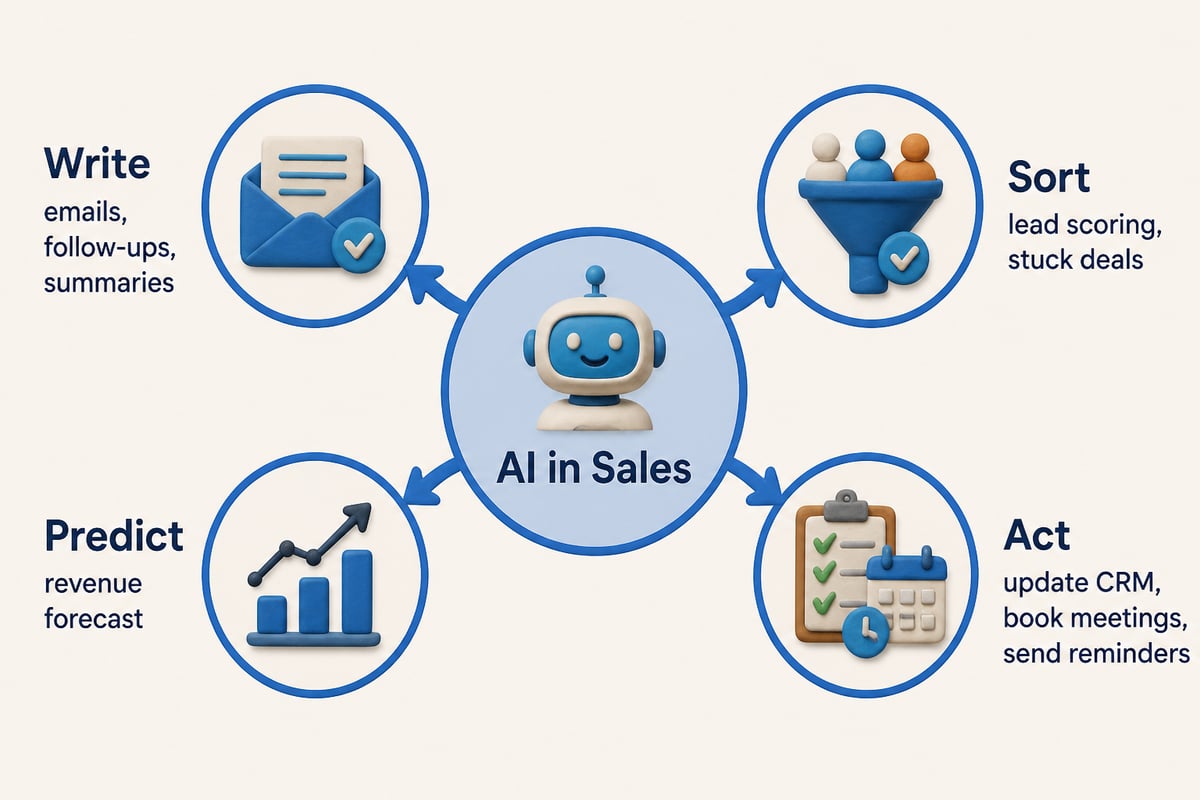
AI in sales does four jobs: it writes, it sorts, it predicts, and it acts. That is the whole list.
Take one lead. Someone fills out a form on your site at 9 p.m. A rep sees it the next morning. By then, the lead has booked a call with a faster competitor.
Now run the same lead through an AI setup. The form fires. An agent checks the company, scores the lead, writes a short reply that mentions their business, and offers two times to talk. It takes about a minute. No one was awake.
Here are the four jobs in plain terms:
- Write: emails, follow-ups, call summaries, proposals.
- Sort: which leads are hot, which deals are stuck, which accounts are at risk.
- Predict: how much revenue will close this quarter.
- Act: update the CRM, book the meeting, send the reminder, ping the rep.
The first three are tools that help a person. The fourth is where the biggest gains sit for a small team, because an agent that acts removes work instead of moving it around. More on that in a moment.
Why small teams are adopting AI in sales now
Small teams adopt AI in sales because they have the most to gain from saved hours and the least slack to waste.
The numbers show where the market is. In Salesforce's 2024 survey of 5,500 sales professionals across 27 countries, most sales teams were experimenting with or had implemented AI. In the same survey, teams using AI were more likely to report revenue growth than teams not using it. That is a survey link, not proof that AI caused the growth. Teams that grow may simply be more willing to try new tools. Still, the gap is big enough to take seriously.
HubSpot's survey adds detail on what reps say AI does for them:
- Most said AI saves time and improves processes.
- Most said it personalizes prospect interactions.
- Most said it surfaces better insights from data.
Source for all three: HubSpot's 2025 State of Sales.
A 10-person agency feels time savings more than a 500-person company does. If each of your four reps saves five hours a week on admin, that is 20 hours. That is half a full-time hire, with no salary.
How can I use AI in sales?
You can use AI in sales by picking one repeat task, handing it to a tool or agent, and measuring the hours it frees up. Start narrow. Do not try to change the whole team at once.
Here are the use cases that pay off fastest for a small team, in the order most teams should try them.
Lead follow-up
Speed wins deals. An agent can reply to every new lead within minutes, ask one or two qualifying questions, and book a call. It can also chase leads that went quiet, with a short note every few days.
Hypothetical example: a recruiting firm gets many inbound candidate and client inquiries a week. Reps handle them between calls, and some get a reply after a day or more. An agent that answers each one in minutes and sorts them into "book a call," "nurture," and "not a fit" would fix the slow replies without adding headcount.
Call notes and CRM updates
Reps hate typing notes. So the notes are short, late, or missing. An AI note-taker can join the call, write a summary, pull out next steps, and push both into the CRM. The rep checks it in 30 seconds instead of writing it in 10 minutes.
Lead scoring
Scoring ranks leads by how likely they are to buy. It looks at things like company size, pages viewed, emails opened, and past deals. Salesforce's overview of AI CRM for small business covers how scoring helps reps pick who to call first. Even a basic score beats gut feel when you have more leads than time.
Proposals and emails
Generative AI writes a first draft of a proposal or a cold email in seconds. A human edits it. Treat the draft as a rough cut, never the final.
Reporting
Most owners build the weekly sales report by hand. A reporting agent can pull numbers from the CRM, spot what changed, and send a short summary every Monday. No one opens a spreadsheet.
Support and onboarding handoffs
Sales does not end at the signed deal. A support agent can answer new client questions, send onboarding steps, and flag trouble to your team. If that interests you, our guide on AI customer service covers it in more depth.
Which AI is best for forecasting?
No single AI is best for forecasting, because the best forecast comes from clean CRM data plus a tool that fits your deal size and sales cycle. Pick the tool second. Fix the data first.
Forecasting tools look at your past deals and your open pipeline. They guess how much will close and when. They flag deals that look stuck. Most CRMs now have a forecasting feature built in. Standalone tools exist too, but they cost more and need more setup.
For a team under 50 people, here is a simple way to choose:
- Check your data. If reps skip stages or leave close dates blank, no tool will save you.
- Start with your CRM's built-in forecast. It already has your data and costs little or nothing extra.
- Compare the forecast to what happened for three months. If it misses by a lot, the data is the problem, not the tool.
- Only then look at add-ons, if you need more detail than the CRM gives.
Small teams also have a math problem. If you close 15 deals a quarter, one deal moving a week changes the whole forecast. AI forecasting shines on larger volume. At small volume, a rep's own read of each deal still matters. Use AI to flag risk, and let a human make the call.
What goes wrong with AI in sales?
Four things go wrong most often: bad data, too many tools, no owner, and messages that sound fake.
Bad data. Salesforce found that many sales professionals do not completely trust the accuracy of their organization's data. If you feed an AI messy records, it gives you messy output, fast. Before you build anything, spend a day cleaning duplicates, filling in missing fields, and deleting dead contacts.
Too many tools. A team signs up for a note taker, a writing tool, a scoring add-on, and a chatbot. Nobody connects them. Reps now log into six apps. The fix is simple: pick one job, solve it, then move on.
No owner. Someone has to watch the AI. If an agent sends a wrong email to 200 leads, who finds out? Give each agent a human owner who checks its work weekly.
Fake-sounding messages. Buyers can tell when an email was written by a bot with no context. Keep messages short. Use real details. Have a person approve anything high-stakes, like a proposal or a message to a big account.
There are also privacy limits. Do not paste client contracts or private data into a public AI tool. Use tools that keep each user's data separate and do not train on your inputs.
How to roll out AI in sales in four weeks
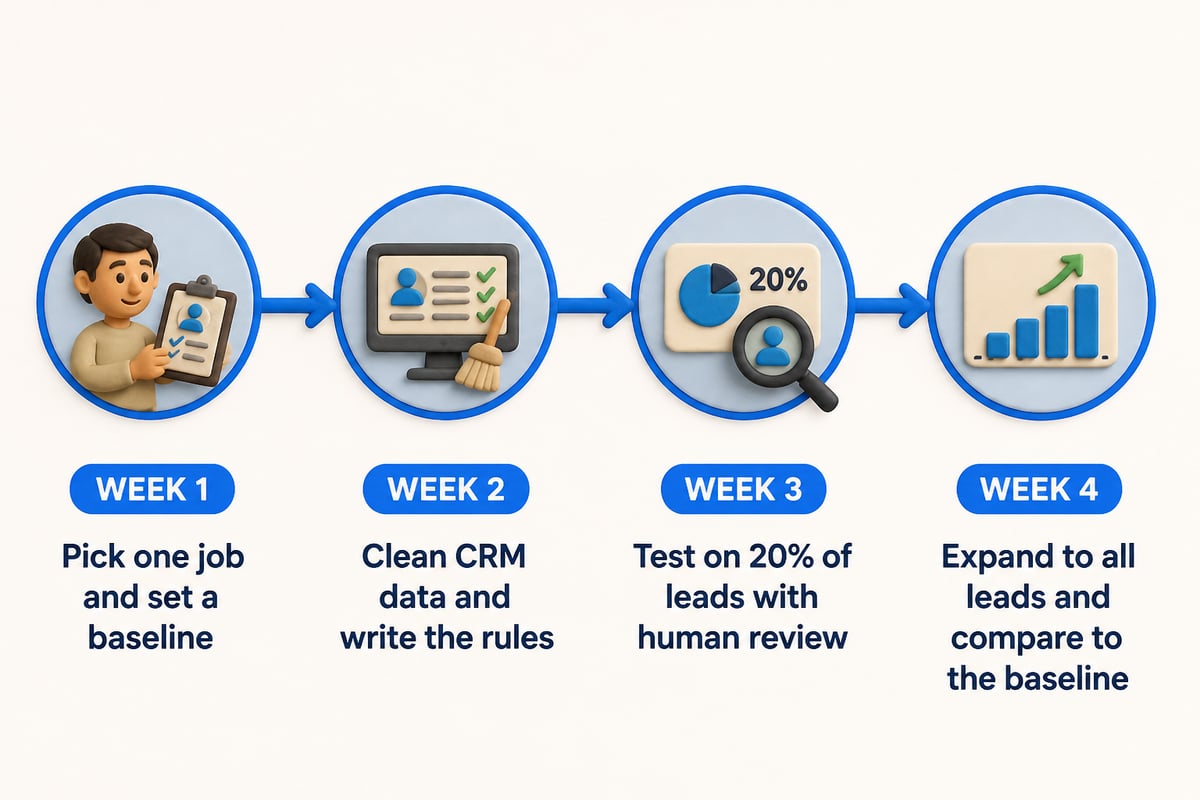
You can roll out AI in sales in four weeks if you pick one task, set one number to beat, and do not add anything else until it works.
- Week 1: Pick the job. List the five most repeated tasks your team does. Choose the one that eats the most hours and has the clearest rules. Lead follow-up is a common winner.
- Week 1: Set a baseline. Count today's numbers. How long does a lead wait for a first reply? How many hours a week do reps spend on notes? You cannot prove a gain without a starting point.
- Week 2: Clean the inputs. Fix the CRM fields the tool will read. Write down the rules a human follows today, such as "reply within 10 minutes" or "ask budget before booking."
- Week 3: Build and test on a small slice. Run the tool on 20% of leads. A person reviews every output. Fix mistakes.
- Week 4: Expand and measure. Roll it out to all leads. Compare to your baseline. Keep it only if the number moved.
A small team does not need a big project plan. It needs one clear task and one number.
AI agents versus AI tools in sales
An AI tool helps a person do a task. An AI agent does the task on its own, inside your systems, without a person steering each step. For small teams, that difference decides how many hours you actually get back.
Compare two setups for call follow-up:
| AI tool (assistant) | AI agent | |
|---|---|---|
| Who starts it | A rep opens the app | The call ending triggers it |
| What it does | Writes a draft summary | Writes the summary, updates the CRM, drafts the follow-up email, creates the next task |
| Who finishes it | The rep copies, pastes, sends | A rep approves, or it sends on its own for low-risk cases |
| Hours saved | Some | Most |
A tool still needs a human to start it and finish it. That human time adds up. An agent owns one narrow job and runs from start to end. If you want the longer explanation, see our guide to agentic AI and the walkthrough on agentic workflows.
The word "narrow" matters. An agent built to do ten things does most of them badly. An agent built to do one thing, like qualify inbound leads and book calls, can be tested, measured, and trusted. Small teams do best with several narrow agents, not one clever one.
How much does AI in sales cost?
Costs fall in three buckets: software fees, setup time, and the cost of running the AI itself. Most small teams underestimate the second one.
- Software fees: monthly seats for CRM add-ons, note takers, or writing tools. These are easy to see and easy to compare.
- Setup time: the hours your team spends connecting tools, cleaning data, and writing rules. This is the hidden cost. A cheap tool that takes 60 hours to wire up is not cheap.
- Run cost: every AI answer uses a model, and models charge by usage. Heavy models cost more per answer than light ones. Many tasks, like sorting a lead into a bucket, do not need the heaviest model.
That last point is where good builders save you money. At Vieerx, each run uses the cheapest model that passes evaluation tests. If a small model gets the answer right, there is no reason to pay for a big one. You can try that math yourself with the model calculator.
A fair way to judge cost is payback time. If an agent saves 20 hours a week and a rep hour is worth $40, that is $800 a week. Divide your total cost by that number to see how many weeks it takes to pay back. Aim for six weeks or less. If a project cannot show a path to that, shrink it.
Build it yourself, buy a tool, or hire a builder
You have three ways to get AI into your sales process, and the right one depends on your hours, your skills, and how custom your process is.
Buy a tool. Good when your need is common: call notes, email drafts, a built-in CRM forecast. Cheap and fast. The limit is fit. The tool does what it does, and you bend your process around it.
Build it yourself. Good if someone on your team likes automation and has time. No-code platforms such as n8n let a non-engineer link a CRM, an inbox, and a model. The limit is time. The first build often takes weeks of trial and error, and someone must keep fixing it.
Hire a builder. Good when the task is specific to your business, touches several systems, or must work reliably from day one. The limit is trust: you need a partner who ships working agents, not slide decks.
Many teams mix these. Buy the simple tools. Hire out the custom agent that touches your CRM, inbox, and calendar.
What to ask before you hire an AI builder
Ask five questions: what exactly will it do, how will you measure it, how fast will it be live, what happens to my data, and who maintains it?
Use this checklist in your first call:
- One job, in one sentence. If the builder cannot say what the agent does in one sentence, the scope is too loose.
- A number to hit. Reply time under five minutes. Notes in the CRM within one hour of every call. Pick the metric before work starts.
- A timeline. A working agent in weeks, not quarters.
- Data handling. Does one user's information ever mix with another's? How is memory kept apart?
- Handover. Will your team learn to build and edit agents, or are you locked in forever?
Vieerx works to this standard. Every agent owns a single narrow job and runs without a human steering it. The first live agent goes in within 14 days of kick-off, and a deployment crew trains your team to build agents without us. On the quality side, Vieerx works to keep each user's memory separate, so no user's information mixes with another's. Real ROI comes in six weeks or less.
If your first project is a sales agent for follow-up, lead sorting, or CRM updates, Custom AI agents from Vieerx are built for your tools and your process rather than a generic template.
How do small teams make money with AI in sales?
Small teams make money with AI in sales by closing more of the leads they already have and by cutting the hours it takes to sell, not by finding a magic trick. Anyone promising $1,000 a day from AI with no work is selling you something.
Here is how the real gains show up for a service business:
- Faster replies close more deals. Each lead that gets an answer in minutes instead of a day has a better chance of booking a call. You pay nothing extra for the lead. You just stop losing it.
- Quiet leads come back. A follow-up agent that sends three short messages over two weeks wakes up deals that reps forgot.
- Reps sell more hours. If reps drop five hours a week of admin, those hours go to calls. More calls means more deals.
- Account growth. An agent can scan current clients and flag who may need a new service, based on what they bought and when.
Salesforce's survey found that reps at organizations using AI were more likely to say it was easy to get the customer insights needed to close deals than reps at organizations without AI. Better insight means better conversations.
Run the math on your own numbers. If you get 100 leads a month, close 10%, and sell at $3,000 a deal, you make $30,000. If faster follow-up lifts the close rate to 12%, that is $36,000. Same leads. Same team. The gain comes from the process.
Will AI replace salespeople?
AI will not replace salespeople who build trust, read a room, and handle hard conversations, but it will take over the admin work around them. Reps who use AI will out-produce reps who do not.
Here is what AI does badly. It cannot sit across from a nervous buyer and sense what they are not saying. It cannot negotiate a custom deal with three decision makers. It cannot earn a referral by being a person someone likes.
Here is what AI does well. It never forgets a follow-up. It never skips the CRM update. It works at 2 a.m. It reads 500 call transcripts without getting bored.
So the split is clean:
- Give to AI: first replies, scheduling, note taking, data entry, reports, reminders, lead sorting.
- Keep with people: discovery calls, pricing talks, relationship building, final proposals, anything that carries risk.
Roles that rely on empathy, judgment, and trust, such as senior account managers and consultative sellers, are the safest. Roles built mostly on typing information from one place to another are the most exposed. For a small team, that is good news. You can move reps off the typing work and into the selling work.
Where to start with AI in sales this month
Start this month with the one task that costs your team the most hours and follows the clearest rules.
Pull a quick list. Ask each rep, "What do you do every day that you wish you did not have to?" The answers repeat. Lead follow-up. Call notes. Weekly reports. CRM clean-up. Pick one. Write down the steps a human takes. If you can write the steps on one page, an agent can do it.
Two other reads help you plan. If you are still deciding on scope, our post on AI for small business lays out where small teams usually begin.
FAQ
What is the first thing a small team should automate with AI in sales?
Automate lead follow-up first. It has clear rules, it ties straight to revenue, and the gain is easy to measure. Track how long a new lead waits for a first reply before and after. If that time drops from hours to minutes, you have your proof. After that, move to call notes and CRM updates.
How long does it take to get an AI sales agent running?
A simple agent can be live in about two weeks if the job is narrow and your CRM data is clean. Vieerx puts a working agent live within 14 days of kick-off. Wider projects that touch many systems take longer. The speed depends less on the AI and more on how well you can describe the job and how tidy your data is.
Is AI in sales safe for client data?
It can be, if you choose the setup with care. Do not paste private contracts or client details into a public chatbot. Use tools that keep each user's data separate and do not train on your inputs. Ask any builder how memory is stored, who can see it, and whether one user's information can ever reach another's.
Pick one repeat task on your sales team this week, write its steps on one page, and time how long it takes today. That page is the brief for your first agent. If you want a builder to turn it into a working agent in 14 days, look at Custom AI agents built for your tools. Vieerx is an AI integration agency that builds sales, support, and ops agents for agencies and service businesses with 5 to 50 people, so you can book a demo and see what your first agent would do.