

Agentic workflows are processes where an AI agent plans the steps, picks the tools, does the work and checks its own result, with little or no human steering. A normal automation follows a fixed path. An agentic workflow decides the path as it goes.
Here is a small example. A lead fills out a form on your agency site. A normal automation sends one template email. An agentic workflow reads the form, looks up the company, drafts a reply that fits, books a call if the lead asks for one, and logs it all in your CRM. If the lead writes back with a question, the agent answers it. If it cannot answer, it hands the thread to a person.
This guide is for owners and team leads at service businesses. You will learn what makes a workflow agentic, the parts you need, the patterns that work, and how to build the first one without wasting a quarter.
What Is an Agentic Workflow?
An agentic workflow is a series of steps where an AI agent chooses what to do next, uses tools to do it, and checks the result before moving on.
Think of a new hire on your sales team. You do not hand them a script for every case. You give them a goal, access to your tools, and rules for when to ask for help. An agent works the same way.
Three things make a workflow agentic:
- A goal, not a script. You say "qualify this lead and book a call." You do not list every click.
- Tools. The agent can read email, search your CRM, write to a calendar, or call an API.
- A loop. The agent acts, looks at what happened, and decides the next step. It repeats until the job is done or it asks for help.
That loop is the key. Without it, you have a prompt. With it, you have an agent.
If you want the wider picture of how this idea fits into AI as a whole, our post on agentic AI covers it in plain terms.
Agentic Workflow vs Regular Automation vs a Chatbot
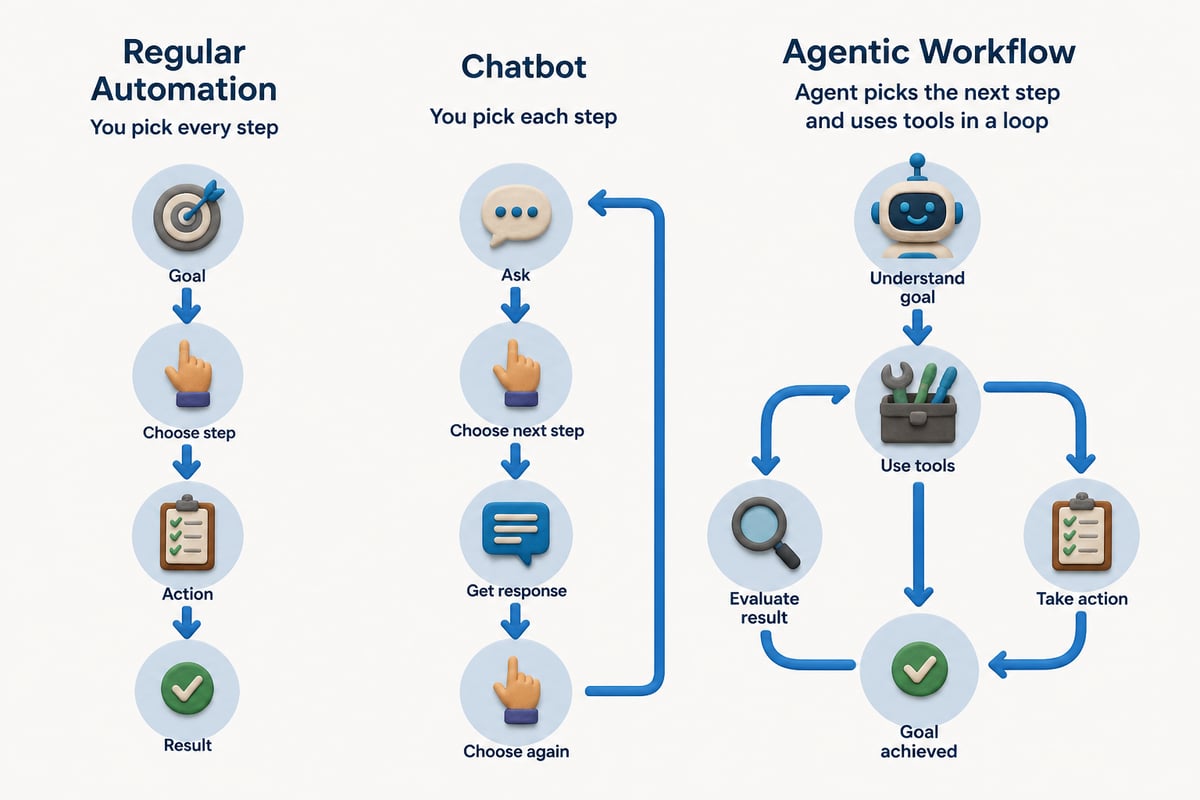
The difference comes down to who picks the next step. In a regular automation, you do. In a chatbot, the user does. In an agentic workflow, the agent does.
Here is how they compare.
| Regular automation | Chatbot | Agentic workflow | |
|---|---|---|---|
| Who picks the next step | You, ahead of time | The user, one message at a time | The agent, as it works |
| Handles surprises | No, it breaks | Sometimes | Yes, it adapts or asks for help |
| Uses tools | Fixed connections | Rarely | Yes, picks the right one |
| Best for | Same steps every time | Answering questions | Work with branches and judgment |
Is ChatGPT an example of agentic AI? On its own, a chat window is not. You type, it answers, and you decide what happens next. It becomes agentic when it is wired to tools and allowed to take several steps toward a goal without you typing each one. The model is the brain. The workflow around it is what makes it an agent.
A rule that keeps you honest: if the task is the same ten steps every single time, use a plain automation. It is cheaper and more stable. Use an agent when the steps change based on what the agent finds.
Our post on conversational AI explains where chat fits and where it stops.
How Agentic Workflows Work, Step by Step
Every agentic workflow runs the same basic loop: take in a goal, plan, act with a tool, check the result, then finish or try again.
Take a support example. A client emails your agency: "My report shows the wrong ad spend for March." Here is the loop.
- Read the goal. The agent reads the email and sees it is a data question about one client and one month.
- Plan. It decides it needs the client's report, the raw ad numbers, and the billing record.
- Act. It calls the reporting tool, then the ad platform, then billing.
- Check. It compares the three. The report is off by $412 because one campaign was missed.
- Respond or escalate. If the fix is inside its rules, it reruns the report and replies. If it needs a refund or a judgment call, it sends the case to a person with a short summary.
Each pass through steps 2 to 4 is one turn of the loop. A simple job takes one turn. A hard job might take six.
Two things keep this safe. First, each step is logged, so you can read what the agent did and why. Second, the agent has a stop rule. If it fails three times or hits something outside its job, it stops and asks.
The Core Parts of an Agentic Workflow
An agentic workflow has five parts: a model, tools, memory, rules and a trigger. If one is missing, the agent will fail in a predictable way.
- The model. This is the language model that reads, reasons and writes. Bigger is not always better. Many steps, like sorting an email, work fine on a small cheap model.
- Tools. These are the things the agent can touch: your CRM, inbox, calendar, help desk, spreadsheet or billing system. An agent with no tools can only talk.
- Memory. Short-term memory holds what happened in this task. Long-term memory holds facts about the client, the lead or the past thread. Memory is also where privacy goes wrong, so keep each user's data separate.
- Rules. These say what the agent may do, what it may not do, and when it must hand off. A rule like "never promise a refund over $200" is worth more than a longer prompt.
- A trigger. Something starts the work: a new email, a form, a time of day, a ticket status change.
Hypothetical example: a recruiting firm wants an agent to screen inbound resumes. The trigger is a new application. The tools are the applicant tracking system and email. Memory holds the job description and the hiring manager's notes. The rules say to score on four listed criteria and never reject without a human check. The model reads, scores and drafts. That is a complete agent, and each part is small.
Design Patterns That Work
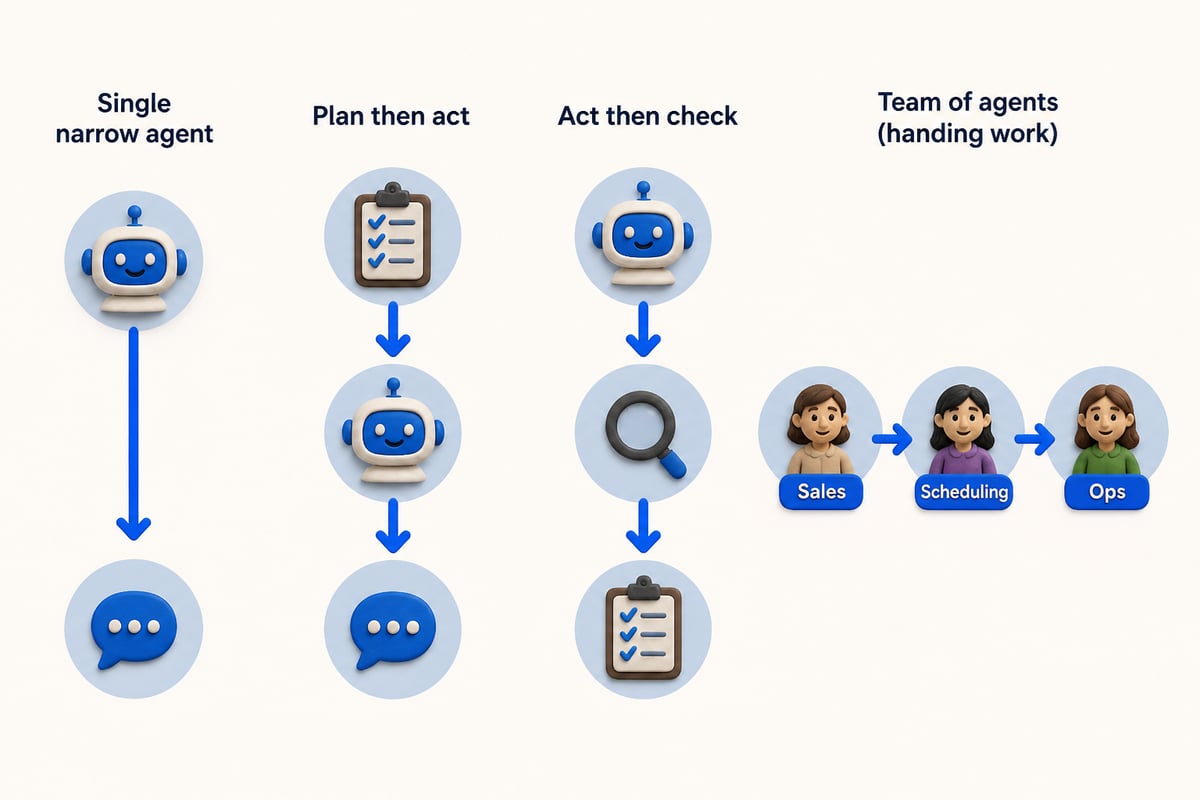
Four patterns cover almost every useful agent: a single agent with tools, a plan then act flow, a checker that reviews the work, and a team of narrow agents.
One agent, one narrow job
Start here. One agent owns one task, such as "answer billing questions" or "follow up with leads who went quiet." Narrow agents are easier to test, cheaper to run and simpler to fix. Vieerx builds agents this way: every agent owns a single narrow job and runs without a human steering it.
Plan, then act
The agent writes a short plan first, then runs each step. This helps on jobs with five or more steps, like building a weekly client report. The plan also gives you something to read when you need to find out what went wrong.
Act, then check
A second pass reviews the first. The agent drafts a client email, then a checker tests it against your rules: right name, right numbers, right tone, no promises you do not make. If it fails, it goes back for a rewrite. This one pattern removes a large share of the silly errors people fear from AI.
A team of agents
Once single agents work, you can link them. A sales agent qualifies a lead. A scheduling agent books the call. An ops agent updates the CRM and sends the brief to the account lead. Each hands off to the next. Do not start here. Teams of agents add moving parts, and every moving part is a place for a bug.
What is the best agentic workflow? There is no single best one. The best one is the narrowest one that removes a task your team does over and over and hates doing. For most service businesses, that is lead follow-up, first-line support or weekly reporting.
Agentic Workflows for Service Businesses: Use Cases
The best first agentic workflows for service businesses are the ones with high volume, clear rules and a cost you can count. Four stand out.
Lead follow-up
A lead asks for a quote at 9 p.m. Most agencies reply the next afternoon. An agent can reply in minutes, ask two qualifying questions, check the answers against your ideal client, and book a call for the right fits. It drops the poor fits a polite note. Your sales lead wakes up to a calendar, not an inbox.
First-line support
An agent reads each ticket, finds the answer in your docs and past tickets, and replies. When it is unsure, it escalates with the context attached. Vieerx reports 17,169+ tickets resolved with zero mix-ups between users, and 99.4% answer accuracy across 1,000+ users. For more on this setup, read our post on AI customer service.
Reporting and ops
Every Monday, someone pulls numbers from four tools and pastes them into a deck. An agent can pull the data, check it for gaps, write a plain summary and post it to Slack. Your team reviews it instead of building it.
Intake and scheduling
Clinics, home service firms and consultancies lose jobs to missed calls and slow replies. A voice or text agent can take the request, collect the details and book the slot. Our guides on the AI receptionist and the AI voice agent go deeper on this.
If you want a broader list of jobs that suit agents, see AI agents for business.
Is It Worth It? What the Numbers Say
Adoption is already wide, and plenty of companies are making the same move you are weighing. A 2025 Cloudera survey of nearly 1,500 enterprise IT leaders across 14 countries found that 96% planned to expand AI-agent use in the next 12 months. In a PwC survey of 308 U.S. business executives taken April 22 to 28, 2025, 79% said AI agents were already being adopted in their companies.
Those numbers come from large companies. The point for you is simpler. Some of your competitors will likely have agents answering leads fast. If yours wait a day, you may lose some of those deals.
The same Cloudera survey lists what slows teams down. The top barriers were data privacy concerns (53%), integration with existing systems (40%) and implementation costs (39%). Each one is a design problem, and each has a fix:
- Privacy. Give each user separate memory so one client's data never shows up in another's thread.
- Integration. Start with tools you already pay for, like your CRM and help desk, and connect only what the first agent needs.
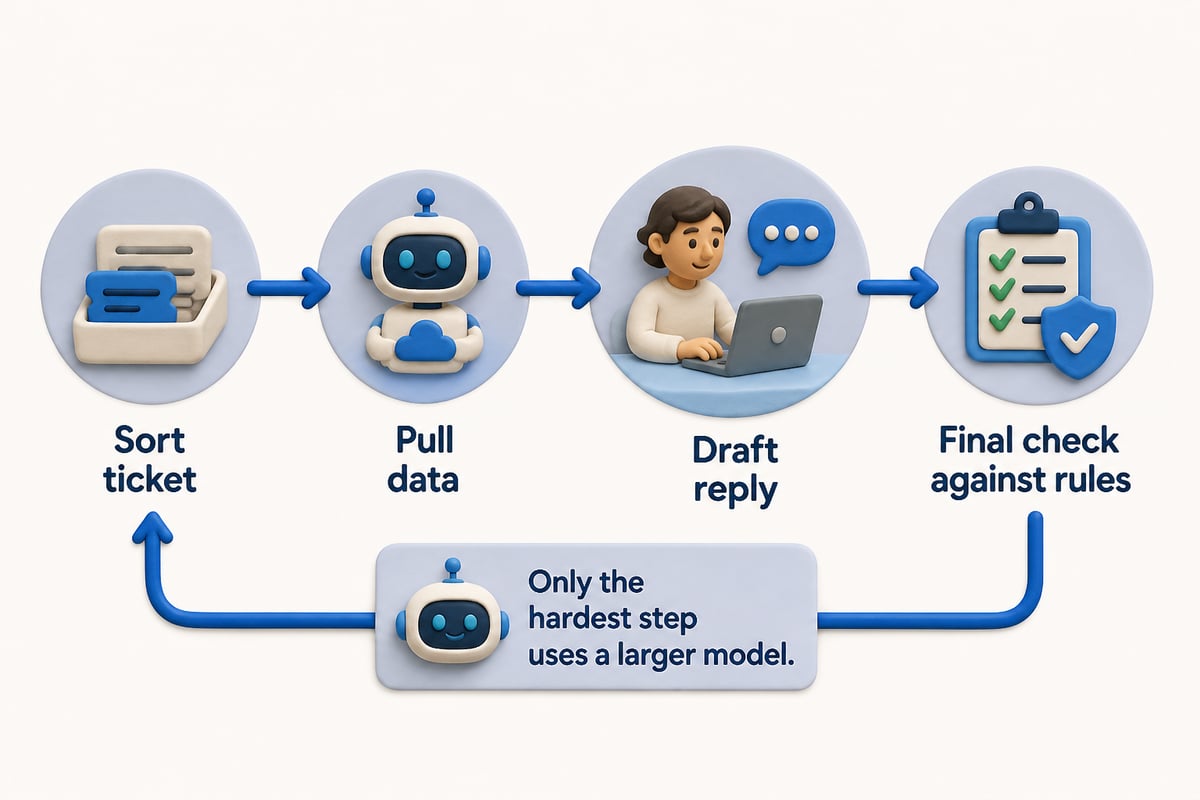
- Cost. Match the model to the step. A cheap model can sort an email. Save the stronger model for the hard part.
What Goes Wrong, and How to Stop It
Agentic workflows fail in five common ways, and each one has a plain fix. Knowing them before you build saves weeks.
- The job is too wide. "Handle all customer questions" fails. "Answer billing questions using these 40 help articles" works. Cut the job until you can describe it in one sentence.
- No stop rule. An agent with no limit can loop, burn money and send ten emails. Set a cap on turns and a rule for when to ask a human.
- Mixed-up memory. If the agent keeps one shared pile of notes, it can show one client's data to another. Keep memory separate per user.
- No test set. If you cannot measure accuracy, you do not know if it works. Write 50 to 100 real past cases with the right answers, and run the agent on them before launch and after every change.
- Too much freedom. Give the agent the fewest permissions that let it do the job. Read access first. Write access later. Money and deletes last, and with approval.
Security is getting attention at the standards level too. NIST's AI security and resilience work includes planned control overlays for securing single-agent and multi-agent systems. You do not need to read it to start. But it signals where good practice is heading: least access, clear logs and human checks on risky actions.
Choosing the Right Model for Each Step
Pick the cheapest model that passes your tests for each step, not the biggest model for the whole workflow.
A workflow that runs 2,000 times a week can cost ten times more than it should if every step uses a top model. Most steps are easy. Sorting a ticket into one of six types, pulling a date from an email or checking that a reply includes the client's name does not need much power.
Here is a simple way to do it:
- List each step in the workflow.
- Run your test cases through a small model first.
- If it passes, keep it. If not, move that one step up.
- Re-test every few months, because small models keep improving.
Vieerx works this way: each run uses the cheapest model that passes evaluation tests. If you want to compare the cost of different models yourself, the model calculator is a fast place to start.
How to Build Your First Agentic Workflow
Build one narrow agent in four steps: pick the task, write the rules, connect the tools, and test it on real past cases before it touches a live client.
Step 1: Pick the task
Pick work that is repeated, rules-based and painful. Ask your team: "What do you do every day that you wish a new hire could do?" Count the hours. A task that eats five hours a week is a good first target.
Step 2: Write the rules on one page
Write what the agent should do, what it must never do, and when it hands off. Use plain words. Include three or four sample cases with the right answers.
Step 3: Connect the tools
Connect only what the agent needs. For a lead agent, that is the form, the CRM, the calendar and email. Use n8n or a similar builder for the plumbing if your team is technical.
Step 4: Test, then go live in small steps
Run your 50 to 100 past cases. Fix what fails. Then go live with human review on every output for the first week. Cut review as accuracy proves out.
Most owners stall at the first step, because they do not know what to build first or who to trust to build it. If that is you, custom AI agents from Vieerx are built for your business and plugged into your tools, and go live in 14 days. The deployment crew also trains your team to build agents without Vieerx. Vieerx says it aims for real ROI in six weeks or less.
Build It Yourself or Hire a Team
Build it yourself if you have a technical person with spare time and one clear task. Hire a team if you want a working agent fast and do not want to learn the stack.
| Build in house | Hire an agency | |
|---|---|---|
| Speed to first agent | Weeks to months | Days to weeks |
| Skills needed | Prompting, APIs, testing | Mostly yours to describe the job |
| Ongoing upkeep | Your team | Shared, or handed over |
| Risk | Stalls when the builder gets busy | Depends on who you pick |
Whichever way you go, ask three questions before you start:
- Can you show accuracy numbers on a test set?
- How do you keep one user's data apart from another's?
- Will my team be able to run and change this without you?
If an answer is vague, keep looking. Our posts on AI automation services and what to look for in an AI agency lay out what good answers sound like.
Who Are the Big Four AI Agents?
There is no official "big four" list of AI agents, and the question matters less than it seems. The tools change every few months. What lasts is the shape of the workflow: a clear goal, the right tools, separate memory, firm rules and a test set.
For a service business, the better question is not "which famous agent should I buy?" It is "which task should my first agent own?" A famous general agent that does everything will do most things half well. A narrow agent that does one thing well will pay for itself.
FAQ
What is an agentic workflow in simple words?
It is a job done by an AI agent that plans its own steps, uses your tools and checks its work. You give it a goal and rules. It does the rest and asks a person when it is unsure. A good example is a lead agent that reads a form, replies, qualifies the lead and books a call.
Is an agentic workflow the same as a chatbot?
No. A chatbot answers questions inside a chat. An agentic workflow takes action across your tools, like updating a CRM, sending an email or booking a slot. A chatbot can be one part of an agentic workflow, but it is not the whole thing.
How long does it take to set up an agentic workflow?
It depends on the job and the tools involved. A narrow agent with clear rules can be live in days, not months, if you test it on real past cases first. Vieerx puts a working agent live within 14 days of kick-off. To scope your own, book a call through the link in the final paragraph.
Your next step is to list the three tasks your team repeats most and pick the one with the clearest rules. That is your first agent. If you want help choosing and building it, custom AI agents from Vieerx go live in 14 days and plug into the tools you already use. Book a demo with Vieerx and we will show you what your first agent would do in your business.