

AI for small business means using software that does repeat work for you, like answering leads, replying to support emails and building reports. Start with one narrow job that costs you hours each week, and prove it pays back before you add a second.
Picture a recruiting firm with 12 people. A new lead fills in a form on Friday at 5 pm. Nobody calls until Monday. By then the lead has booked a call with a rival. One small agent that replies in two minutes fixes that. It costs less than one lost deal.
That is the whole idea. Pick a leak, plug it, measure it. This guide shows where the leaks usually are, what to build first, what to skip, and how to avoid paying for tools nobody uses.
Why AI for Small Business Is Worth Your Attention Now
AI for small business has moved from a nice idea to normal practice in under two years.
A Thryv survey of 540 small-business decision-makers found that reported AI use rose from 39% in 2024 to 55% in 2025. Among those who use it, many said they use it every day. This is not a test anymore. It is part of the work.
Owners also see it as a way to compete. A 2024 GoDaddy survey of more than 3,500 U.S. microbusiness owners found that many had tried generative AI in the preceding few months. And many believed it could help them compete with larger businesses.
Here is what that means for you. A 10-person agency cannot hire a 24-hour sales team. But it can run an agent that never sleeps. The big firm has more people. You can have faster replies.
The risk is not that AI fails. The risk is that you buy five tools, use none well, and decide AI is a waste. Most wasted money comes from starting with the tool, not the problem.
Look at the daily-use number again. When 63% of users open the tool every day, it means the work has changed, not that people are playing with a demo. If your competitors answer leads in two minutes and you answer in two days, a client will notice before you do. Waiting also has a cost you can count. Every week without a follow-up system is another week of leads going cold on Friday evening. You do not need to match a larger firm's budget. You need to fix one slow, repeated job before they fix theirs.
Where Small Businesses Use AI Today
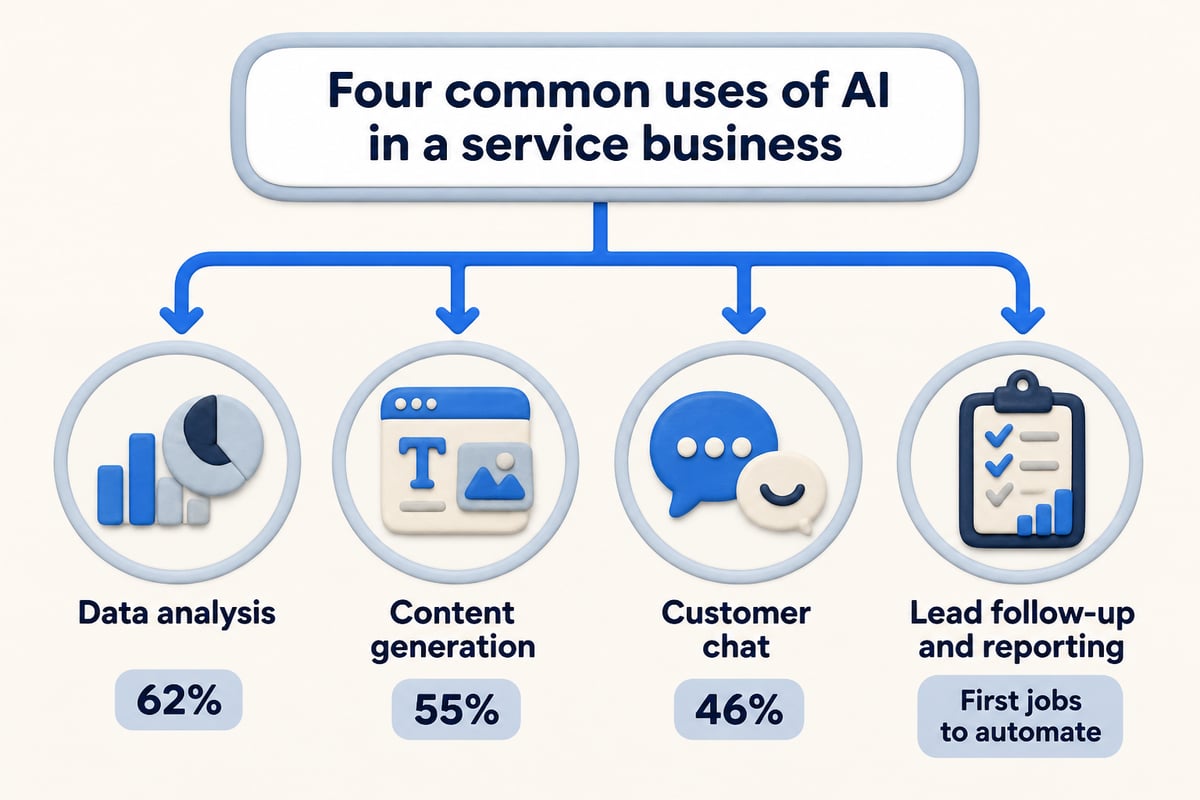
Most small businesses use AI for data work, content and customer chat.
Thryv asked AI-using small businesses what they do with it. The top answers were data analysis, content generation, and customer-engagement tools such as chatbots. That tells you where the easy wins sit.
Here is how that looks inside a service business:
- Lead follow-up. A new lead gets a reply in minutes, not days.
- Support. Common questions get answered at once, and hard ones go to a person.
- Reporting. A weekly client report builds itself from your data.
- Content. First drafts of emails, posts and proposals.
- Admin. Meeting notes, invoices, scheduling and data entry.
Notice what these have in common. Each is a task you already do. Each repeats. Each follows rules. That is where AI works best.
Data analysis sits at the top for a simple reason. Most small firms already have the numbers in a CRM, a spreadsheet or a billing tool, and nobody has time to read them. An agent can scan last month's deals and tell you which lead source closed the most. A recruiting firm can see which job boards bring candidates who actually get placed. Content works the same way. A first draft of a proposal takes minutes, and a person edits it. Chat is the newest of the three, and it grows from the support and lead-reply jobs above.
The U.S. Small Business Administration also offers a guide to AI for small businesses if you want a government starting point on the basics.
Chatbot, Tool or Agent: Know the Difference Before You Pay
A chatbot answers questions, a tool helps one person do one task, and an agent does a whole job on its own.
A real example makes this clear. Say a customer emails to move a booking.
- A chatbot says, "You can change bookings on our website."
- A tool helps your staff write a reply faster. A person still sends it.
- An agent reads the email, checks the calendar, moves the booking, sends the confirmation and logs it. No one steers it.
Agents save the most time because they remove the human step. They also take more care to build, because they touch your real systems. If you want the full picture, our post on AI agents for business walks through what they do. Our explainer on agentic AI covers how they make decisions.
A simple rule: if a task needs the same three steps every time, build an agent. If it needs judgment each time, use a tool and keep a person in charge.
The label matters because it sets the price and the risk. Many products sold as "AI agents" are chatbots with a new name. Ask the seller one question: what does it do after the customer replies? If the answer is "it suggests something to your staff," you are buying a tool. If it updates the calendar, writes to the CRM or sends the message itself, that is an agent. You also need to decide who checks its work. A chatbot that gives a wrong answer is embarrassing. An agent that moves the wrong booking has changed your real data, so it needs clear limits and a log you can read.
The Five Jobs to Automate First
Start with jobs that are repeated, rule-based and tied to money.
Here are five that fit most agencies, recruiting firms, consultancies and clinics. Each one starts with a real situation.
1. Lead follow-up
A marketing agency gets 40 form fills a month. The owner replies to the hot ones and forgets the rest. An agent can answer every lead within minutes, ask two qualifying questions and book a call. Speed wins deals. This is usually the highest payback job.
2. Customer support
A clinic gets the same ten questions all week. Hours, prices, parking, forms. An agent handles those and passes anything odd to a person. Our guide to AI customer service shows how to split the work. If you take calls, read about the AI receptionist and the AI voice agent.
3. Client reporting
A consultant spends every Friday copying numbers into slides. An agent can pull the numbers, write three lines of plain summary and send the report. You get your Friday back.
4. Candidate or customer intake
A recruiting firm reads 200 resumes for one role. An agent can sort them against your rules and flag the top 20. A person makes the final call.
5. Admin and follow-through
Meeting notes, task creation, invoice reminders, onboarding emails. Small jobs, but they add up to hours each week.
Pick one. Not all five. The first win teaches you how your team works with agents.
How to Pick Your First Project in One Hour
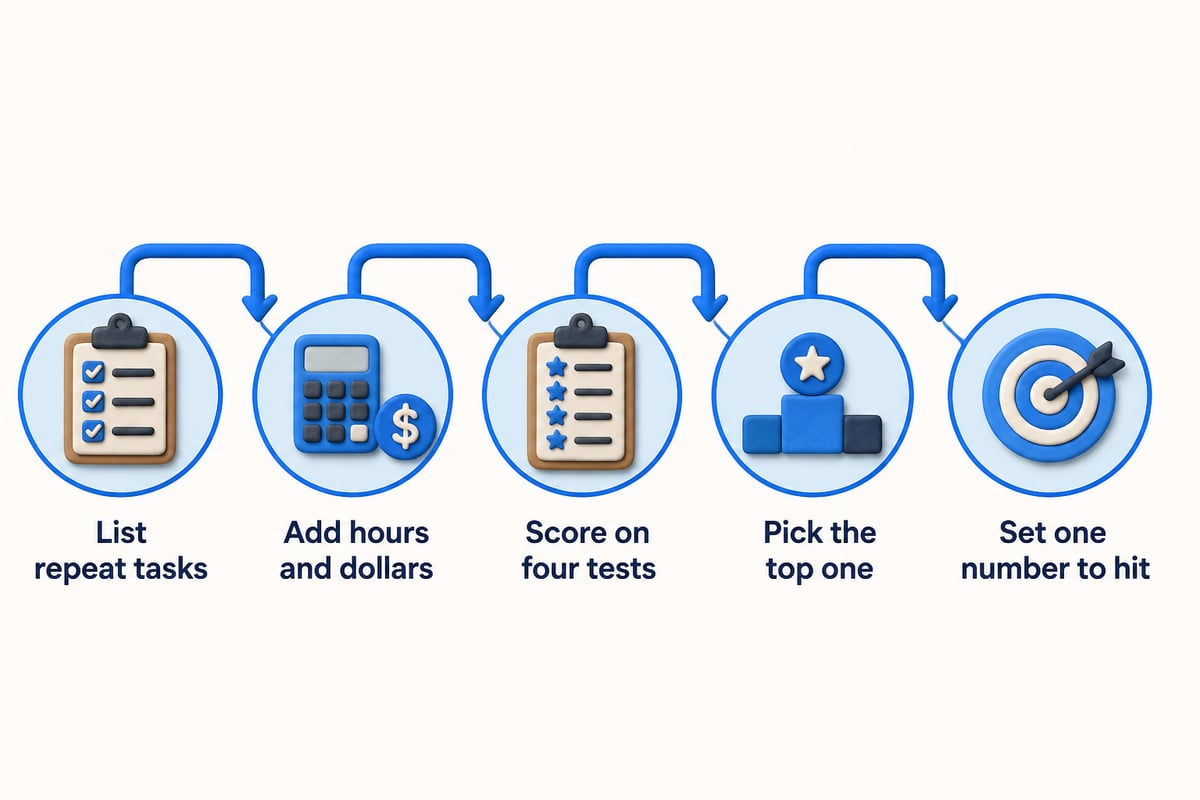
Pick the job that costs the most hours or loses the most money, then check it against four tests.
Sit down with a pen and do this:
- List your repeat tasks. Write down everything your team does more than five times a week.
- Add hours. Estimate time per week for each. Be honest.
- Add dollars. Multiply hours by what that person's time costs. Add any money lost when the task is late.
- Score each task. Is it repeated? Does it follow rules? Is the data in one place? Is a mistake cheap to fix?
- Pick the top score. That is your first build.
Here is a quick example with made-up round numbers to show the math. A task takes 6 hours a week. Your staff time costs $30 an hour. That is $180 a week, or about $9,360 a year. If an agent does most of it, you can see the room for payback before you spend a cent.
If a task fails the tests, leave it for later. A job with messy data or high risk is a bad first build.
What It Costs and How to Avoid Waste
Most wasted AI money goes to tools that do too much, models that cost too much, and projects with no clear measure of success.
Let's take those one at a time.
Too many seats. A software plan with 15 seats sounds fine until 11 people never log in. Buy for the job, not the headcount. Start with the two or three people who do the task today, and add seats only when someone asks for one.
Too much model. The biggest AI model is not always needed. A simple task like sorting an email does not need the most costly model. Match the model to the job. You can test options with Vieerx's model calculator to see how model choice changes cost. Cost grows with volume, so a job that runs thousands of times a month is where a cheaper model saves the most.
No finish line. Write down the number you want before you start. "Reply to leads in under five minutes." "Cut report time from five hours to one." If you cannot measure it, you cannot tell if it worked.
Building too wide. One agent with ten jobs breaks often. One agent with one job holds up. Narrow beats clever.
Also watch for stacked subscriptions. Three tools that each do a little of the same job cost more than one that does it well, and your team will not know which one to trust. Review every plan on the date you set at the start, and cancel anything nobody opened that month.
A good plan has four parts: one job, one number, one owner on your team, and a date to review. That is all.
Build, Buy or Hire Help
You can buy a ready tool, build it yourself, or hire a team to build it, and the right choice depends on how close the job is to your core systems.
| Option | Good for | Watch out for |
|---|---|---|
| Ready-made tool | Simple jobs like drafting text or notes | Limited fit to your process |
| Build it yourself | Teams with a technical person and spare time | Slow start, long tail of fixes |
| Hire a build team | Jobs that touch sales, support or client data | You need to pick a team you trust |
Ready-made tools work well for writing and notes. They fall short when the job has to read your CRM, your inbox and your calendar, then act.
Building it yourself sounds cheap. It often is not. A founder who spends 60 hours wiring up an agent has paid for it in lost selling time.
Hiring a build team makes sense for the jobs that matter most. Ask three things before you sign: how fast will it be live, how do you measure success, and will my team be able to run it later?
What Good Looks Like: A Narrow Agent in Practice
A good agent has one job, runs on its own, and keeps each person's data apart.
Vieerx builds custom AI agents for sales, support and operations, and plugs them into the tools you already use. Here is what it focuses on:
- One narrow job per agent. Each agent owns a single task and runs without a person steering it.
- The cheapest model that passes tests. Each run uses the lowest-cost model that clears evaluation tests, so you do not overpay.
- Separate memory per user. No user's information gets mixed with another's.
- Speed. A working agent is live within 14 days of kick-off, with real ROI in six weeks or less.
- Training. A deployment crew trains your team to build agents without Vieerx.
On results, Vieerx reports high answer accuracy across 1,000+ users, and 17,169+ tickets resolved with zero mix-ups between users. For service firms, the separate-memory point matters. A clinic or a recruiter cannot let one client's details leak into another client's reply.
You can use this as a checklist for any builder you talk to, not only Vieerx. Ask about narrow scope, cost control, data separation and who owns the skills afterward.
Risks to Plan For
The main risks are bad answers, data leaks and staff who feel replaced, and each one has a simple fix.
Bad answers. An agent can say something wrong. Fix it with limits. Tell the agent what it may answer and what it must hand to a person. Test it on 50 real past questions before it talks to a real client.
Data privacy. Do not paste client records into a public chatbot. Use setups where each user's data stays apart, and read the vendor's data terms. Ask where the data lives and who can see it.
Rules and ethics. Rules on AI are still changing. If you work in health, law or finance, check what applies to you before you automate client-facing work. Tell clients when they are talking to an AI.
Your team. Staff worry about jobs. Say plainly what the agent will take over, such as the boring copy-paste work, and what stays human, such as judgment and relationships. Most teams relax once the dull work disappears.
Weak results. If you give an agent vague rules, you get vague work. Write clear instructions and review the first 100 outputs by hand.
The SBA Office of Advocacy has also written about how small businesses are closing the AI adoption gap, using Census Bureau survey data. It is useful context if you want to see where you stand against other firms.
A 30-Day Plan to Get Started
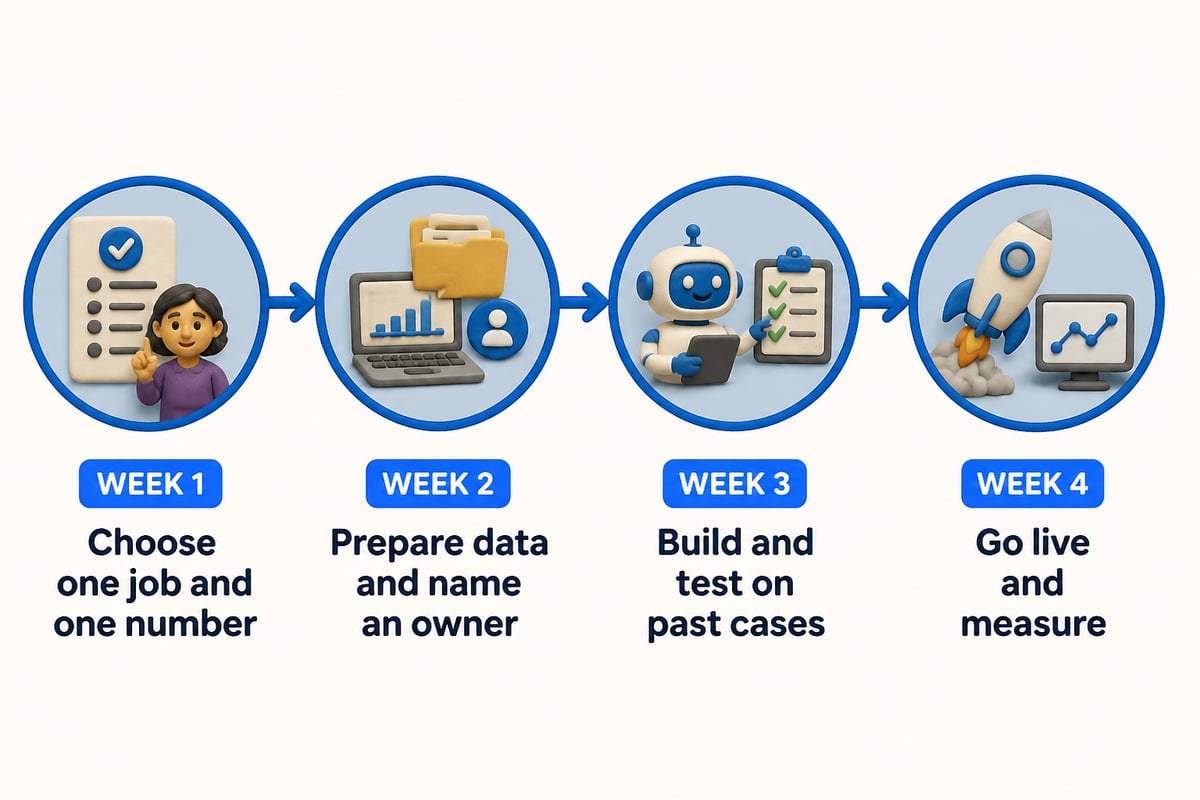
You can go from idea to a working first agent in about 30 days if you keep the scope small.
Week 1: Choose. Run the one-hour exercise from earlier. Pick one job and one number to hit.
Week 2: Prepare. Gather what the agent needs. For lead follow-up, that means your service list, your pricing rules, your calendar link and ten sample good replies. Name one person on your team as the owner.
Week 3: Build and test. Build the agent, or have a team build it. Run it on past cases first. Fix what breaks. Set the rules for when it hands off to a human.
Week 4: Go live and measure. Launch to a small share of real traffic. Check the number you set in week one. Review every handoff. Adjust.
After 30 days you will know two things: whether the job pays back, and how your team likes working with agents. Then pick the second job. Lead follow-up often leads to booking, then to onboarding, then to reporting. Each step builds on the last.
If you also want more leads coming in, outbound marketing can feed the agent. Vieerx runs done-for-you outbound marketing on top of its agent builds, so new leads arrive and the agent handles them.
FAQ
Do I need technical skills to use AI for small business?
No. You need to know your own process well. A good build team handles the technical work and shows you how to run it. Your job is to explain the task clearly and check the results.
Start by writing the task down as if you were training a new hire. What triggers it? What are the steps? When does it go to a person? If you can write that on one page, you can brief a builder. If you cannot, spend a day on the process first. The agent will only be as clear as your instructions.
Will AI replace my staff?
It takes over repeat tasks, not whole roles. A person who spent ten hours a week on copy-paste work can spend that time on clients. Tell your team early which tasks move to the agent and which stay with them.
Think about a front-desk person who answers the same ten questions all day. After an agent takes those, they can call back warm leads, handle upset clients and fix scheduling problems. The work that needs judgment and a human voice stays human. Say that out loud so nobody guesses.
How fast can I see a return?
It depends on the job. Simple, high-volume tasks like lead replies pay back fastest. For Vieerx builds, a working agent goes live within 14 days of kick-off, with real ROI in six weeks or less. Set one number before you start so you can check.
Pick a number you can read without a report, like average reply time or hours spent on weekly reporting. Write down today's value, then check it every week after launch. If the number has not moved by week four, review the instructions and the handoff rules before you blame the tool.
Your next step is to write down the three tasks that eat the most hours in your business this week, and pick the one that loses you money when it runs late. If you want a team to build that first agent and have it live in 14 days, look at Vieerx's custom AI agents. Then book a free demo with Vieerx and see what your first agent would do inside your business. You can also book a free demo directly at https://cal.com/tanvieerx/agentic-review.