

AI automation services are paid help to build software that does your repeat work for you, like answering leads, booking calls, replying to support tickets and sending reports. You buy a build, not a tool. The best ones go live in weeks, have one clear job per agent, and show a number you can check.
Picture a recruiting firm with 12 people. Every morning, two recruiters spend an hour sorting new applicants and sending the same three emails. That is 10 hours a week gone on work a machine can do. An AI automation service builds the machine, wires it into your tools, and hands it back working.
This guide tells you what you can buy, what each piece costs you in time and risk, and how to pick a builder you can trust. It is written for owners and managers of agencies, recruiting firms, consultants, clinics and home service companies.
What AI automation services actually are
AI automation services are done-for-you projects where a team designs, builds and installs software that handles a repeat task in your business without a person steering it each time.
Start with an example. A marketing agency gets 40 new leads a month from its website. Today, a person reads each form, writes a reply, and tries to book a call. Three days pass before some leads hear back. By then, many have talked to a rival.
An automation service builds a lead follow-up agent. The agent reads the form, checks the lead against your rules, writes a reply that sounds like you, and offers three call times. It does this in about a minute. A person only steps in when the lead is a big one.
That is the lesson. Good automation takes one boring job and does it the same way every time.
Here are the jobs service businesses automate most:
- Lead follow-up. Reply fast, qualify, book the call.
- Support. Answer common questions and route hard ones to a person.
- Reporting. Pull numbers from your tools and send the weekly report.
- Invoicing and billing checks. Send invoices, chase late ones, flag errors.
- Booking and scheduling. Fill calendars, send reminders, cut no-shows.
- Internal ops. Move data between your CRM, spreadsheets and inbox.
You do not need all of these. You need the one that costs you the most hours or the most missed money.
AI agents, workflows and chatbots are not the same thing
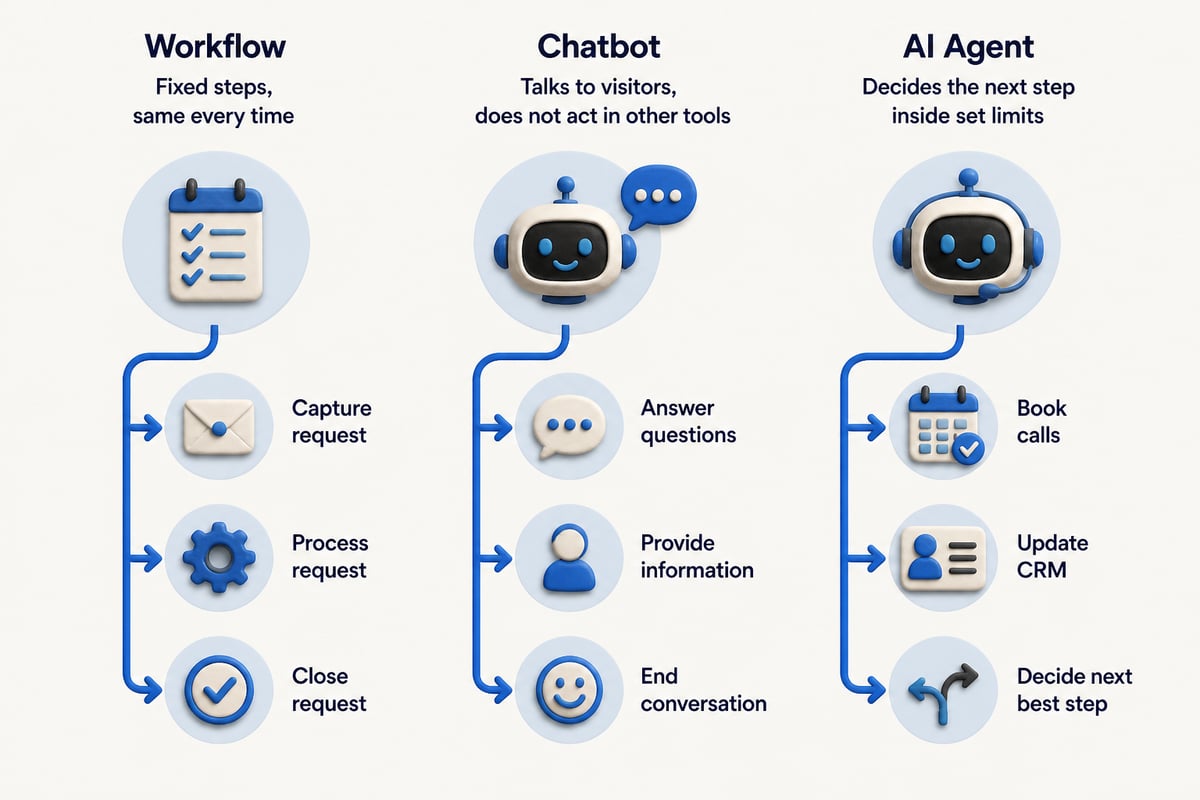
A workflow follows fixed steps, a chatbot talks, and an agent decides what to do next inside limits you set, so you should know which one you are buying before you sign.
Here is a plain example of each, using one business: a three-person consulting firm.
A workflow. When a client signs the contract, the system creates a folder, sends a welcome email and adds a task for the kickoff call. It does the same steps every time. No thinking is needed.
A chatbot. A box on the website answers "What do you charge?" and "Do you work with startups?" It talks. It does not go and do things in your other tools.
An agent. A lead writes in and says, "We need help but our budget is unclear." The agent reads the message, looks up the company, picks the right reply, asks two questions, and books a call if the answers fit. It chooses its next step.
Most real projects mix all three. A workflow moves data. An agent handles the part that needs judgment. A chat window is only the front door.
For a deeper look at the difference, see this guide to agentic AI. If you want more on the chat side, read about an AI chatbot for business.
Why does this matter when you buy? Because some vendors sell a chatbot and call it an agent. Ask them one question: "What does it do after it answers?" If the answer is "nothing," you bought a chatbot.
What you can buy: the main types of AI automation services
You can buy four kinds of AI automation services: tools you set up yourself, a freelancer, a consultancy that advises, or an agency that builds and installs the work for you.
Take a clinic owner with 8 staff who wants fewer missed calls. Here are her four paths.
| Option | What you get | Your time | Best when |
|---|---|---|---|
| Do it yourself with no-code tools | A subscription and a blank canvas | High, often 5 to 10 hours a week at first | You have a tech-minded person with spare time |
| Freelancer | One build, one person | Medium, you manage the work | The job is small and clear |
| Consultancy | A plan and advice | Medium, you still need someone to build | You need a strategy first |
| Build-and-install agency | Working agents inside your business | Low, you give feedback | You want results and have no builder in-house |
Each path has a trap.
Do it yourself. Tools are cheap. Your hours are not. Owners often spend a month on a flow that breaks when a form field changes. Nobody is on call.
Freelancer. A good one is great. But one person means one point of failure. If they get busy or leave, you hold a build nobody understands.
Consultancy. You get slides and a roadmap. The build is still on you. That works if you have an engineer. If you don't, the roadmap sits in a folder.
Build-and-install agency. You pay more up front, but the work arrives running. The key check is what happens after launch. More on that below.
If you want help picking a partner type, this piece on how to choose an AI agency goes through it step by step. And if you are weighing advice against a build, read about AI consulting.
What to automate first
Automate the task that costs you the most money or hours and follows the same steps each time, because a clear, repeatable job is the easiest to get right.
Here is a simple test. A home services company with 20 staff wrote down every task the office did in one week. Then they marked two things for each: how many hours it took, and how often it followed the same pattern.
Quote requests came out on top. The office replied to each by hand. Replies took six hours on average. Jobs went to whoever answered first.
Use the same test:
- List your repeat tasks for one week.
- Write the hours each one takes.
- Mark each as "same steps every time" or "needs judgment."
- Pick the one with the most hours and the most "same steps."
- Ask what a slow answer costs you in lost jobs.
Step five is the one owners forget to do. A slow reply is not free. If you close 1 in 5 leads who hear back in a minute, and 1 in 20 who hear back in a day, speed is your money.
Good first picks for service businesses:
- Lead follow-up for agencies and consultants
- Candidate screening replies for recruiting firms
- Missed call and booking handling for clinics and home services
- Weekly client reports for agencies
Bad first picks: anything rare, anything that changes every time, and anything where one mistake costs you a client.
You can see how call handling works in practice in this guide to an AI receptionist and this one on an AI voice agent.
How an AI automation project runs, step by step
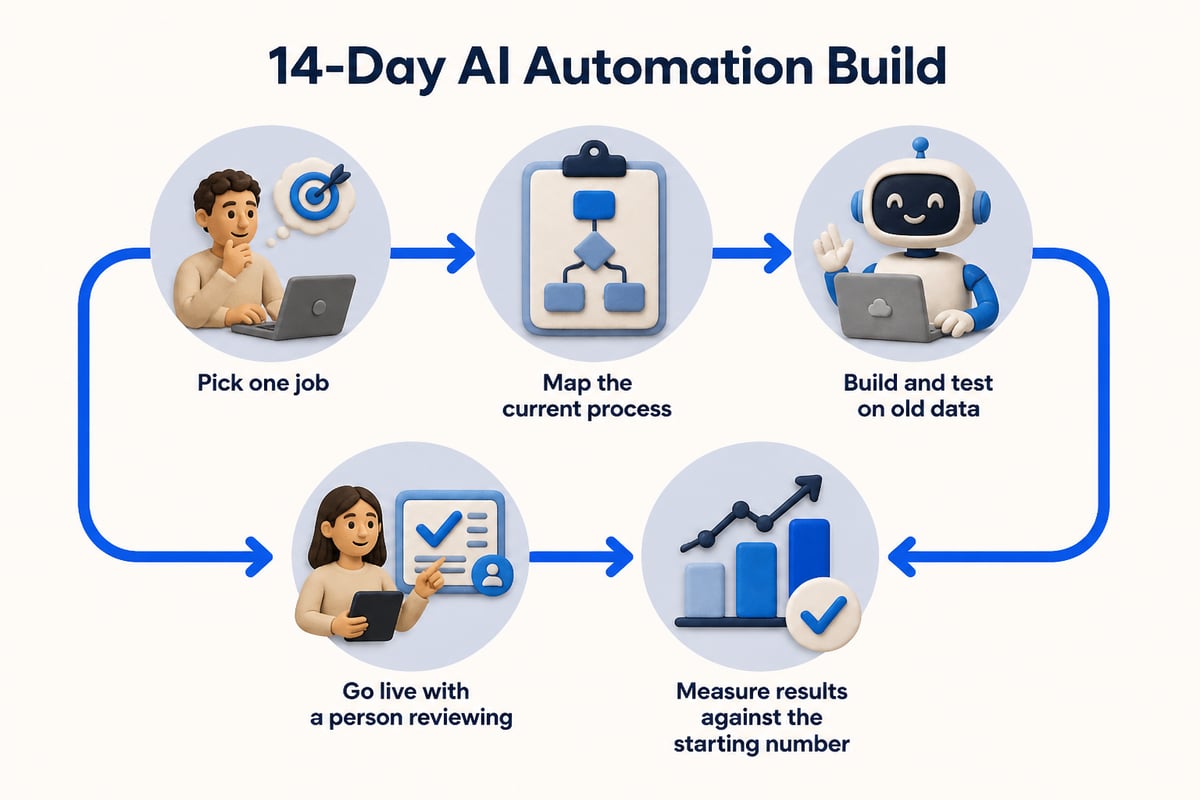
A good project follows five steps: pick one job, map how it works today, build and test it, go live with a person watching, then measure the result against a number you set at the start.
Take a recruiting firm that wants faster candidate replies. Here is how a clean project goes.
- Pick one job. "Reply to every new applicant within five minutes and book a screen call for good fits."
- Map the job. Someone writes down what the best recruiter does today. What do they check? What do they say? When do they ask for help?
- Build and test. The agent is built. It runs on 50 old applicants before it touches a real one. Wrong answers get fixed.
- Go live with a human watching. For the first days, a person reads what the agent sent. Mistakes get caught early.
- Measure. Compare to the starting number. Replies in five minutes. Calls booked. Hours saved.
Speed matters here. A project that runs for six months before anything works is a red flag. Vieerx puts a working agent live within 14 days of kickoff and aims for real ROI in six weeks or less. Whoever you pick, ask for a date when something real goes live, and hold them to it.
Also ask who teaches your team. Some builders keep everything in their heads. Vieerx's deployment crew trains your team to build agents without them, so you are not stuck.
How to tell a good builder from a risky one
A good builder gives you one job per agent, a test you can see, a live date, and a number to check, while a risky one gives you big promises, vague scope and no way to measure.
Think of two sales calls. Builder A says, "We will transform your whole business with AI." Builder B says, "We will build one agent that replies to leads in under two minutes. Here is how we test it. It goes live on day 14."
Builder B is the one to trust. Specific beats grand every time.
Use this checklist when you talk to any vendor:
- Narrow jobs. Each agent should have one task. An agent that does "everything" does nothing well. Vieerx builds each agent around a single narrow job that runs without a person steering it.
- Tests before launch. Ask how they check answers. Ask for the accuracy number and how many users it covers. Vieerx reports 99.4% answer accuracy across 1,000+ users.
- Real volume. Ask how many real tasks the system has handled. Vieerx reports 17,169+ tickets resolved with zero mix-ups between users.
- Cost control. Ask which model runs each step. Smart builders use the cheapest model that passes the tests, so your bill does not climb. Vieerx does this on every run.
- A live date. Anything over 30 days to first launch needs a good reason.
- Handover. Ask what you own at the end and who can change it.
- Clear scope. If they cannot say what the agent will not do, they have not thought about it.
Walk away if you hear any of these:
- "Guaranteed 10x results" with no starting number
- "We can't show you a test"
- "You'll need a six-month contract before we begin"
- A price that has no link to a task or a result
You can check a builder's math before you talk. Vieerx has a model cost calculator that shows how model choice changes your bill.

Privacy and safety: the questions to ask before you sign
Before you sign, ask how the builder keeps each user's data separate, who sees your customer data, and what happens when the agent is wrong, because those three answers decide your risk.
Here is a real kind of mistake. A support agent holds a chat with Customer A. Then it holds a chat with Customer B. If the system mixes the two, Customer B sees Customer A's order details. One mix-up like that can cost you a client and a lot of trust.
The fix is separate memory for each user. Vieerx gives each user their own memory, so no person's information gets mixed with another's. Ask every builder to explain how they handle this in plain words. If they cannot, that tells you something.
There is also a public standard you can use as a guide. The U.S. National Institute of Standards and Technology runs a voluntary AI Risk Management Framework that helps organizations find and manage AI risks. NIST also released a Generative AI Profile, a cross-sector companion that gives suggested actions to govern, map, measure and manage the risks of generative AI. You do not need to read all of it. But a builder who knows it and can talk about it in plain words is a better bet than one who has never heard of it. NIST also keeps a hub of framework resources if you want to go deeper.
Questions to ask:
- Where does my customer data go, and who can see it?
- How do you keep one customer's data apart from another's?
- What does the agent do when it is not sure?
- How do I turn it off fast?
- How do you log what it did, so I can check?
The third one matters most. A safe agent says "I will pass this to a person" instead of guessing. Ask to see that in a demo.
What AI automation services cost, and how to judge the return
Judge the cost of AI automation services by the hours and revenue they return, not by the price tag, so set a starting number before you buy and check it again at six weeks.
Here is the math with plain numbers. Say an agency owner pays a coordinator $25 an hour. That person spends 10 hours a week on lead follow-up. That is $250 a week, or about $13,000 a year. If an agent handles 80 percent of that work, the saved time is worth about $10,400 a year. Now count the extra deals from faster replies. If one more client signs each quarter at $3,000, add $12,000. The return on a clean build can cover itself fast.
These are example numbers to show the method. Use your own pay rates and close rates. Do not use a vendor's numbers.
Costs to ask about, and to compare across vendors:
- Build fee. One time, or monthly?
- Run cost. Model fees, tool fees, hosting.
- Change cost. What does it cost to adjust the agent in month three?
- Support. Who fixes it at 9 a.m. on a Monday when it breaks?
Cheap on the front can mean costly later. A $500 build that you cannot change is worse than a $5,000 build you can.
Set the proof up on day one. Write down: hours spent today, replies per day, average reply time, calls booked per week. At week six, measure the same four. If the numbers did not move, ask why before you pay for more.
This is the best test of any provider. A builder who is happy to be measured is a builder who expects to win.
Where Vieerx fits
If you run a service business with 5 to 50 people and you do not have a builder on staff, you can book a short review of your repeat work. Vieerx offers an AI automation build that sets up workflows on n8n and Claude to do the repeat work for you, such as lead follow-up, booking, reporting and invoicing.
That fits agencies, recruiting firms, consultants, course sellers and SaaS founders best. It is not made for a person who wants a personal assistant, or for a business that wants a free chatbot with no setup. If that is you, a self-serve tool is the better path.
For a wider look at how agents work across a whole team, read about AI agents for business.
Frequently asked questions
How long do AI automation services take to set up?
A focused project can go live in about two weeks. Vieerx puts a working agent live within 14 days of kickoff. Large projects that touch many systems take longer. If a vendor cannot name a launch date, treat that as a warning.
Do I need a technical team to use AI automation services?
No. A good provider builds the agent, connects it to your tools and tests it. You need one person who knows how your work runs today, usually the owner or the team lead. Ask for a handover plan so your team can make small changes later.
How do I know if an AI automation is working?
Pick the numbers before the build starts. Good ones are hours spent per week, reply time, calls booked and tickets resolved. Check them again at six weeks. If nothing moved, ask the builder what they will change.
Pick one repeat task this week, write down how many hours it takes, and use that number to judge any offer you get. Vieerx builds AI agents for agencies and service businesses, goes live in 14 days, and trains your team so you are never stuck. Book a free demo at Vieerx to see how it would work on your own lead follow-up, support or reporting at https://cal.com/tanvieerx/agentic-review.