

An AI answering service is software that picks up your business calls, talks to the caller, and handles the job. It can answer questions, book appointments, take messages, and send a hot lead to a real person. It works at 2 a.m. It never puts anyone on hold. For a service business with 5 to 50 people, it fixes one problem: calls that go to voicemail and never come back.
This guide explains how it works, what it costs, where it fails, and how to pick one. It is written for owners and managers who run agencies, recruiting firms, clinics, and home service companies.
What does an AI answering service actually do?
An AI answering service answers a call, understands what the caller wants, and takes the next step without a human on the line.
Here is a hypothetical example. A recruiting firm gets a call at 7 p.m. from a hiring manager. Nobody is in the office. Without the AI, the call goes to voicemail. The hiring manager calls the next firm on the list. With the AI, the call is answered on the first ring. The AI asks what role they need to fill, how fast, and what the budget is. It books a call with a recruiter for the next morning. It then adds the details to the CRM.
That is the whole job. A good AI answering service does five things:
- Answers every call, day or night
- Asks the right questions
- Books time on a calendar
- Sends the call to a human when it should
- Logs everything where your team can see it
It is different from the phone tree you hate. A phone tree says "press 1 for sales." An AI agent lets the caller just talk. It understands normal speech and answers in plain words.
If you want the deeper view of how voice agents are built, read our guide on AI voice agents.
How does an AI answering service work?
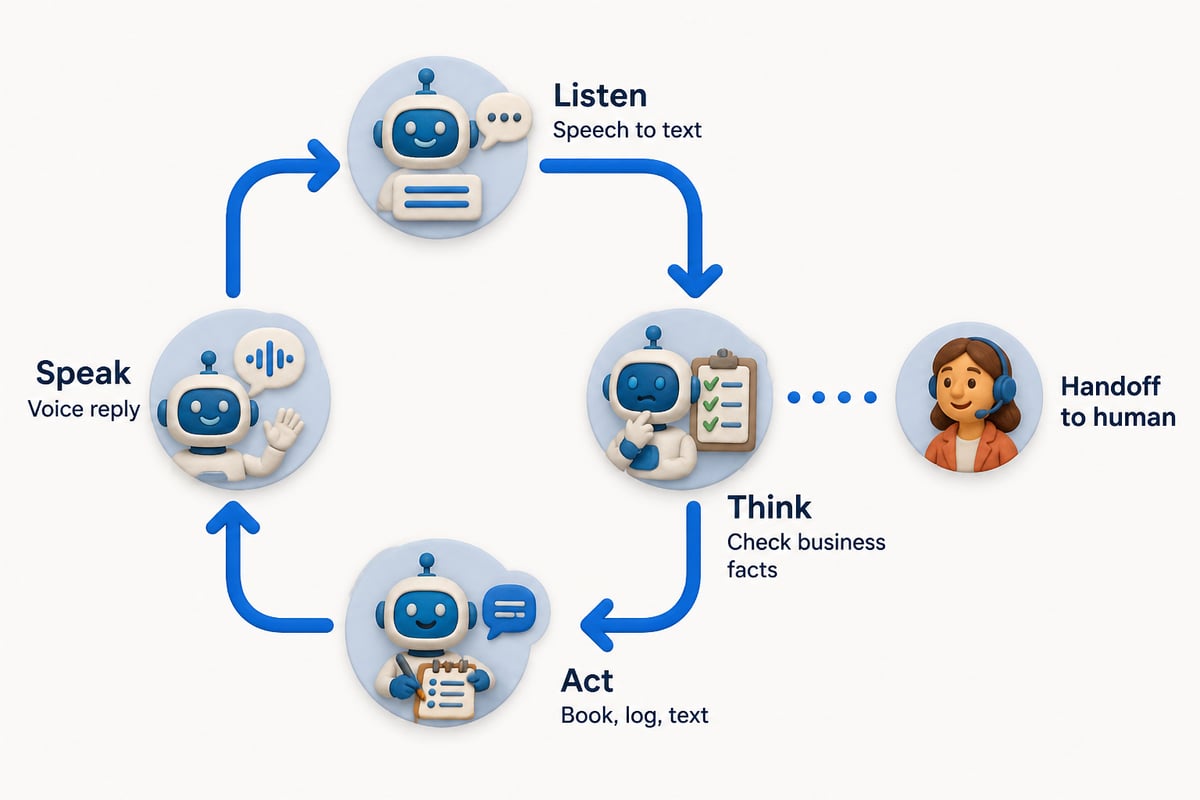
An AI answering service turns the caller's voice into text, decides what to say, and speaks the answer back, all in about a second.
Think of it as four steps that repeat for every sentence:
- Listen. Speech to text turns the caller's words into written words.
- Think. A language model reads the words, checks your business info, and picks a reply.
- Act. The agent runs a task, like checking a calendar or looking up a customer.
- Speak. Text to speech turns the reply into a human sounding voice.
The "think" step matters most. A weak system guesses. A good one only answers from facts you gave it, like your hours, services, prices, and booking rules. If it does not know, it says so and passes the call on. That is the difference between a helpful agent and one that makes things up.
The "act" step is what makes it more than a message taker. The agent connects to your tools. It can read your calendar, write to your CRM, send a text, or open a support ticket. Without those links, you only get a fancy voicemail.
AI answering service vs. a human answering service
A human answering service costs more per minute and runs on shifts, while an AI service costs less and runs all day without breaks. Each one wins in a different place.
| AI answering service | Human answering service | |
|---|---|---|
| Hours | 24/7, no shifts | Often limited by staffing |
| Wait time | None, answers on first ring | Can queue at busy times |
| Cost pattern | Flat or per minute, usually lower | Per minute, usually higher |
| Calls at once | Many at the same time | One per agent |
| Tricky or upset callers | Needs a human handoff | Handles with empathy |
| Memory of your business | Only what you load in | Only what the script says |
The honest answer for most small teams is a mix. Let the AI take the routine calls. Send the upset, high value, or odd calls to a person. That is what most good setups do.
A Salesforce State of Service report found that most service professionals with voice AI said the move to a human rep is seamless for customers. The handoff is the part to test first.
Which calls should the AI take, and which should go to a person?
Give the AI the calls that follow a pattern and keep the calls that need judgment for your team.
A simple rule: if you could write the answer on an index card, the AI can handle it.
Good fits for the AI:
- "What are your hours?"
- "Do you work in my area?"
- "Can I book a time next week?"
- "Where is my order or my ticket?"
- First contact from a new lead
Keep for a human:
- A client who is angry about a bill
- A large deal that needs a custom quote
- A sensitive health or legal matter
- Anything where a wrong answer costs real money
Here is a hypothetical example for a home services company. The AI answers "Do you fix water heaters on weekends?" and books the visit. When a caller says "my basement is flooding right now," the AI flags it as urgent and rings the on call tech at once. Same system, two paths, set by simple rules.
Write your rules down before you pick a tool. Ten lines on one page is enough. The page becomes your setup guide.
Is AI taking call center jobs?
AI is taking some tasks from call centers, but it is mostly changing the work, not removing the people.
The tasks it takes are the repeat ones: hours, status checks, simple bookings. The tasks that stay are the hard ones: upset callers, odd cases, deals that need trust. Salesforce's report says service leaders expect AI to resolve a much larger share of service cases by 2027. That is a big shift in who handles what.
For a 5 to 50 person business, the picture is simpler. You likely do not have a call center. You have a front desk person, an owner, or a shared phone that rings during meetings. The AI does not replace a team you do not have. It covers the calls you miss today. Salesforce also reports that service leaders using AI agents expect costs and case resolution times to drop.
If you have staff, the usual best move is to free them from the dull calls so they can do the work that grows the business.
How much does an AI answering service cost?
Most AI answering services charge a monthly fee plus a per minute rate, and the total depends on how many calls you get and how much custom work you need.
Prices change often, so check each vendor's page before you decide. Here are the common models:
- Flat monthly plan. You pay one price for a set number of minutes. Easy to budget. Overages can sting.
- Per minute. You pay for what you use. Good for low volume, risky for busy lines.
- Per call or per booked job. Rare, but it lines cost up with results.
- Custom build. You pay a one time build fee plus running costs. The agent is shaped to your process and tools.
Do the math on a real number. If you miss 30 calls a month and 1 in 5 would have become a client, that is 6 clients. Multiply by what one client is worth to you. Compare that with the monthly price. If the answer is clear, buy. If it is close, start with a small plan and watch the first month.
Ask three cost questions before you sign:
- What happens when I go over my minutes?
- Is there a setup fee?
- Are CRM links and calendar links included or extra?
Our guide to AI automation services covers how build and run costs usually split.
What should you look for when you choose an AI answering service?
Choose the service that answers accurately, connects to your tools, and hands off to a human cleanly, in that order.
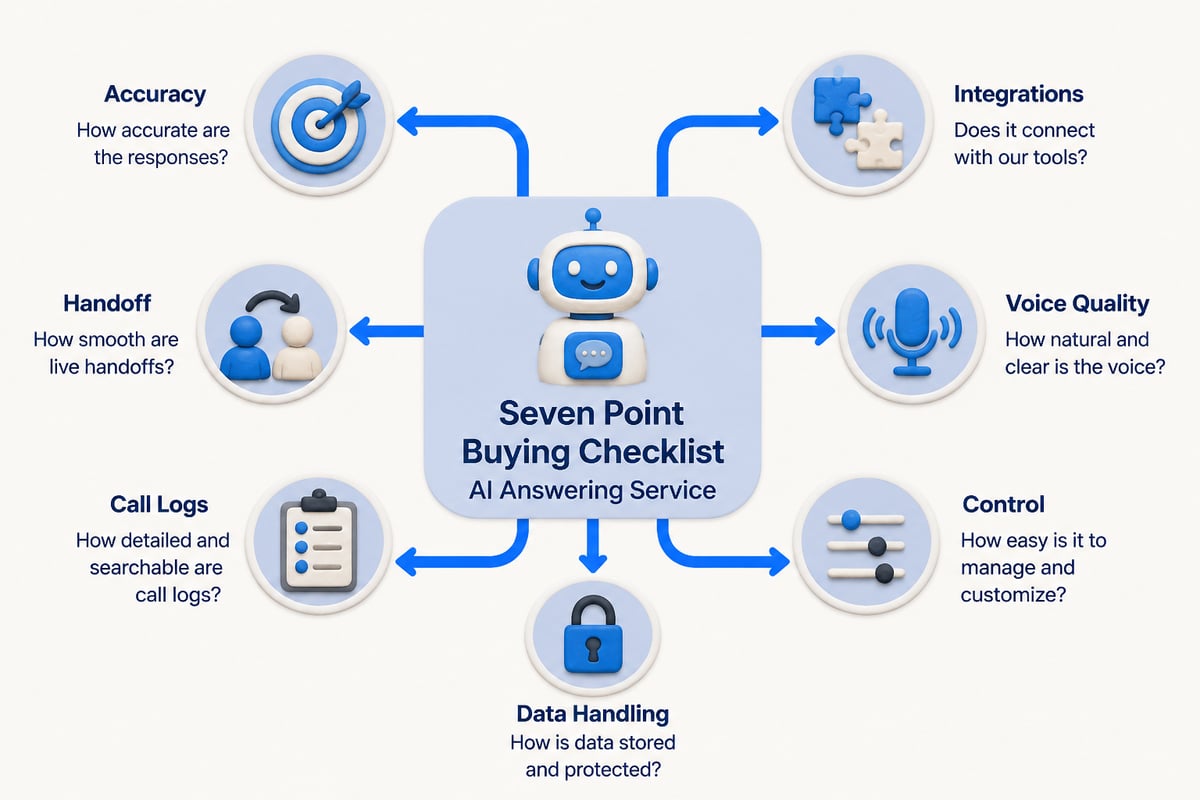
Use this checklist when you compare tools:
- Accuracy. Does it answer only from your facts? Ask for a demo with your real questions.
- Integrations. Does it write to your CRM and calendar, or does it only send an email?
- Handoff. Can it transfer a live call to a person with the context attached?
- Voice quality. Call it yourself. Would a customer feel fine talking to it?
- Call logs. Can you read the full transcript of each call?
- Control. Can you change a rule today without waiting a week?
- Data handling. Where do call recordings and customer details go, and who can see them?
The last point deserves care. The NIST AI Risk Management Framework explains how organizations can build trust into how they design, use, and test AI. You do not need to read all of it. Take one idea from it: test the system before real customers use it, and keep testing after.
The part most buyers skip: one agent, one job
Narrow agents answer better than one agent that tries to do everything.
Many answering tools try to be a receptionist, a sales rep, and a support desk at once. The more jobs one agent has, the more it mixes up. A caller asks about billing and gets sales talk. Another asks about a booking and gets a policy answer meant for someone else.
The fix is to split the work. One agent books appointments. A different agent answers support questions. A third qualifies new leads. Each has one narrow job and its own rules. This is how Vieerx builds. Every agent owns a single narrow job and runs without a human steering it.
Memory is the other half. If the agent keeps one shared memory, details from one caller can leak into another caller's call. That is a real privacy problem. Ask any vendor how memory is kept apart for each caller. Vieerx gives each user separate memory, so no user's information gets mixed with another's. Its support agents have resolved 17,169+ tickets with zero mix-ups between users, and answer accuracy sits at 99.4% across 1,000+ users.
Cost matters here too. Not every call needs the most costly AI model. Vieerx runs each task on the cheapest model that passes its evaluation tests. That keeps the monthly bill low without making answers worse.
If you want to see how this idea works across a whole business, read about AI agents for business.

Can you build your own AI answering service, or should you buy one?
Buy a ready tool if your needs are simple, and build a custom agent if your calls touch several tools or follow rules unique to your business.
Here is a plain way to decide:
- Buy off the shelf when you need basic call pickup, message taking, and simple booking. Setup is fast and the price is fixed.
- Build custom when the agent must check a CRM, qualify leads by your own rules, open tickets, or pass work to other agents.
- Mix both when you start with a simple tool and move to a custom build once volume grows.
Hypothetical example: a marketing agency gets leads by phone, form, and email. An off the shelf tool answers the phone but cannot see the form leads. A custom setup can treat all three the same way.
If you want a custom build, Custom AI agents from Vieerx are built for your business and plugged into your tools, live in 14 days. For pricing and scope, check with Vieerx directly.
How do you set up an AI answering service in a week?
You can set up an AI answering service in one week if you do the prep work first and test with real calls before going live.
Follow these steps:
- List your top 20 calls. Look at the last month. Write down what people asked.
- Write the answers. One or two sentences each. These become the agent's facts.
- Set the handoff rules. Name who gets a live transfer and when.
- Connect your tools. Calendar first, then CRM, then text or email alerts.
- Pick the voice and the greeting. Keep the greeting short. Say who you are and how you can help.
- Test with 20 practice calls. Ask odd questions. Try to confuse it.
- Go live on after hours only. Add daytime calls once the nights go well.
- Read the transcripts every day for two weeks. Fix gaps as you find them.
Step 7 is a safe way to start. After hours calls are the ones you lose today, so the AI cannot make things worse. Once you trust it, widen the hours.
Our piece on the AI receptionist goes deeper on greeting scripts and front desk rules.
What can go wrong with an AI answering service?
The main risks are wrong answers, bad handoffs, and privacy slips, and all three can be tested before launch.
Wrong answers. The agent says something false with a confident voice. Fix this by limiting it to facts you supplied and making it say "let me get a person" when it is unsure.
Bad handoffs. The agent passes a call to a human but drops the context, so the caller repeats everything. Fix this by sending a short summary with every transfer.
Privacy slips. Call details end up where they should not. Fix this by asking each vendor where data is stored, who can read transcripts, and how long recordings are kept.
Caller frustration. Some people just want a human. Let them reach one. A caller who says "agent" or "person" should get one fast.
A simple habit prevents most problems: read ten random call transcripts each week. You will spot patterns in minutes. Then fix the rule that caused them.
NIST's framework for generative AI, released July 26, 2024, lists suggested actions for governing, mapping, measuring, and managing the risks of this kind of tool. See the NIST Generative AI Profile if your team wants a formal checklist.
How do you stop an AI from answering your calls?
You stop an AI from answering by turning off call forwarding to the service or by changing its hours or rules in the settings.
For a business line, there are three common ways:
- Pause the forwarding. Remove the forward from your phone system or carrier settings. Calls go back to your normal line.
- Change the schedule. Set the AI to answer only after hours, or only when no one picks up in a set number of rings.
- Add a transfer word. Set a rule so that "person" or "agent" sends the call to a human right away.
For a personal phone, the steps depend on your phone and carrier. Look in your call settings for a screening or assistant option and switch it off. This article is about business tools, so check your device's help page for the exact steps.
If you run a business line, test the off switch before you need it. Know who can turn the AI off, and how fast.
Can an AI answering service help you make money?
An AI answering service makes money by catching calls you lose today and turning them into booked work, not by finding customers on its own.
The math is plain. Take your missed calls in a month. Take the share that would have become paying clients. Multiply by the value of one client. That number is what the AI can recover.
Hypothetical example: a clinic misses many calls after 5 p.m. If a share of them would have booked a visit, those visits are the monthly gain. Compare that gain to what the service costs.
You can also add value past the phone. The same agent can text new leads, send reminders, and ask for reviews. Each step costs little and brings in more work. A build like this sits in the wider world of conversational AI, where one system talks with leads and clients across channels.
Be careful with big income promises. No answering tool gives you a fixed monthly income. It gives you more of the calls you already earn.
FAQ
What is the difference between an AI answering service and an AI receptionist?
The two terms mostly mean the same thing. "Answering service" stresses picking up calls and taking messages. "Receptionist" stresses a fuller front desk role, like booking and routing. Many tools do both.
Will callers know they are talking to an AI?
Some will, and some will not. Voices are now smooth, but tone and timing can still give it away. The safe move is to be honest in the greeting and make it easy to reach a person.
How much does AI customer support cost?
It depends on call volume, setup work, and how many tools it connects to. Models include flat monthly plans, per minute rates, and custom builds. Price your own missed calls first, then compare plans against that number.
Take your last 30 days of missed calls and write down how many would have turned into work. That number tells you if this is worth doing. If you want an agent built around your own calls, rules, and tools, Vieerx builds Custom AI agents that go live in 14 days. Book a free demo at https://cal.com/tanvieerx/agentic-review.