

An AI phone answering service picks up your business calls with a computer voice, talks to the caller, answers common questions, books appointments and passes the hard calls to a person. Most plans cost between a few dozen and a few hundred dollars a month, and a good setup takes days, not months.
This guide is for owners and managers of service businesses. Think agencies, recruiting firms, consultants and clinics. You will learn what these services do, what they cost, how to pick one and how to set it up so it helps your team instead of annoying your callers.
What Does an AI Phone Answering Service Actually Do?
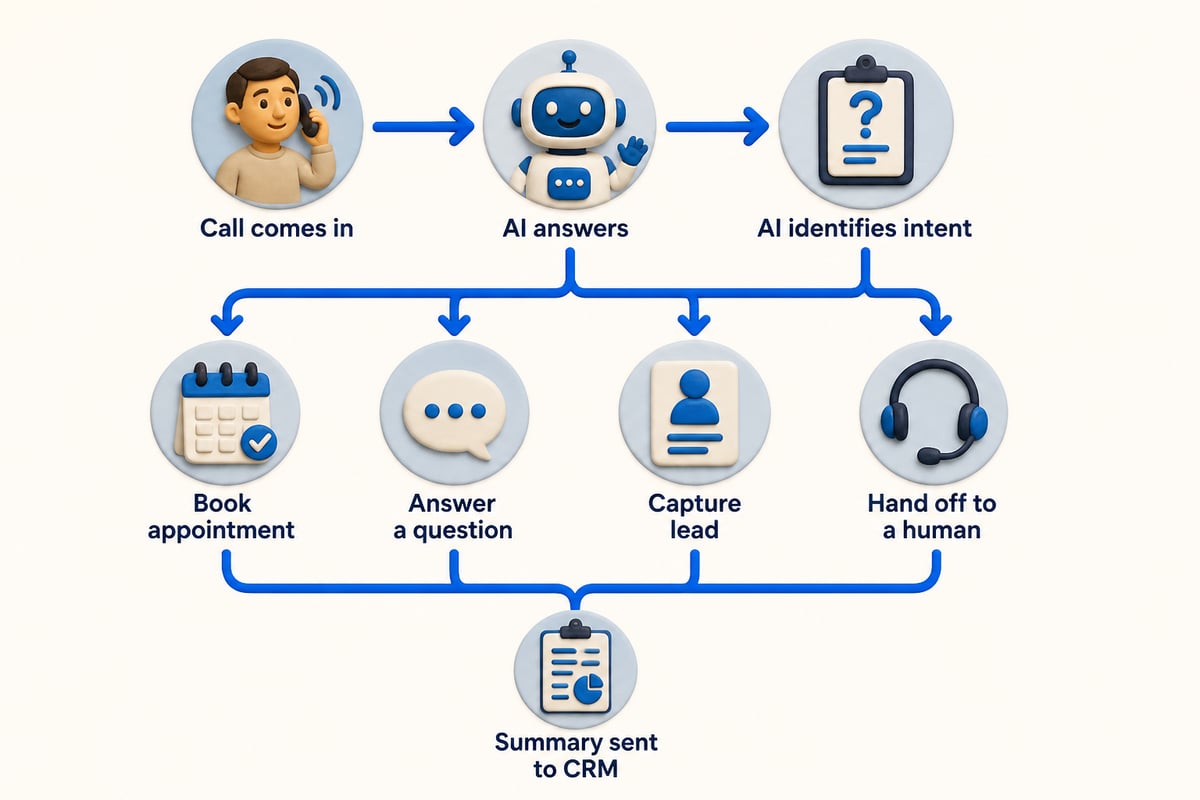
An AI phone answering service answers inbound calls, understands what the caller wants, replies in a natural voice and takes action, such as booking a slot or sending a lead to your CRM.
Hypothetical example: a recruiting firm gets an evening call from a hiring manager while the office is closed. The AI answers, asks about the role, checks the calendar and books a call for the next morning. It then texts a short summary to the account lead.
That is the whole job. The call does not go to voicemail. The lead does not call your competitor next.
A solid service handles these tasks:
- Answers every call at any hour, with no hold music.
- Answers common questions about hours, pricing, services and location.
- Books and moves appointments on your live calendar.
- Captures lead details like name, number, company and need.
- Routes urgent calls to a real person by text or transfer.
- Writes a summary of each call and sends it to your tools.
It does not replace your best salesperson. It handles the first 60 seconds of a call so your best people spend time on calls that matter.
How Is an AI Answering Service Different From a Human One?
The main difference is cost and coverage. A human answering service charges per minute or per call. An AI service answers unlimited calls at the same time at a flat or usage-based rate.
A human receptionist can only take one call at once. If three people call at 9:02 a.m., two wait or hit voicemail. An AI picks up all three.
A human is better at tricky moments. An upset client, a sensitive medical question or a complex negotiation still needs a person. Good AI setups know this and hand those calls over fast.
Here is a plain comparison:
| Feature | Human answering service | AI phone answering service |
|---|---|---|
| Calls at once | One per person | Many at once |
| Hours | Often limited, extra for nights | 24/7 |
| Cost model | Per minute or per call | Flat monthly or per minute |
| Setup time | Days to a week | Days to two weeks |
| Tricky or emotional calls | Strong | Needs a handoff to a person |
| Consistency | Varies by agent | Same answer every time |
Many businesses use both. The AI takes the first pass. A person takes anything flagged as urgent or sensitive.
You may also see this called an AI receptionist or an AI voice agent. The names overlap. Our guide on the AI receptionist goes deeper on the front desk use case, and the one on the AI voice agent covers the voice technology itself.
How Much Does an AI Phone Answering Service Cost?
An AI answering service usually costs a monthly platform fee plus a per-minute call fee, and the total depends on your call volume. Small businesses with a few hundred minutes a month often spend far less than the cost of a part-time hire.
Costs come from four places. Know all four before you sign.
- Platform or seat fee. A flat monthly charge to use the tool.
- Call minutes. Most services bill per minute of talk time. Per-minute rates vary by provider, so get the exact rate in writing.
- Setup or build fee. Done-for-you providers charge once to build, train and connect the agent.
- Add-ons. Phone numbers, call recording, SMS, extra integrations and premium voices.
Do a quick math check. Say you get 400 calls a month and each lasts 3 minutes. That is 1,200 minutes. Multiply by the per-minute rate in the quote. Add the monthly fee. Compare that to what a missed call costs you.
That last part is the one that matters. If one new client is worth $3,000 and you miss even two real leads a month, the service pays for itself fast. Do the math with your own deal size, not an average.
Watch for these price traps:
- A low base price with steep overage rates.
- Minimum monthly minutes you pay for even if you do not use them.
- Charges for every integration.
- Long contracts with no exit.
Ask for a written quote based on your real call volume. If the provider cannot give you one, move on. If you want to see how AI model choice drives running costs, the model calculator shows the math.
What Should You Look For When Choosing One?
Choose a service by testing it on five things: voice quality, accuracy, integrations, handoff rules and data handling. If it fails any one, the rest does not matter.
Voice quality and speed
Call the demo line yourself. Interrupt it. Ask something odd. Listen for long pauses. A delay of more than about a second feels broken to a caller. If it sounds robotic, your callers will hang up.
Accuracy on your questions
Give it your 10 most common questions. Check every answer against what you would say. A tool that makes up prices or hours is worse than voicemail. Ask the provider how it stops wrong answers. Ask what it does when it does not know.
Integrations
The AI must write to the tools you already use. That means your calendar, your CRM, your help desk and your text messages. If it cannot book into your real calendar, a human must finish every call, and you saved nothing.
Handoff rules
You decide when a person takes over. Good triggers include an angry caller, a legal or medical question, a high-value lead or a caller who asks for a human twice. Test the handoff. Does it transfer live, or does it just say "someone will call you"?
Data and privacy
Ask where call recordings live and who can see them. Ask if your data trains the vendor's models. If you work in health, legal or finance, ask about the rules that apply to you before you go live.
Use this as a quick score sheet. Rate each item 1 to 5 during a demo:
- Voice sounds natural and replies fast
- Answers your 10 real questions correctly
- Books into your live calendar
- Hands off to a person when you say so
- Gives you a clear data policy
- Gives you a written price for your volume
Are Off-the-Shelf Tools or Custom-Built Agents Better?
Off-the-shelf tools are faster and cheaper to start. Custom-built agents fit your process better and do more than answer the phone. The right choice depends on how much your calls feed into the rest of your work.
Off-the-shelf tools work well when your needs are simple. You want calls answered, a name and number captured and a text sent to you. You can set one up yourself in an afternoon.
They get weak when calls need action. A lead calls in. Someone must check your pipeline, see if the person is already a client, pick the right owner, create the deal, start a follow-up email and book the call. A basic tool takes a message. A custom agent does the next five steps.
Here is a hypothetical example. A 20 person marketing agency gets 60 inbound calls a month. About half are new leads, and the rest are current clients with questions. A basic answering tool treats them all the same. A custom agent checks the caller's number against the CRM. A current client gets routed to their account manager. A new lead gets qualified with three questions, scored and booked.
Pick off-the-shelf if:
- You get a low volume of calls.
- Your answers are the same every time.
- You only need messages taken.
Pick custom if:
- Calls tie into your CRM, billing or project tools.
- You have different rules for leads, clients and vendors.
- You want the same agent to also handle email, chat and follow-up.
The custom AI agents Vieerx builds are for the second group. Each agent owns one narrow job and runs without a person steering it. The goal is a live working agent within 14 days of kick-off.
You can read more about the trade-offs in our guides on AI agents for business and the AI agent builder options.
How Do You Set Up an AI Phone Answering Service?
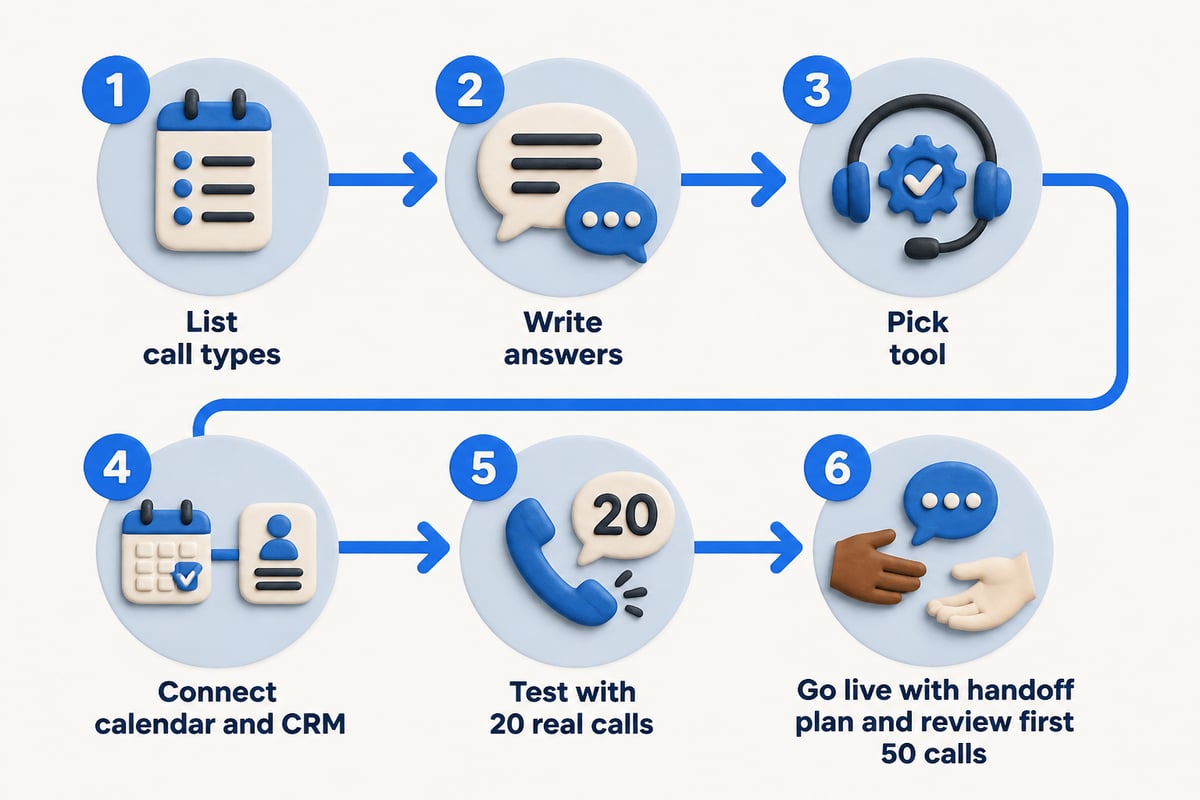
You can start an AI answering service in six steps: list your call types, write your answers, pick a tool, connect your systems, test with real calls and go live with a handoff plan. Small teams often finish in one to two weeks.
- List your call types. Pull the last 30 days of calls from your phone system. Sort them into groups. New lead, existing client, vendor, wrong number, billing, support. Count each group. The top three groups are your starting scope.
- Write the answers. For each call type, write what a great receptionist would say. Include hours, prices you share, services you offer and what you never discuss on the phone. Keep each answer short.
- Pick the tool or builder. Use the score sheet from the section above. Demo at least two options with your own questions.
- Connect your systems. Link the calendar, CRM, text messaging and email. Test that a booked call shows up in the right place with the right name.
- Test with real calls. Call it 20 times. Use different voices, accents and bad connections. Ask odd questions. Log every wrong answer and fix it.
- Go live with a handoff plan. Decide who gets the urgent texts and who covers after hours. Review the first 50 calls by reading the summaries.
Do not skip step 5. Bad AI phone experiences often come from teams that went live after only a few test calls.
One more tip. Start narrow. Let the agent handle one thing well, like booking new-lead calls, before you add billing questions and support. A narrow job is easier to test and easier to trust. This is the same idea behind agentic workflows: small, clear jobs chained together.
What Does the Law Say About AI Answering Calls?
For inbound calls, the rules are lighter than for outbound calls, but you should still tell callers they are talking to an AI and check your state and industry rules. Outbound AI calls face stricter federal limits.
Here is what is on the record. On February 8, 2024, the FCC confirmed that the TCPA applies to AI-generated human-voice calls. Those calls fall under the limits on artificial or prerecorded voices. They generally need the called party's prior express consent, unless there is an emergency or an exemption.
That ruling is about calls an AI makes. An answering service takes calls. The FCC also put out a 2024 proposal on AI-generated calls. Legal 500 reports that proposal described AI calls as outbound calls and suggested excluding tools that answer inbound calls, such as virtual customer-service agents. The same proposal would require a disclosure at the start of an AI-generated voice call, per the Federal Register. It is a proposal, not an adopted rule, so check the current status before you rely on it.
What this means for you:
- Inbound answering is the lower-risk use. Many states still require you to tell callers if you record a call. Add a short line at the start.
- Outbound AI calling for follow-up or sales needs consent. Talk to a lawyer before you build it.
- Disclosure is smart practice even where it is not required. "Hi, this is the virtual assistant for Northside Consulting" costs you nothing and builds trust.
This is not legal advice. If you work in health, finance or law, ask your counsel what applies to your calls.

How Do You Stop an AI From Answering Your Phone?
To stop an AI from answering your phone, turn off call forwarding or the AI feature in your phone settings, or pause the agent in your provider's dashboard. Many services let you switch it off by schedule, number or call type.
Try these in order:
- Check the provider's dashboard. Look for a pause, schedule or hours setting. You can often limit the AI to after hours only.
- Turn off call forwarding. On a business line, forwarding rules sit in your phone system or carrier account. Remove the forward to the AI number.
- Use a human-first ring plan. Ring your team for 15 to 20 seconds. Send to the AI only if no one picks up.
- Add an opt-out line. Let callers press 0 or say "representative" to reach a person at any time.
- On a personal phone, your carrier or phone's built-in call screening may be the AI answering. Turn off call screening in your phone's call settings.
A good rule for any business is to never trap a caller. If someone asks for a human, give them one.
Where Does an AI Phone Answering Service Fit in a Bigger AI Plan?
The phone is one door into your business. The same agent that answers a call can also qualify the lead, update the CRM and start a follow-up, so the biggest gains come from connecting the call to the work that follows.
Think of the call as the start of a chain. A call comes in. The lead is scored. A deal is created. A follow-up email goes out. A reminder fires if no one replies in two days. Each step used to need a person to remember it.
That is why service businesses tend to get more from a custom build than from a stand-alone answering tool. The call is easy to automate. The hard part is what happens after.
When you plan this, ask three questions:
- What is the first thing a person does after a call ends?
- What do we forget to do on busy days?
- Which of those steps follows a rule we can write down?
If you can write the rule, an agent can run it. Vieerx agents each own one narrow job, and each run uses the cheapest model that passes evaluation tests, which keeps running costs down. Each user also gets separate memory, so one caller's details never mix with another's. In a support deployment, Vieerx reports 99.4% answer accuracy across 1,000+ users and 17,169+ tickets resolved with zero mix-ups between users. The target is real ROI in six weeks or less.
What Mistakes Should You Avoid?
The most common mistakes are going live untested, giving the AI too many jobs, hiding that it is an AI and never reading the call summaries. Each one is easy to avoid.
- Going live untested. Run at least 20 test calls. Fix every wrong answer.
- Too many jobs at once. Start with one call type. Add more after two clean weeks.
- No human exit. Always let callers reach a person. A trapped caller never calls back.
- Skipping the summaries. Read the first 50 call summaries. You will find gaps in your answers fast.
- Ignoring your own phone tree. If your old menu has seven options, the AI will inherit the confusion. Cut it down first.
- Judging by price alone. The cheapest plan with weak integrations costs more in manual cleanup.
Track three numbers for the first 30 days: calls answered, calls handed to a person and bookings made. If handoffs stay above 40% of calls after two weeks, your answers need work.
FAQ
What are the best AI apps for answering questions?
The best app depends on the channel. For phone calls, look for a voice agent that books into your calendar and hands off to a person. For web chat, look for a bot trained on your own help content. Test any tool with your 10 most common questions before you pick one.
Can an AI phone answering service work for a small team?
Yes. A team of 5 to 50 people often gets the most value, because missed calls cost real deals and no one has time to cover the phone. Start with one call type, like new-lead booking, and expand from there.
How long does it take to go live?
A simple off-the-shelf setup can run in a day or two. A custom agent tied to your CRM and calendar takes longer. Vieerx builds a live working agent within 14 days of kick-off.
Your next step is to pull the last 30 days of call logs and sort them into call types, so you know exactly what an agent should handle first. If you want a team to build it for you, Vieerx builds custom AI agents that plug into your calendar, CRM and phone line and go live in 14 days, and you can book a demo to see one handle your own calls.