

An AI agent builder is a tool that lets you set up software that does a job on its own, like answering leads or sorting support tickets, without writing much code. You pick a goal, connect your tools, give the agent rules, and test it. For a service business, the real question is not which builder to pick. It is which job to hand over first.
This guide is for owners and managers of agencies, recruiting firms, consultants, clinics and home service companies. You will learn what these tools do, what to automate first, how to compare options, and what it costs in time and risk.
What Is an AI Agent Builder?
An AI agent builder is software that helps you create an AI worker that takes actions, not just answers questions. A chatbot talks. An agent does things: it reads an email, checks your calendar, writes a reply, and updates your CRM.
Think of a recruiting firm. A new candidate applies at night. A plain chatbot says "thanks for applying." An agent reads the resume, scores it against the open role, books a screening call, and tells the recruiter in the morning. That is the difference.
OpenAI's Agent Builder documentation describes a workflow as a combination of agents, tools, and control-flow logic. That is a fair summary of how many builders work. Here are the three parts:
- Agents are the AI steps that read, decide and write.
- Tools are the apps the agent can use, like your inbox, CRM or calendar.
- Control flow is the set of rules for what happens next, like "if the lead is qualified, book a call."
Most builders look like a canvas. You drag blocks, connect them with lines, and press run. Some let you type a sentence and build the first draft for you. Others are code libraries for engineers.
One note on timing. OpenAI says its Agent Builder is scheduled to shut down on November 30, 2026, though ChatKit remains available. That is a good reminder. Builders come and go. Build your agent logic so you can move it.
How an AI Agent Differs From a Workflow or a Chatbot
An agent decides its own next step, a workflow follows a fixed path, and a chatbot only replies. Most useful business systems mix all three.
Here is a plain example. A marketing agency wants a weekly client report.
- Workflow: Every Friday at 4 pm, pull numbers from ad accounts, put them in a template, email the client. No decisions. Same steps every time.
- Chatbot: A client asks "how did my ads do?" and it answers from the report.
- Agent: It pulls the numbers, notices cost per lead jumped 40%, checks which campaign caused it, writes a note explaining it, and flags the account manager.
If you want a deeper look at the idea behind this, our post on agentic AI covers how agents plan and act.
A good rule: use a workflow when the steps never change. Use an agent when the input is messy, like free text emails or voice calls. Many teams over-build here. They use an agent where a simple automation would be cheaper and more reliable.
What Jobs Should a Service Business Automate First?
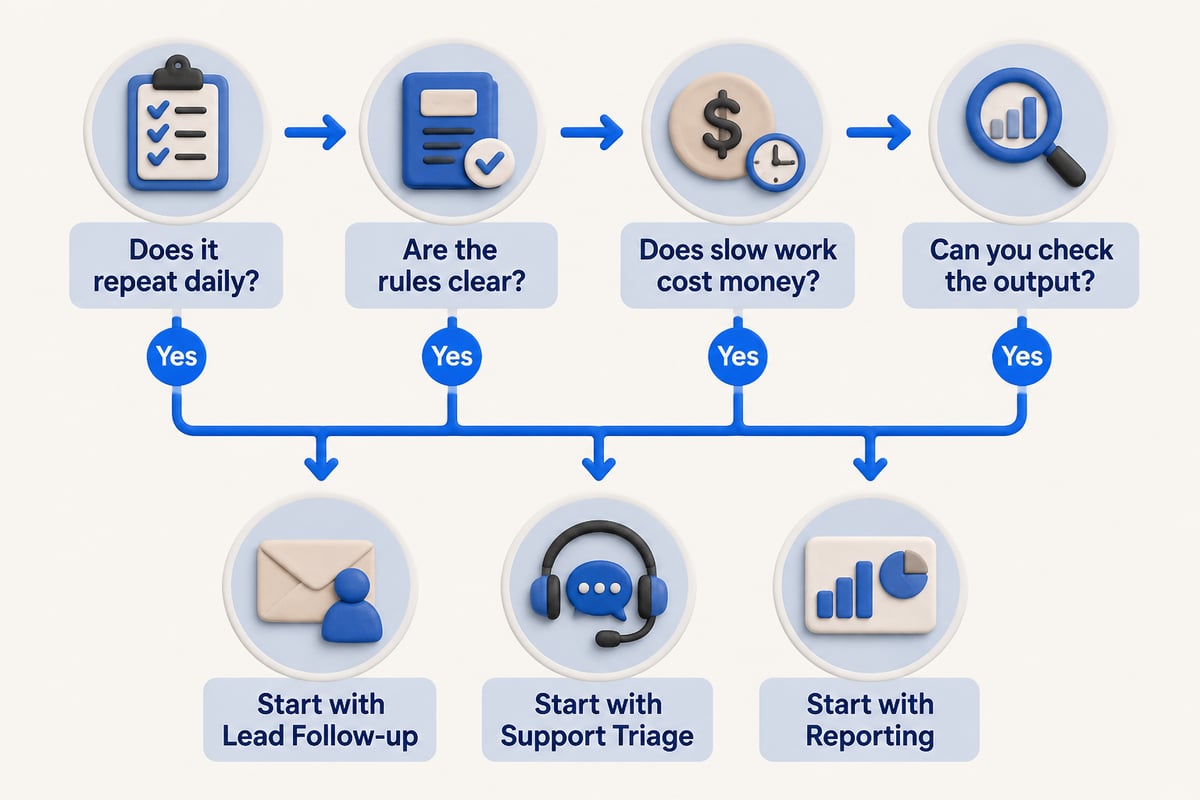
Start with a job that repeats daily, follows clear rules, and costs you money when it is slow. Lead follow-up is the usual winner.
Hypothetical example: a consulting firm gets many form fills each month. The owner replies to each one by hand, often the next day. Some leads go cold. An agent can reply quickly, ask qualifying questions, and book a call. The owner then sees only the leads who answered.
Good first jobs for service businesses:
- Lead follow-up: reply fast, qualify, book the call.
- Support triage: read the ticket, answer the common ones, route the hard ones.
- Reporting: pull numbers, write the summary, send it on time.
- Intake and onboarding: collect forms, check them, create the client record.
- Proposal drafts: turn call notes into a first draft for a human to edit.
Jobs to avoid first:
- Anything where one wrong answer causes real harm, like medical advice or legal claims.
- Jobs you cannot describe in one paragraph.
- Jobs with no clear way to check if the output is right.
Want more ideas by team? Our guide to AI agents for business lists sales, support and ops use cases in detail.
What Features Should You Look for in an AI Agent Builder?
Look for tool connections, testing, memory control, human handoff, and clear cost tracking. Fancy canvases matter less than these five.
1. Connections to your tools. The agent is only useful if it can reach your CRM, inbox, calendar, helpdesk and spreadsheets. Check the list of native connections before anything else. If your CRM is not there, ask how it handles custom API calls.
2. Testing and evaluation. You need a way to run the agent on 50 or 100 sample cases and see how many it gets right. Without this, you are guessing. A builder with no test mode is a demo tool, not a business tool.
3. Memory and user separation. If your agent talks to many clients, each person's data must stay separate. A mix-up here is a serious problem. Ask exactly how the tool keeps one user's information away from another's.
4. Human handoff. Every agent should know when to stop and pass the job to a person. Look for simple rules like "if the customer is angry, escalate" or "if confidence is low, ask a human."
5. Cost control. Agents call AI models, and models cost money per use. Cheaper models handle simple steps well. A good setup picks the lowest-cost model that still passes your tests. You can estimate spend with Vieerx's model calculator.
Some big platforms also publish their own builders. Microsoft documents how to build declarative agents for Microsoft 365. Google Cloud's agent platform docs offer quickstarts and API references. These make sense if your business already lives inside those ecosystems.
What Is the Best AI Agent Builder?
The best AI agent builder is the one that fits your tools, your team's skills and the job you picked. No single tool wins for every business.
Here is how to match the type of builder to your situation:
| Builder type | Good for | Watch out for |
|---|---|---|
| No-code canvas tools | Simple workflows, quick tests | Gets messy past 20 steps |
| Platform builders from big vendors | Teams already in that ecosystem | Lock-in, limited outside actions |
| Open-source workflow tools | Teams with a technical person | Someone must host and maintain it |
| Code frameworks | Custom, complex agents | Needs real engineers |
| Done-for-you build | Owners with no time or tech staff | You depend on a partner |
If you are weighing the open-source route, our post on n8n explains what that style of tool can and cannot do.
A fair way to choose is to run a small trial. Pick one job. Build it in two tools. Test both on the same 50 cases. Count the correct answers. Pick the winner on the numbers, not the demo video.
Is an AI Agent Builder Free?
Many AI agent builders have a free tier, but real use costs money for model calls, hosting, and your time. Free gets you a prototype, not a live system.
Here is what you pay for, even when the tool is "free":
- Model usage. Every agent step calls an AI model. More steps and longer text mean higher bills.
- Connections. Some tools charge extra for premium app links or higher run limits.
- Hosting. Open-source tools are free to download but need a server and someone to look after it.
- Your hours. A first agent often takes a person 20 to 40 hours to build, test and fix. At an owner's hourly value, that is the biggest cost.
Free tiers are good for learning. Build one small agent. See what breaks. Then decide if you want to keep building yourself or bring in help.
How Do You Create Your Own AI Agent?
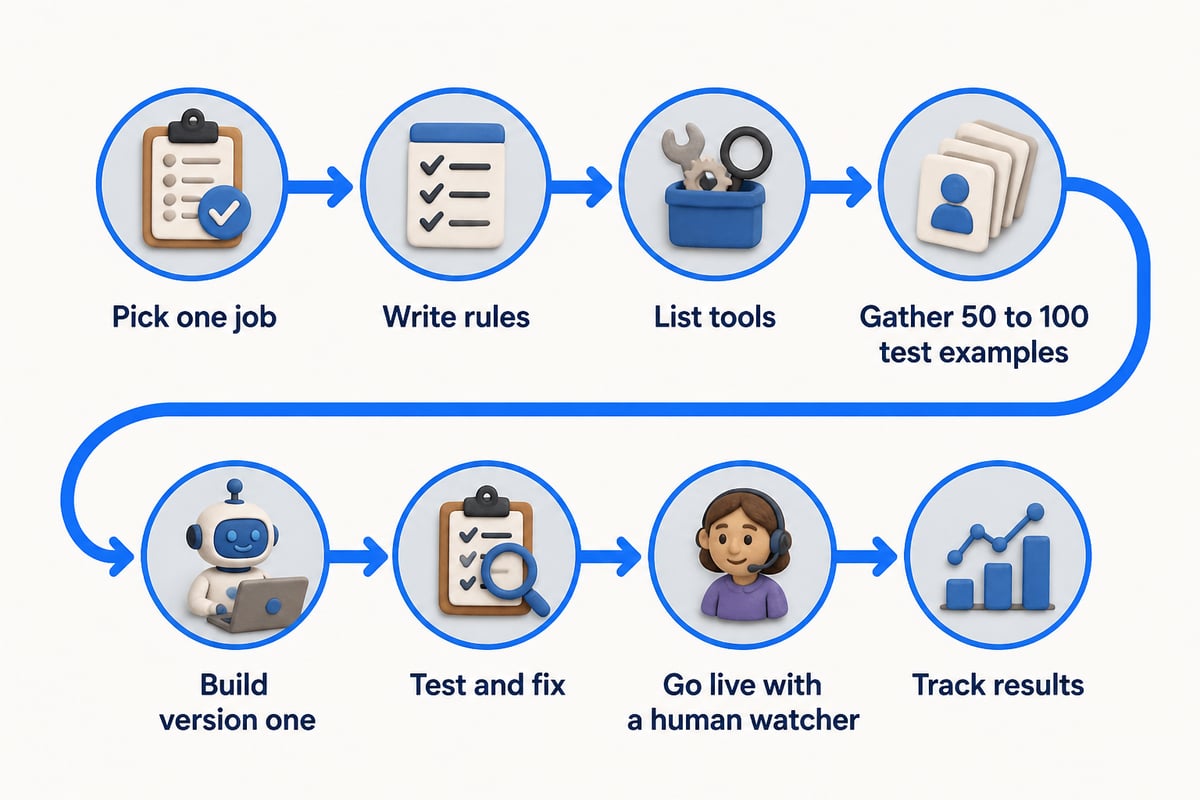
You create an AI agent by choosing one narrow job, writing clear rules, connecting tools, testing on real cases, and then going live with a human watching. Follow these steps in order.
- Pick one job. Write it in one sentence. "Reply to new leads within 2 minutes and book a call if they qualify."
- Write the rules. What counts as qualified? What should the agent never say? When does it hand off to a person?
- List the tools it needs. Inbox, CRM, calendar, maybe a knowledge base.
- Gather 50 to 100 past examples. Real emails, tickets or forms, with the right answer next to each one.
- Build the first version. Keep it small. One agent, one job.
- Test it. Run all your examples. Count correct answers. Fix the wrong ones. Repeat.
- Go live with a watcher. For the first two weeks, a person reviews every output or a sample of them.
- Track results. Response time, booked calls, hours saved.
The "one narrow job" rule matters most. An agent told to "handle sales" will fail. An agent told to "qualify inbound leads and book calls" can work. Keep each agent to a single task and add more agents later.
What Does a Working Agent Look Like in Numbers?
A working agent is measured by accuracy, speed and cost per task, and you should know all three before you go live.
Take support as the example. Vieerx's own agents have reached 99.4% answer accuracy across 1,000+ users, and have resolved 17,169+ tickets with zero mix-ups between users. Your results will depend on your data, your tools and how narrow the job is.
Here are the numbers you should track for any agent you build or buy:
- Accuracy: out of 100 test cases, how many did the agent get right? Aim to set a bar before launch, like 95%.
- Response time: how fast does the first reply go out? Minutes beat hours for leads.
- Cost per run: model cost plus tool cost for one task. Cheap models on simple steps keep this low.
- Escalation rate: how often does the agent hand off to a human? Too high means the job is too broad. Too low may mean it is guessing.
- Time to payback: how many weeks until saved hours cover the build cost?
Vieerx's target is real ROI in six weeks or less on its builds. If a vendor will not give you a payback window, ask why.
How Fast Can an Agent Go Live?
A narrow agent can go live in two weeks if the job is clear and your tools have working connections. Most delays come from messy data and unclear rules, not from the AI.
A realistic plan for a first agent:
- Days 1 to 3: pick the job, write the rules, collect examples.
- Days 4 to 8: build the first version and connect tools.
- Days 9 to 12: test, fix, and test again.
- Days 13 to 14: go live with a person watching.
This is the pace Vieerx works to: a live working agent within 14 days of kick-off. For owners with no technical staff, custom AI agents built and plugged into your existing tools are the faster path, and the deployment crew trains your team to build agents without Vieerx afterward.
If you build in house, expect it to take longer the first time. The second agent goes faster because you already have your tools connected and your testing habit set.
Is It Legal to Build Your Own AI Agent?
Yes, it is legal to build your own AI agent in the United States, but you must follow the laws that already apply to your business, like privacy, consumer protection and industry rules. The agent does not get a pass. You are responsible for what it says and does.
Here are the main risks to check before launch:
- Customer data. If the agent sees personal information, you need to know where that data goes and who can read it. Recruiting firms and clinics should be extra careful.
- Disclosure. Some places expect you to say when a person is talking to an AI. Check rules for your state and industry.
- Calls and texts. Automated calls and texts have their own rules on consent. Check before you turn on outbound voice or SMS.
- Wrong answers. If your agent gives a bad quote or a false claim, your business owns that mistake.
- Vendor terms. Read how your model provider uses your data.
For a clear structure, look at the NIST AI Risk Management Framework, a voluntary guide from the U.S. government. Its core is built around four functions: govern, map, measure, and manage. In plain terms: set who is in charge, list what could go wrong, test it, and keep watching it after launch.
This is not legal advice. Ask a lawyer who knows your industry before you put an agent in front of clients.
What Mistakes Do Service Businesses Make With AI Agents?
The most common mistakes are starting too big, skipping tests, and having no person watching. Each one is easy to avoid.
Starting with five agents at once. An agency tries to automate sales, support, reporting, hiring and invoicing all at once. Nothing gets finished. Start with one agent. Get it stable. Add the next.
No test set. The agent looks great in a demo. Then it meets real clients and gets 70% right. Build your test set before you build the agent.
Using the biggest model everywhere. Big models cost more per run. Many steps, like sorting an email into a category, work fine on a small, cheap model. Test the cheap one first.
No handoff rule. An agent that never says "I don't know" will make things up. Write the escalation rule on day one.
Treating launch as the finish line. Agents drift. Your offers change, your prices change, your tools change. Review results weekly for the first month, then monthly.
The adoption data shows many companies are already past the planning stage. In PwC's survey of 308 U.S. business executives, run April 22 to 28, 2025, 79% said AI agents were already being adopted in their companies. If your competitors are testing agents on lead follow-up now, waiting a year is a real cost.
Should You Build Agents Yourself or Hire a Team?
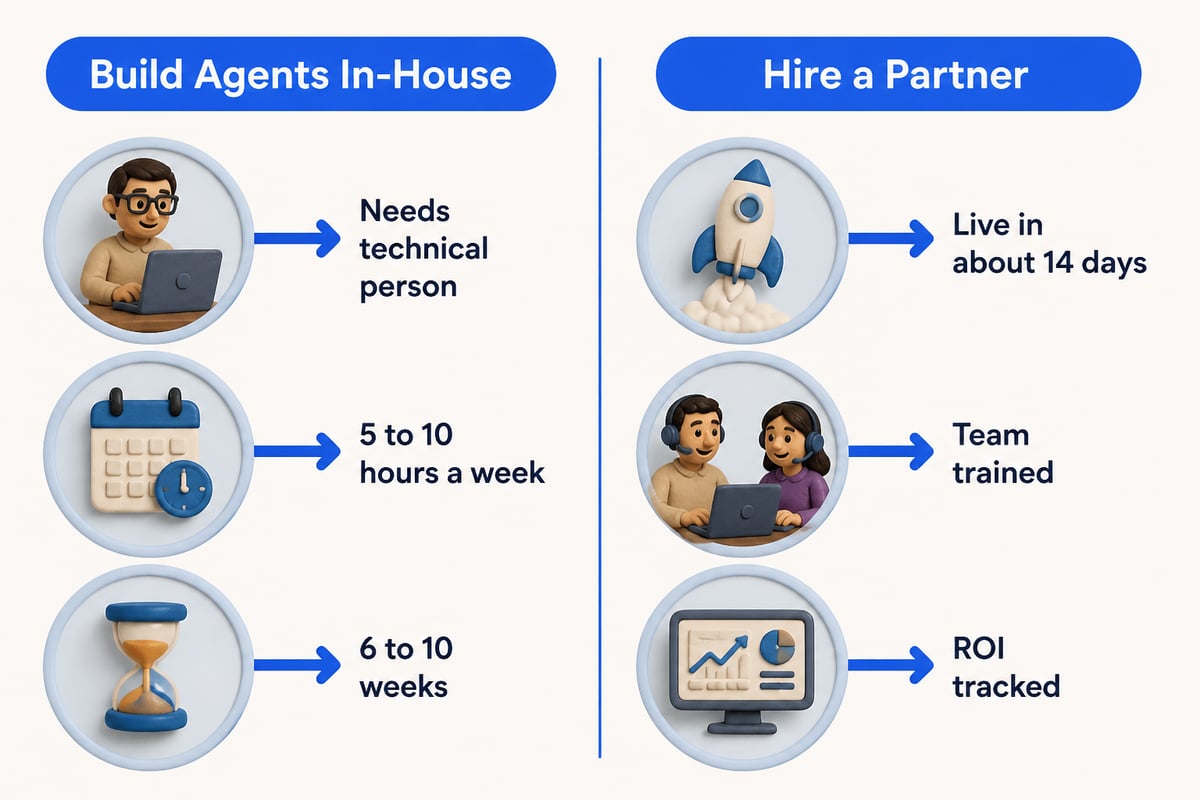
Build yourself if you have a technical person with spare time and a low-risk first job. Hire a team if you want a working agent fast and do not want to learn the tools.
Here is a simple way to decide:
Build in house when:
- You have someone who likes tools and can give 5 to 10 hours a week.
- The first job is low risk, like internal reporting.
- You are happy to take 6 to 10 weeks for the first agent.
Hire a partner when:
- You want a live agent in weeks, not months.
- The agent will talk to clients or touch your CRM and billing.
- Nobody on your team has time to maintain it.
- You do not yet know what to build first.
If you are comparing options in this space, our posts on AI automation services and what an AI agency does explain what to expect from a partner and how to judge one.
A good partner should train your team too, so you are not stuck. They should also show you accuracy numbers from past work, tell you how they keep client data separate, and give you a payback window in writing.
FAQ
Can an AI agent builder replace my staff?
No. An agent takes over repeat tasks like first replies, ticket sorting and weekly reports. Your people keep the work that needs judgment, trust and relationships. Most owners use agents to give staff back hours, not to cut headcount.
How much does an AI agent cost to run each month?
It depends on how many tasks the agent handles and which AI model each step uses. Simple steps on small models cost very little per run. Long, complex steps on large models cost more. Run a test batch first, check the cost per task, then multiply by your monthly volume.
What if the agent gives a wrong answer to a client?
Plan for it before launch. Set a clear handoff rule so the agent passes hard or unclear cases to a person. Review a sample of outputs every week at first. Fix the rule or the instructions when you spot a miss, then rerun your test set.
Pick one job today, like lead follow-up, and write it in a single sentence with a pass mark, such as "95 of 100 test leads handled right." If you would rather have it built and live in 14 days, the team at Vieerx builds custom AI agents for agencies and service businesses, so book a free demo with Vieerx and see what your first agent would do.