
An AI email assistant is software that reads your email, drafts replies, sorts what matters, and sums up long threads so you spend less time in your inbox. For a service business, the best setup does more than write nicer sentences. It handles the repeat work: lead follow-up, support questions, and weekly reports. This guide shows you how to set one up, step by step, in plain words.
What an AI email assistant does for a service business
An AI email assistant takes the repeat tasks out of your inbox and does them in seconds, so your team only handles the emails that need a human brain.
Hypothetical example: a recruiting firm with a small team. Every day, many emails come in from candidates asking the same few things: Where is my application? What is the pay? When will I hear back? Someone has to type the same answers again and again. An assistant can read each email, pull the right answer, and write the reply.
Here is what these tools do well:
- Draft replies. They write a first version using the thread as context.
- Summarize threads. A 30-message chain becomes five lines.
- Sort and rank. They flag urgent mail and push low-value mail down.
- Rewrite for tone. They make a rough note sound clear and polite.
- Pull facts. They answer questions like "What price did we quote this client?"
The big tools already do this. Google says Gmail's AI features can draft and refine emails, summarize email threads, and answer questions about information in your emails. Microsoft says Copilot in Outlook can prioritize incoming messages as high, low, or normal and explain why a message may be important.
These are good helpers for one person. A service business with a team has a bigger need, and we cover that gap next.
Writing helper or email agent: pick the right one first
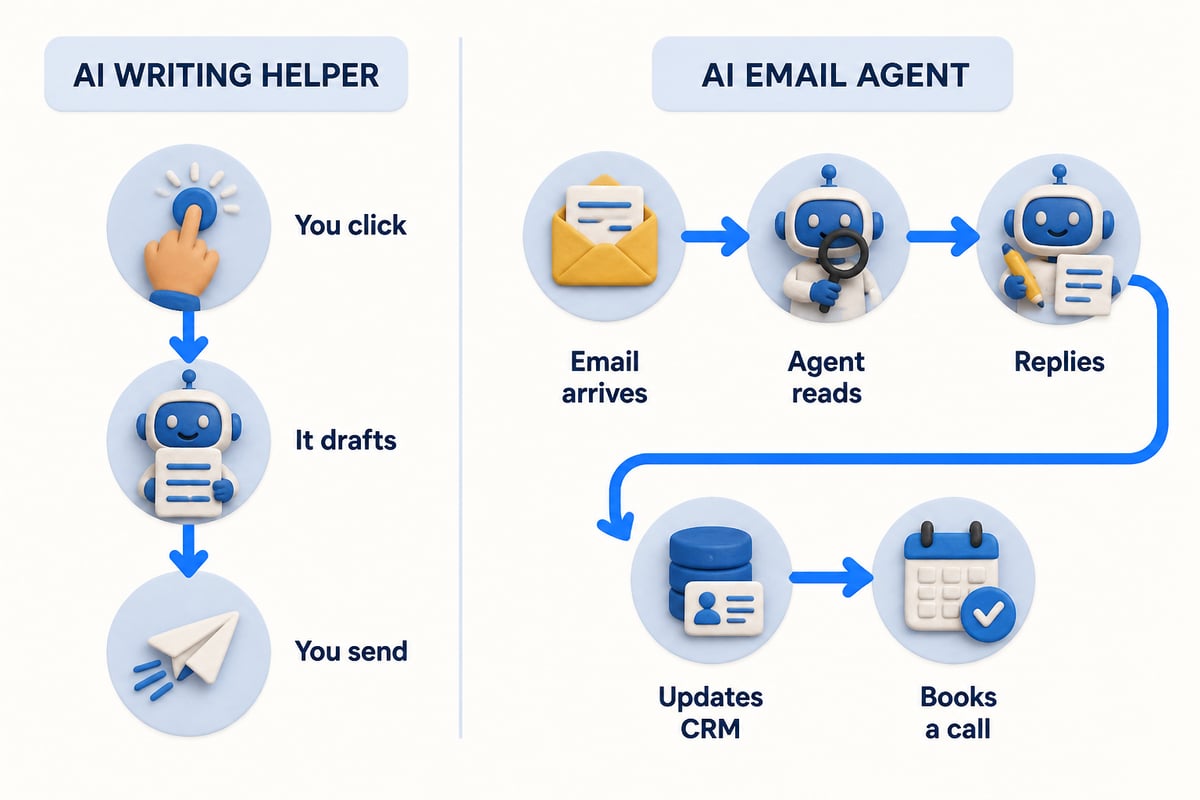
A writing helper drafts text when you ask. An email agent does a whole job on its own, from reading the message to sending the answer. Most owners need the second one, and they buy the first.
Here is a simple way to see the difference.
| Writing helper | Email agent | |
|---|---|---|
| Who starts it | You click a button | A new email arrives |
| What it does | Writes a draft | Reads, decides, replies, logs the result |
| Who checks it | You, every time | You, on a sample or on edge cases |
| Where it works | Inside your inbox | Across inbox, CRM, calendar, and support desk |
| Time saved | Seconds per email | Hours per week |
A writing helper is fine if you send 15 emails a day and want them to sound sharper. You get faster, but you still do every task by hand.
An email agent fits when the same type of email shows up again and again. Think of a marketing agency that gets many new lead emails each week. Each one needs a quick reply, a CRM entry, and a calendar link. Those steps take a person several minutes per lead, which adds up over a week. An agent can do them as each email lands.
Ask yourself one question. Do I want help writing, or do I want the job done? If the answer is "done," you need an agent. We cover the build in a later section. For the bigger picture, see our guide on AI agents for business.
Which emails to automate first
Start with the emails that repeat, have a clear right answer, and carry low risk if one reply is slightly off.
Here is a ranked list for a typical agency, consultancy, or recruiting firm. Work from the top.
- Lead replies. A new inquiry arrives. The agent answers within a minute, asks two qualifying questions, and offers a booking link. Speed matters here, and the script rarely changes.
- Meeting follow-ups. After a call, the agent sends a recap and next steps drawn from your notes.
- Support questions with known answers. Billing dates, file locations, process steps, hours. These have one correct answer.
- Status updates. A client asks, "Where are we on the project?" The agent checks your project tool and replies.
- Weekly reports. The agent collects numbers every Friday and emails the summary to each client.
- Internal triage. Shared inboxes like info@ get sorted by topic and sent to the right person.
Leave these for later, or keep a human in the loop:
- Contract disputes
- Refund demands
- Angry clients
- Anything with legal or medical weight
- First contact with a very large account
A good rule: if a wrong reply could cost you a client or real money, a person approves it first.
Pick one item from the top of the list. Do not try to automate all six at once. One working agent beats five half-built ones.
How to set up an AI email assistant in seven steps
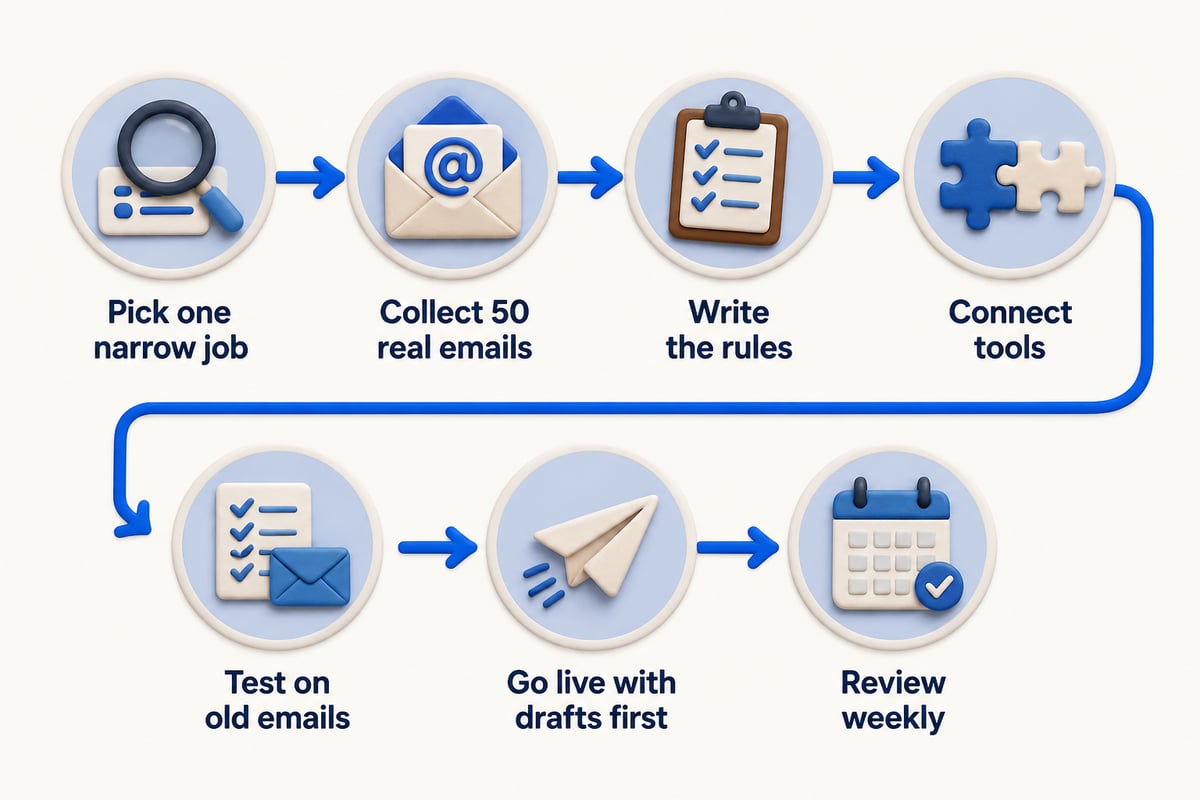
You can set up an AI email assistant by choosing one job, writing its rules, connecting your tools, testing on old emails, and then going live with a human checking a sample.
Follow these steps in order.
Step 1: Pick one narrow job
Write it in one sentence. "Reply to new lead emails within two minutes and offer a call." If the sentence has the word "and" three times, the job is too big. Split it.
Step 2: Collect 50 real emails
Pull 50 past emails of that type. Mark which replies were good. These are your examples. The agent learns your voice and your answers from them, so quality here matters more than any setting.
Step 3: Write the rules
List what the agent can say and what it must never say. Cover prices, promises, timelines, and topics to hand to a human. Keep each rule to one line.
Step 4: Connect your tools
The agent needs to read your inbox, and it often needs to write to a CRM, a calendar, or a help desk. Each connection is a place where things can break, so connect only what the job needs.
Step 5: Test on old emails
Run the agent on the 50 past emails without sending anything. Compare its replies with the good ones. Count the misses. Fix the rules. Run again.
Step 6: Go live with a safety net
For the first two weeks, have the agent save drafts instead of sending. Your team approves each one. When 95 of 100 drafts need no edits, switch to auto-send for that email type.
Step 7: Review every week
Read a sample of 20 sent emails each week. Look for wrong facts, odd tone, and missed hand-offs. Adjust the rules.
Free and built-in options: what they can and cannot do
Yes, there are free ways to get AI help with email, and they work well for one person writing drafts, but they stop short of running your lead follow-up for you.
Here is what you get from the common routes.
Chat tools such as ChatGPT. Can ChatGPT help you write an email? Yes. You paste in the email you received, tell it what you want to say, and it writes a draft. Can it reply to emails by itself? Not on its own. A chat tool answers only when you open it and paste the message. It does not watch your inbox. To make it reply on its own, you need an automation around it that passes each new email in and sends the answer out.
Built-in tools inside your mail app. Gmail and Outlook now include AI. Microsoft says Copilot in Outlook can summarize email threads, draft messages from prompts and thread context, and coach you on tone, sentiment, and clarity. It can also schedule meetings or events through chat with up to two other people. Microsoft has a short guide to getting started with Copilot in Outlook if your team already lives in that app.
Free email generators. Many websites offer a free email writer. They suit one-off emails. They do not know your pricing, your clients, or your process, so you must fill in every detail each time.
What all three have in common: you stay in the middle. You open the tool, you paste, you review, you send. That is fine for 10 emails a day. It does not scale to 100.
Also, what is replacing Gmail? Nothing is replacing it for most businesses. Gmail and Outlook remain the two big inboxes, and both are adding AI. The shift is not a new inbox. It is an agent that sits beside your inbox and does the work.
Where an AI email assistant needs a custom build
An AI email assistant needs a custom build when the answer to an email lives in your own systems, such as your CRM, your project tool, or your help desk.
A built-in tool can read an email thread. It cannot easily look up whether a candidate passed screening, what stage a deal is in, or which invoice is overdue. A custom agent can, because it is wired into those tools.
Hypothetical example: a consulting firm gets an email from a client asking whether a signed contract arrived. A built-in tool can draft a polite reply, but it does not know. A custom agent can check the document tool and reply with the status and the next step.
This is also where each agent keeps one job. A good design gives every agent a single narrow task and lets it run without anyone steering it. One agent handles lead replies. A different one handles support. A third builds the weekly report. When one breaks, the others keep working.
Two more design points matter for a team inbox:
- Separate memory per person. If your agent writes to 200 clients, it must never mix one client's details into another's reply. That is a privacy failure and a trust failure.
- The right model for each run. Not every email needs the most expensive AI model. A simple "thanks, received" needs a small one. A long thread summary needs a bigger one. Matching the model to the task keeps costs low.
At Vieerx, these are the rules we build by. Each agent owns one narrow job. Each run uses the cheapest model that passes our evaluation tests. Each user gets separate memory. Across more than 1,000 users, our answer accuracy sits at 99.4%, and our agents have resolved over 17,169 tickets with zero mix-ups between users.
If you want an agent built around your inbox and your tools, Vieerx builds custom AI agents for sales, support, and operations, and they go live in 14 days. For a wider view of what that work looks like, read about AI automation services.
How to keep AI email replies accurate and safe
Keep replies accurate by limiting what the agent may say, testing it on real past emails, and having a person review a sample every week.
AI can sound sure and still be wrong. It may invent a price, promise a date you cannot meet, or answer a question it should have passed on. Here are the guardrails that stop most of that.
Give it a source of truth. The agent should pull answers from your documents, price list, and CRM, not from guesswork. If the answer is not in the source, it should say "Let me check and get back to you" and hand the email to a person.
Write a "never say" list. Examples: never quote a price outside the price sheet, never promise a start date, never discuss another client.
Set hand-off triggers. Words like "cancel," "lawyer," "refund," "unhappy," or "urgent" should send the email straight to a human.
Keep a log. Every email in, every reply out, every decision the agent made. When something goes wrong, you can find out why in minutes.
Check privacy. Know where your email data goes. Ask any vendor whether your mail is used to train their models and where it is stored. Confirm that one client's data never appears in another's thread.
Measure it. Track three numbers each week:
- Share of replies sent with no edits
- Share of emails handed to a human
- Number of errors found in the 20-email sample
If the no-edit rate falls, pause auto-send and fix the rules. This matters more than any feature on a pricing page. A fast wrong answer is worse than a slow right one.
What it costs and how to measure the return
Count the cost of an AI email assistant against the hours it gives back, and expect a clear answer within weeks, not years.
Here is a simple way to do the math. Hypothetical example: say your lead replies take a few minutes each and you get a steady flow of leads each week. The hours add up quickly, and the cost of that time adds up over a year. Now add support replies, status updates, and reports. Many service businesses find a good number of hours each week hiding in the inbox.
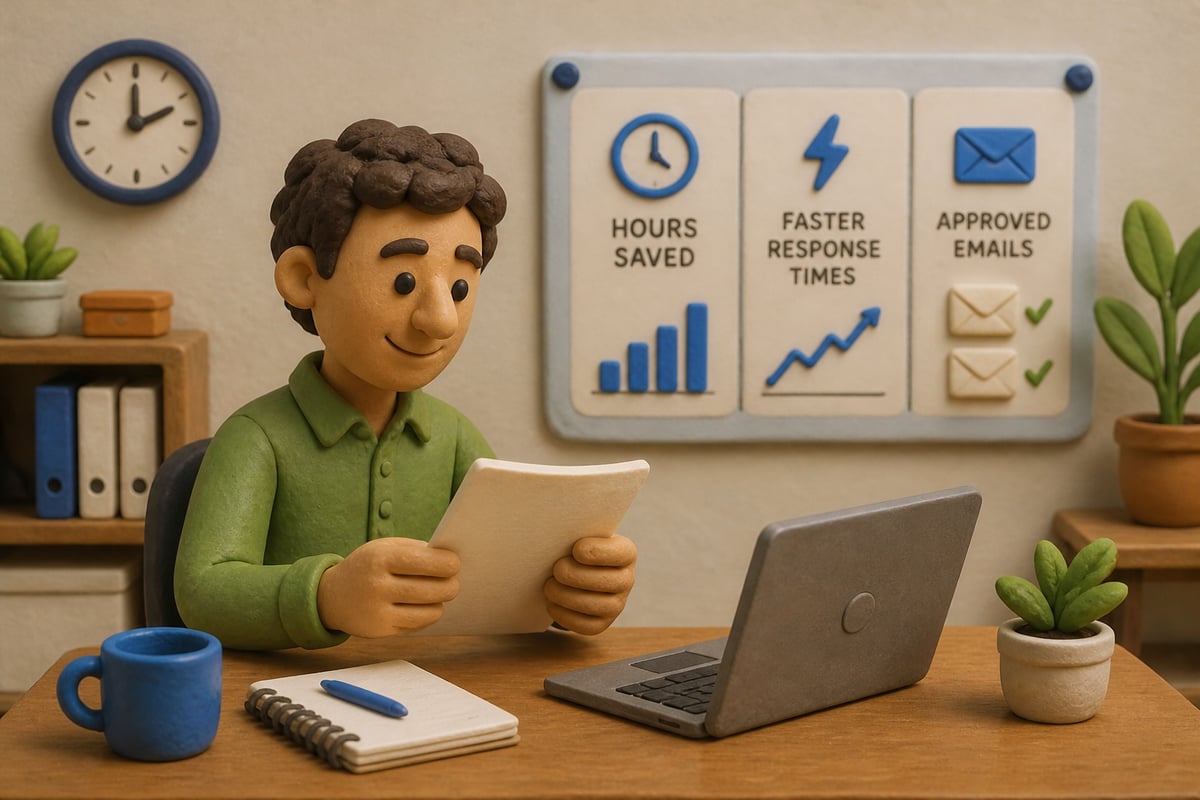
Track these before you start, so you can compare after:
- Average first reply time. Faster replies win more leads.
- Hours per week on email tasks. Ask your team to log it for one week.
- Leads lost to slow replies. Count inquiries that went cold.
- Tickets resolved without a person.
For a sense of cost across different AI models, use the Vieerx model calculator to compare what a task costs on each one.
A realistic target: a focused agent should show real return in six weeks or less. If you cannot point to saved hours or faster replies by week six, the job was too vague or the rules too loose. Narrow it and try again.
One more point on training. A tool your team cannot adjust becomes a tool they stop trusting. Look for a setup where your own people learn to edit rules and build small agents themselves. That is why our deployment crew trains your team to build agents without us, so you are not stuck calling a vendor for every change.
Mistakes that slow down an email assistant rollout
Most failed rollouts come from the same five mistakes, and each one is easy to avoid.
- Starting too big. Teams try to automate every email type in week one. Start with one.
- Skipping the test. Going live without running 50 old emails first means your clients find the bugs.
- No hand-off path. If the agent cannot pass a hard email to a person, it will guess. Guessing damages trust.
- Weak source material. If your price list is out of date, the agent will quote the old prices with total confidence. Clean your documents first.
- Nobody owns it. Pick one person to review the weekly sample. If it is everyone's job, it is no one's job.
Fix these and the technology rarely fails. The usual cause is the setup, not the AI.
FAQ
Can an AI email assistant send emails without my approval?
Yes, but you should earn that. Start with drafts that your team approves. When most drafts need no edits, turn on auto-send for that one email type. Keep a human review on anything involving money, contracts, or upset clients.
Is there a free AI email generator?
Yes. Several chat tools and email writing sites offer free plans, and Gmail and Outlook include AI features. They work well for writing single drafts. They do not watch your inbox, check your CRM, or reply on their own, so they will not run lead follow-up or support for a team.
How long does it take to set up an AI email assistant for a business?
A simple writing helper takes an afternoon. A custom agent tied to your CRM, calendar, and help desk takes longer because it needs testing on your real emails. At Vieerx, a live working agent is ready within 14 days of kick-off. You can book a free demo at https://cal.com/tanvieerx/agentic-review.
Your next step: pull 50 past lead or support emails into one folder and mark the replies you liked. That folder is the start of any good agent. If you want a team to turn it into a working agent in 14 days, look at Custom AI agents, then Vieerx is ready to show you the build when you book a demo.